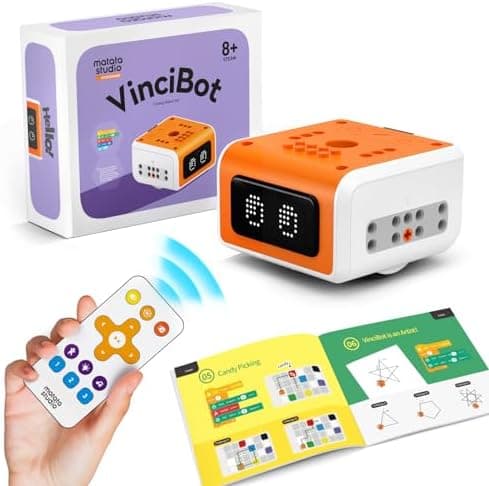
Best Coding Robot Kits for 8-12 Year Olds UK 2026
Top 10 coding robot kits for 8-12 year olds in the UK: VinciBot, Apitor, mBot, Codey Rocky, PYXEL and more compared by price, coding level and age.
The 8-to-12 age range is the golden window for coding toys. Children are old enough to understand logical sequences, patient enough to build something complex, and still young enough to find robots genuinely magical. The challenge for parents is finding a kit that matches the right coding level. Not so simple it bores them in a week, not so complex it sits on a shelf gathering dust.
We've researched and compared the best coding robot kits available in the UK for 2026, ranking them on coding depth, build quality, age suitability, and value for money. Every one of the ten robots below was confirmed in stock on Amazon UK when this guide was last updated, and each links straight to its live product page.
Affiliate Disclosure: As an Amazon Associate, AIToys.co.uk earns from qualifying purchases. When you buy through links on our site, we may earn a commission at no extra cost to you. Prices are correct as of 4 July 2026 but can change. Always check the current price on Amazon before buying.
Quick Comparison
| # | Robot | Best For | Coding | Age | Price* |
|---|---|---|---|---|---|
| 1 | MatataStudio VinciBot | Best overall (AI) | Blocks → Python | 8-12 | ~£99.99 |
| 2 | Apitor Robot X | Best build-and-code | Scratch + Python | 8-12 | ~£99.99 |
| 3 | Makeblock mBot | Best for beginners | mBlock (Scratch) | 8-12 | ~£89.99 |
| 4 | Makeblock Codey Rocky | Best for Python & AI | Scratch + Python | 8+ | ~£121 |
| 5 | Learning Resources PYXEL | Best coding "pet" | Blockly + Python | 8+ | ~£128 |
| 6 | Makeblock mBot Ranger | Best premium (grows with them) | mBlock + Arduino | 8-14 | ~£190 |
| 7 | Apitor Robot J | Best value build kit | Blocks | 7-12 | ~£69.99 |
| 8 | Botley 2.0 Activity Set | Best screen-free | Physical remote | 5-9 | ~£67.94 |
| 9 | Sphero indi | Best screen-free progression | Colour tiles → blocks | 6+ | ~£124.99 |
| 10 | Cooper the STEM Robot | Best budget / first robot | App blocks | 4-8 | ~£59.85 |
*Prices correct as of 4 July 2026 and subject to change.
1. MatataStudio VinciBot: Best Overall
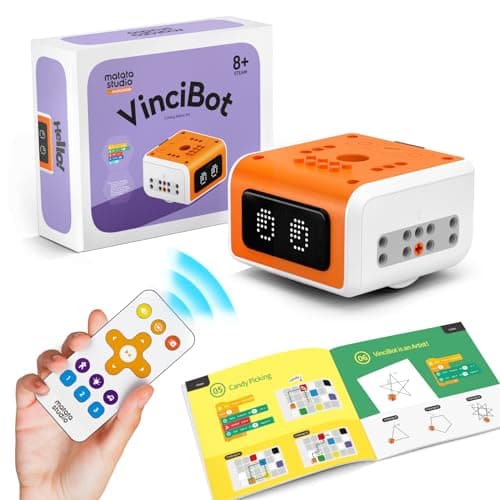
Price: ~£99.99 | Ages: 8-12 | Coding: Scratch-style blocks progressing to Python
The MatataStudio VinciBot is our top pick because it does something most robots at this price can't: it introduces genuine artificial intelligence in a way an 8-year-old can actually use. On top of the usual motors and line-following sensors, VinciBot handles colour recognition, gesture control, and voice interaction, so children write programmes that respond to the real world rather than just driving in pre-set patterns.
Coding happens in the MataCode app, which starts with a friendly Scratch-style drag-and-drop interface and then opens a clear pathway into Python on the same hardware: exactly the progression you want for this age group. A 269-LED matrix on the front gives instant, satisfying visual feedback, and the rechargeable battery means no endless AA replacements.
It's an ideal fit for a curious 8-to-12-year-old on an AI-focused site like ours, because the concepts it teaches (sensors, conditions, machine perception) are the ones underpinning real modern technology.
Best for: Children ready to move beyond simple sequencing into AI concepts and Python.
🛒 Check Price on Amazon UK. MatataStudio VinciBotAs an Amazon Associate, AIToys.co.uk earns from qualifying purchases.
2. Apitor Robot X: Best Build-and-Code
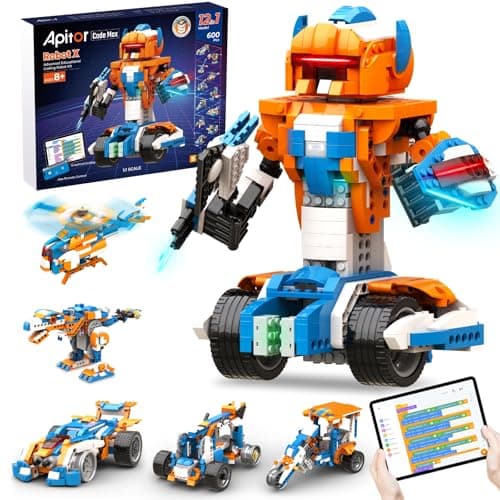
Price: ~£99.99 | Ages: 8-12 | Coding: Scratch blocks + Python
The Apitor Robot X bridges the gap between building toy and genuine coding platform better than almost anything at £100. With 600+ interlocking blocks and a central hub housing seven LEDs, two infrared sensors, a colour sensor and three motors, children build 12 completely different robots (from a wheeled rover to a walking biped) and then bring each one to life in code.
The Apitor Kit app provides a Scratch-style drag-and-drop interface with a structured tutorial mode, plus the ability to progress to Python on the same hardware. That visual-blocks-to-real-language pathway is what makes it such strong value.
Build quality is excellent: the pieces are comparable to LEGO Technic in rigidity and fit, so completed models survive being driven around a living room. Children who enjoy the construction as much as the programming get the most out of it, and the sheer number of builds keeps it fresh for months rather than weeks.
Best for: Children who love both construction and coding and want a kit that grows with them.
🛒 Check Price on Amazon UK. Apitor Robot X
3. Makeblock mBot: Best for Beginners
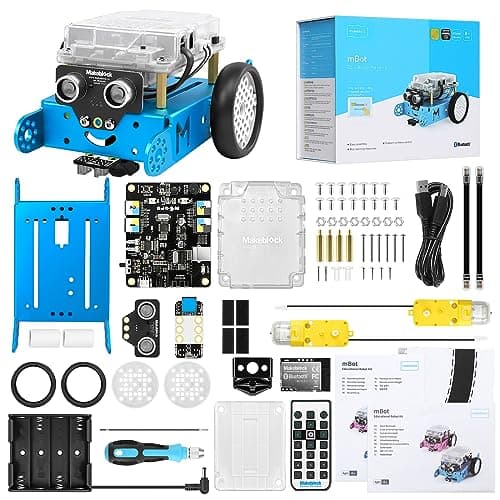
Price: ~£89.99 | Ages: 8-12 | Coding: mBlock (Scratch 3.0) + Arduino
The Makeblock mBot has been the default classroom coding robot for years, and for good reason. It arrives as a simple build (a child assembles the aluminium chassis with a screwdriver in under an hour, which is a satisfying first lesson in itself) and then connects to the free mBlock app, a Scratch 3.0-based environment used in thousands of schools.
Because the community is so large, there is a near-bottomless supply of free lessons, challenges and YouTube walk-throughs, so a stuck child is only a quick search away from an answer. The line-following and ultrasonic obstacle-avoidance sensors are enough for genuinely interesting projects (maze-solving, light-seeking, remote control) without overwhelming a newcomer.
For families dipping a toe into coding for the first time, the mBot hits the sweet spot of low price, real capability, and a support ecosystem that means the robot rarely ends up abandoned in a cupboard.
Best for: Beginners aged 8+ and families who want school-proven software and a huge support community.
🛒 Check Price on Amazon UK. Makeblock mBot
4. Makeblock Codey Rocky: Best for Python & AI
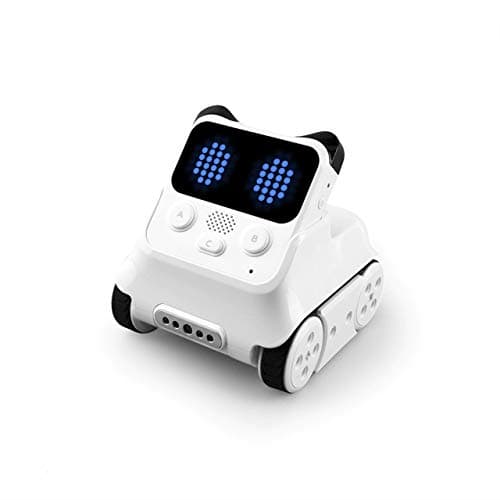
Price: ~£121 | Ages: 8+ | Coding: Scratch + Python (mBlock 5)
The Makeblock Codey Rocky pairs a detachable "Codey" controller with a tracked "Rocky" chassis, and it's the pick for a child who is ready to see real Python rather than just blocks. In the mBlock 5 software you can flip between Scratch-style blocks and Python side by side, which is the single clearest way to show a young coder what those coloured blocks are actually doing under the hood.
Codey packs a colour screen, buttons, speaker, gyroscope and light sensor into the handheld controller, so it's usable for quick experiments even when detached from Rocky. It also exposes approachable AI and IoT features (speech and image recognition, weather data) through mBlock, giving older or more advanced children somewhere genuinely challenging to go.
At around £121 it sits in the middle of our list on price but towards the top on coding ceiling, making it a smart buy for a 10-to-12-year-old who has outgrown pure block coding.
Best for: Children moving from block coding into text-based Python and AI concepts.
🛒 Check Price on Amazon UK. Makeblock Codey Rocky
5. Learning Resources PYXEL: Best Coding "Pet"
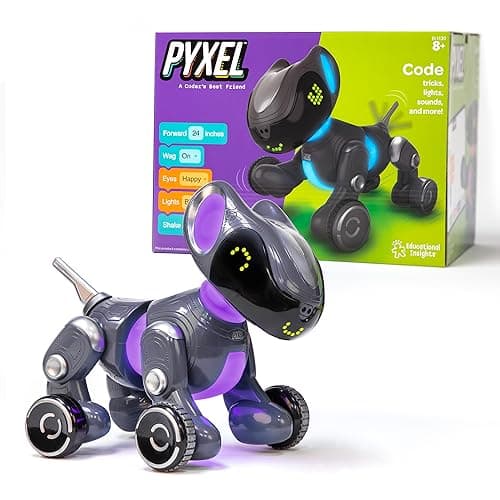
Price: ~£128 | Ages: 8+ | Coding: Blockly + Python
The Learning Resources PYXEL wraps a serious coding platform in the form of an adorable robot puppy, which is a clever way to keep an 8-to-11-year-old emotionally invested. PYXEL has expressive animated eyes, sound, and a set of sensors, and it responds to commands with dog-like personality, but underneath the cute exterior sits a real Blockly-and-Python coding app.
Children start by dragging Blockly blocks to make PYXEL wag, bark, follow a hand or navigate a room, then graduate to typing Python to unlock finer control. The "pet" framing does a lot of quiet work: kids who might lose interest in a plain rover happily keep coding when the goal is teaching their robot dog a new trick.
It's pricier than a basic rover, but for a child who loves animals and needs a reason to care about the code, PYXEL earns its place. It's one of the more engaging bridges from blocks to text-based programming on this list.
Best for: Animal-loving children who need an emotional hook to stay engaged with coding.
🛒 Check Price on Amazon UK. Learning Resources PYXEL
6. Makeblock mBot Ranger: Best Premium (Grows With Them)
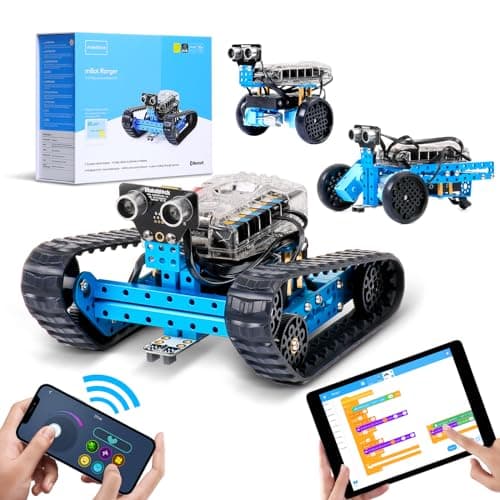
Price: ~£190 | Ages: 8-14 | Coding: mBlock (Scratch) + Arduino
The Makeblock mBot Ranger is the robot to buy when you want one kit to last for years rather than months. It's a 3-in-1 build (the same parts assemble into a rugged Land Raider tank, a self-balancing Nervous Bird, or a three-wheeled Dashing Raptor) and each configuration behaves differently enough to feel like a new project.
Compared with the standard mBot, the Ranger adds more sensors (light, sound, gyroscope, temperature), a stronger metal chassis, and enough expansion ports to keep tinkering long after the box is opened. It runs the same school-friendly mBlock software, so children can code in Scratch-style blocks and then graduate to Arduino/C for genuinely advanced control.
At around £190 it's the most expensive kit here, so it's best suited to a demonstrably keen 10-to-14-year-old, but for that child it offers the highest ceiling on the list and the smallest chance of being outgrown.
Best for: Committed older children (10-14) who want depth, durability, and a robot that keeps giving.
🛒 Check Price on Amazon UK. Makeblock mBot Ranger
7. Apitor Robot J: Best Value Build Kit
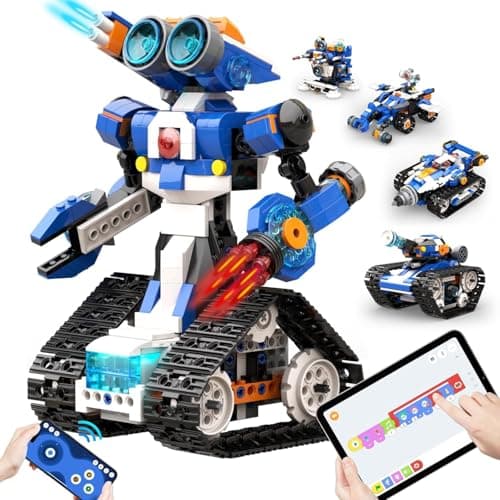
Price: ~£69.99 | Ages: 7-12 | Coding: App blocks
The Apitor Robot J is the more affordable sibling of our number-two pick, and it's the smart choice for parents who want the build-and-code experience without spending £100. It comes with hundreds of Technic-style blocks and a control hub with motors and sensors, letting children construct a range of models and then programme them through the block-based Apitor app.
You get fewer models and slightly fewer sensors than the Robot X, and the coding stays at the block level rather than opening into Python, but for a first proper building-and-coding kit at under £70, that's a fair trade. The construction itself teaches spatial reasoning and patience, and the app's tutorials hold a 7-to-10-year-old's hand through their first few programmes.
If your child is drawn to the LEGO-plus-code idea but you're not ready to commit three figures, Robot J delivers most of the fun at a friendlier price. Keen builders can always graduate to the Apitor Robot X later.
Best for: Younger builders (7-10) and budget-conscious families wanting a real construction kit.
🛒 Check Price on Amazon UK. Apitor Robot J
8. Botley 2.0 Activity Set: Best Screen-Free
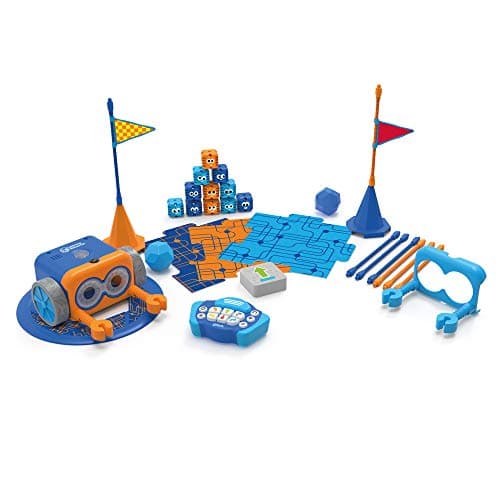
Price: ~£67.94 | Ages: 5-9 | Coding: Physical remote programmer (no screen)
The Botley 2.0 Activity Set proves you don't need a tablet to teach real coding logic. Everything is programmed on a chunky handheld remote: children key in sequences of moves, then add loops and if/then conditional branches as they grow more confident, and Botley trundles off to carry out the programme. There is no app, no account, and no screen time: a genuine selling point for many parents.
The activity set bundles 77+ pieces (walls, tiles, cards and detachable arms) so there's plenty to build courses and challenges with straight out of the box. Botley also detects lines and can be set to follow them, which introduces sensor logic in a tangible, hands-on way.
It sits at the younger end of our range, so a coding-confident 11-year-old may outgrow it, but for 8-to-9-year-olds new to the idea (and for households determined to keep screens out of it) Botley is the best screen-free coding robot you can buy.
Best for: Screen-free households and younger or first-time coders (5-9).
🛒 Check Price on Amazon UK. Botley 2.0 Activity Set
9. Sphero indi: Best Screen-Free Progression
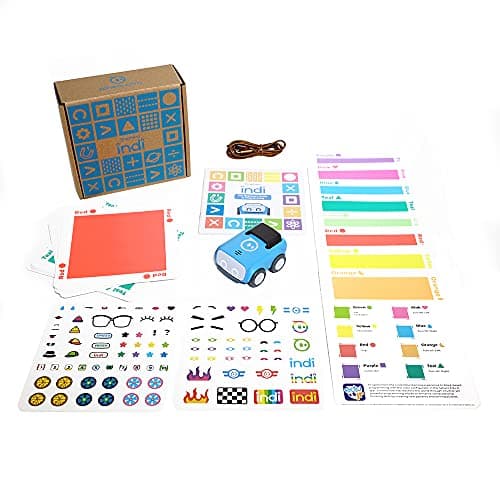
Price: ~£124.99 | Ages: 6+ | Coding: Colour tiles progressing to block coding
The Sphero indi takes a clever staged approach to screen-free coding. To begin with, there's no app at all: children lay down coloured tiles and indi's onboard sensor reads each colour as a command (green to speed up, red to stop, blue to spin) so they build and debug real algorithms by physically arranging a route. It's coding you can touch, ideal for the concrete-thinking end of this age group.
When they're ready for more, the free Sphero Edu Jr app unlocks block-based coding over the same robot, giving indi an unusually long runway from screen-free play into on-screen programming. That progression is exactly what makes it worth more than a simple floor robot.
indi is aimed from age 6, so it leans younger, but the block-coding second stage keeps 8-to-10-year-olds interested well beyond the tile phase. For parents who want to start screen-free but not hit a dead end in six months, it's the best-designed option here.
Best for: Families who want to begin screen-free but keep a path to app-based coding open.
🛒 Check Price on Amazon UK. Sphero indi
10. Cooper the STEM Robot: Best Budget / First Robot
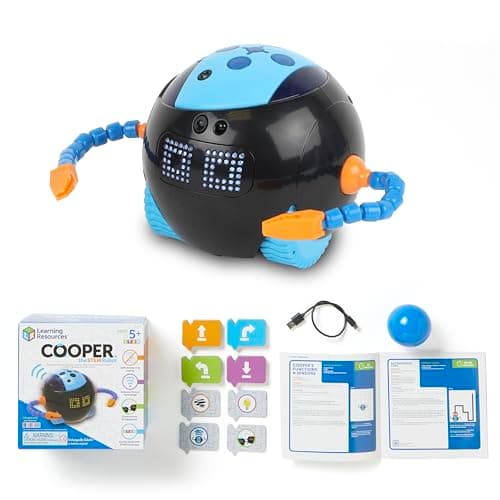
Price: ~£59.85 | Ages: 4-8 | Coding: App-based blocks
Cooper the STEM Robot is the most affordable pick on the list and the gentlest on-ramp for a younger or nervous beginner. He's a friendly talking robot with an expressive face who responds to a companion app; children give him simple block-based instructions and challenges, and his chatty personality keeps the early frustration of "why won't it work?" at bay.
Being aimed at ages 4-8, Cooper is squarely for the younger edge of this roundup. A coding-confident 11-year-old will find him too simple. But for an 8-year-old who has never coded, or as a lower-cost first robot before committing to something like the VinciBot or mBot, he's a warm, low-pressure introduction to sequencing and cause-and-effect.
At under £60 he's also a sensible gift when you're not yet sure how deep a child's interest will run. If it takes hold, any of the kits higher up this list makes a natural next step.
Best for: The youngest 8-year-olds and budget-conscious parents testing the water.
🛒 Check Price on Amazon UK. Cooper the STEM Robot
Buying Guide: What to Look for in a Coding Robot
Coding language: blocks vs Python vs physical
Most robots for this age start with block coding (Scratch-style drag-and-drop), which removes typos and syntax errors so children focus on logic. The best kits then offer a pathway to Python on the same hardware (VinciBot, Apitor Robot X and Codey Rocky all do this) so a child never hits a ceiling. Physical/screen-free coding (Botley, Sphero indi's tile mode) suits younger children and screen-conscious homes, teaching the same sequencing and loops without a tablet.
Budget tiers
Under £70 gets you a capable first robot (Apitor Robot J, Botley 2.0, Cooper). Around £90-130 is the sweet spot for genuine coding depth (mBot, VinciBot, Codey Rocky, PYXEL, Sphero indi). Above £150 (mBot Ranger) buys durability, more sensors and a platform that lasts into the teens: worth it only for a demonstrably keen child.
Build-it vs ready-to-use
Building the robot is part of the learning for kits like the Apitor models and mBot, and many children love it, but it does add time and the occasional fiddly moment. Pre-built robots (VinciBot, Cooper, PYXEL, Sphero indi) get a child coding within minutes, which suits those more interested in programming than construction.
App quality and running costs
Check that the companion app is free, well-rated and available for your device before buying. All ten picks here use free software with no subscription. Prefer rechargeable robots (VinciBot, PYXEL, mBot Ranger) over ones that eat AA batteries if you want to avoid a running cost.
🏬 Prefer the high street? You can also browse coding robots and STEM toys in person at The Entertainer's educational & electronic toys range →.
How we picked these
Every product here was checked against its live Amazon UK listing before publication: in stock, the listing matching the model we describe, and the price recorded at the time of writing. We read the manufacturer's own specifications for the figures quoted, and work through recent verified-purchase reviews looking for the same fault reported repeatedly rather than one-off complaints.
Picks are ordered by who each product actually suits: age, budget, and whether an app or subscription is involved. Not by commission. AIToys.co.uk earns from qualifying purchases through the links on this page; that does not affect the order. The full process, including what we don't do, is on our how we choose page.
FAQ
What age is best to start with a coding robot?
Most children are ready for app-based block coding from around age 7-8. Younger children (4-7) do brilliantly with screen-free robots like Botley or Cooper, which teach the same sequencing and loops without a tablet. Our full guide on how to choose a first coding robot walks through matching a robot to your child's stage.
Do these robots need a tablet or phone?
Some do and some don't. Botley 2.0 and Sphero indi's starter mode are fully screen-free, while VinciBot, mBot, Codey Rocky, PYXEL and the Apitor kits use a free companion app on a tablet or phone. If limiting screen time matters to you, see our comparison of screen-free vs screen-based coding toys.
Will a coding robot actually teach my child to code?
Yes: within limits. These robots teach the fundamentals that underpin all programming: sequencing, loops, conditionals and debugging. The kits that progress to Python (VinciBot, Apitor Robot X, Codey Rocky) or Arduino (mBot Ranger) go furthest, giving children a genuine bridge toward text-based languages used in the real world.
Which is the best value coding robot for 8-12 year olds?
For most families the Makeblock mBot (~£90) and MatataStudio VinciBot (~£100) offer the best balance of price, coding depth and support. If your budget is tighter, the Apitor Robot J and Botley 2.0 both come in under £70. For more options at this price, see our best coding robots under £100 guide.
Is a more expensive robot always better?
No. The right robot is the one that matches your child's age, interests and coding stage. An over-complex kit for a beginner is just as likely to gather dust as an over-simple one for an expert. Spend more only when a child has shown sustained interest and is ready for greater depth.
The Verdict
For most 8-to-12-year-olds, the MatataStudio VinciBot is our top recommendation: it's keenly priced at around £100, introduces genuine AI concepts, and grows with your child from friendly blocks all the way to Python. If your child loves building as much as coding, the Apitor Robot X is the standout, while the Makeblock mBot remains the best low-risk entry point thanks to its school-proven software and vast support community.
Budget-conscious families are well served by the Apitor Robot J, Botley 2.0 and Cooper, while committed older coders should look at the Codey Rocky, PYXEL or the do-it-all mBot Ranger. Whichever you choose, every robot here was in stock on Amazon UK at the time of writing, so you can buy with confidence that the link will actually work.
For more ideas, browse our guides to the best coding robots for beginners, the best screen-free coding toys, and the best STEM toys for 8 year olds.
Read next
Best mBot Alternatives UK 2026: Coding Robots Like the Makeblock mBot
Loved the Makeblock mBot? Here are the best alternatives in the UK for 2026: coding robots across every budget, from £30 screen-free starters to advanced kits.
Best Coding Robots Under £100 UK 2026-10 Top Picks for Every Age
The 10 best coding robots under £100 in the UK for 2026: expert picks for ages 3 to 14. In-stock products, honest reviews, and where to buy.
Best AI Toys for 6-8 Year Olds UK 2026-10 Top Picks for Smart STEM Fun
Discover the best AI toys for 6-8 year olds in the UK for 2026. Our top 10 picks offer smart STEM fun, coding challenges, and educational play for young minds.