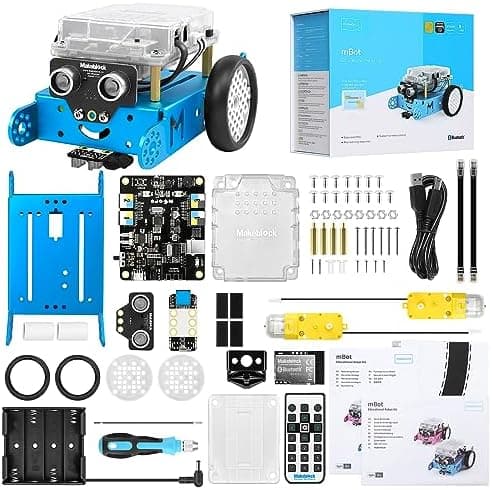
Best Coding Robots for Beginners UK 2026
The best first coding robots for UK beginners in 2026. Compare screen-free and app kits for ages 3-12. Live Amazon UK prices, updated 15 September 2026.
As an Amazon Associate, AIToys.co.uk earns from qualifying purchases.
A first coding robot should get a child from "I pressed this, it moved" to a real sequence, without a computer science degree in the house. This is a UK beginners shortlist, not a catalogue of every programmable toy. On 15 September 2026 we checked most featured ASINs against an Amazon Creators API pull for marketplace www.amazon.co.uk (tag aitoys-21). Apitor Robot X (B0945W59HP) was not on that featured file. A live Amazon UK listing check the same day showed it In stock. A missing Creators availability field is unknown, not unbuyable. Only an explicit out-of-stock or "Currently unavailable" mark is treated as negative.
AIToys.co.uk selects and researches from manufacturer specifications, official brand pages, that Creators snapshot, the live listing check for Robot X, and repeated owner reports. We do not run lab tests. We do not invent star ratings. We do not claim a lowest price or a best deal. Pound figures are snapshots as of 15 September 2026. Check the live Amazon UK page on the day you buy.
The default buy for most families with a child of about 8 to 12, and a tablet or computer already in the house, is the Makeblock mBot (B07XR98YYQ), around £89.99, recorded as in stock. Check the Makeblock mBot on Amazon UKAs an Amazon Associate, AIToys.co.uk earns from qualifying purchases.
No extra screen? Start with Botley 2.0 (B083T5G5ZK). Want a 12-in-1 build kit with Scratch-style coding for about 8 to 12? Apitor Robot X (B0945W59HP), around £99.99. Ages three to five: Tale-Bot Pro. An app ball that can grow into JavaScript: Sphero Mini first, then Sphero BOLT. The BBC micro:bit V2 is not a robot. It is here because it is the cheapest clean UK path into block coding once a child will sit at a table.
Wider decision: how to choose a first coding robot and screen-free versus screen-based coding toys. App kits: smart toy privacy in the UK.
Frequently asked questions
What is the best coding robot for beginners in the UK?
For most 8-to-12-year-olds who already have a phone, tablet or computer, Makeblock mBot (B07XR98YYQ) is the default: a short aluminium build, Scratch-style blocks in mBlock, then a path into Arduino C. Around £89.99, in stock on 15 September 2026. Read the Makeblock mBot review before you buy.
No app? Botley 2.0 (B083T5G5ZK) at about £69.95. Build-and-code for 8 to 12: Apitor Robot X (B0945W59HP) at about £99.99. Younger screen-free: the rechargeable Code & Go Robot Mouse. Under-fives who need chunky buttons: Tale-Bot Pro.
What age should my child start with a coding robot?
Manufacturer ages run from 3 to 5 (Tale-Bot Pro) through 4+ (Code & Go, indi) and 5+ (Botley) up to 8 to 12 (mBot, Apitor Robot X, Sillbird, Sphero, micro:bit). UK pack copy for Robot X often says 8-12; the Associates converting title also says kids 8-14. Same 12-in-1 kit. Those are setup and small-parts warnings, not a promise the child will code alone. A motivated seven-year-old can join an 8+ kit if an adult does screws, pairing and the first account. Do not hand a connected app robot to a toddler because a catalogue field looks low. UK Key Stage 1 starts with sequencing: see coding from age 5.
Do I need a tablet or phone?
Not for Botley 2.0, Code & Go, Tale-Bot Pro or Sphero indi. Those four use a remote, on-robot buttons, cards or colour tiles. mBot, Apitor Robot X, Mini, BOLT and Sillbird need a device for the useful coding path (Sillbird also ships a driving remote). The micro:bit needs a computer or tablet browser. No spare screen? Stay on the first four.
Do coding robots teach real coding?
They teach computational thinking: sequences, prediction, loops, conditions, and changing one instruction when the robot does the wrong thing. That is what UK schools want before syntax. Mastering Botley does not teach Python. It teaches why a computer needs precise steps. mBot (blocks to Arduino), Apitor Robot X (Scratch-style blocks, then Python in the Apitor Kit app), Sphero Edu (Draw to JavaScript) and the micro:bit (MakeCode to Python) are the kits here with a published path into text.
Are app-connected coding robots a privacy issue?
Treat a Bluetooth app and a vendor account as a buying filter. BOLT, Mini, mBot and Apitor Robot X need a device and software. Create the account yourself and read the vendor privacy wording. Botley, Code & Go, Tale-Bot Pro and indi do not need an account for the play described here. The micro:bit is programmed from your computer: that login is the parent job. See smart toy privacy UK 2026.
Where can I buy beginner coding robots in the UK?
Amazon UK is the buy path here. Every featured link uses tracking ID aitoys-21 and a product detail page, not a search result. Confirm the seller and returns window on the day you order. High-street stock changes by branch.
Quick comparison: 15 September 2026 UK cut
| Kit | Best for | Ages | Screens / data | Snapshot price | Stock on this pull |
|---|---|---|---|---|---|
| Makeblock mBot | Default first robot, 8-12 | 8-12 | mBlock app, Bluetooth | £89.99 | In stock |
| Botley 2.0 | Screen-free remote coding | 5+ | No app for core play | £69.95 | In stock |
| Apitor Robot X | Featured build-and-code kit | 8-12 | Apitor Kit app | £99.99 | In stock (live listing) |
| Code & Go Robot Mouse Rechargeable | Younger / budget screen-free | 4+ | No app | £37.99 | In stock |
| MatataStudio Tale-Bot Pro | Ages 3-5, buttons on the robot | 3-5 | No app for core play | £96.99 | In stock |
| Sphero Mini (Golf) | Budget app ball | 8+ | Sphero apps, Bluetooth | £48.99 | In stock, scarce |
| Sphero BOLT | Longer coding ladder | 8+ | Sphero Edu, account | £186.00 | In stock, scarce |
| Sphero indi | Colour-tile mazes, 4+ | 4+ | Screen-free tiles | £124.99 | In stock, scarce |
| Sillbird 5-in-1 | Build-and-drive value kit | 8-13 | App plus remote | £49.99 | In stock |
| BBC micro:bit V2 | Table-top coding, not a robot | 8+ | Browser / USB | £27.13 | In stock |
Prices are approximate and were correct as of 15 September 2026. Always check the current price on Amazon UK. We do not claim any price here is the lowest available. Scarce means the Creators pull recorded a low remaining quantity, not that the item is gone. Robot X stock is a live Amazon UK listing check the same day, not a Creators availability type.
As an Amazon Associate, AIToys.co.uk earns from qualifying purchases.
The ten UK-buyable picks
1. Makeblock mBot: Best first coding robot for ages 8-12
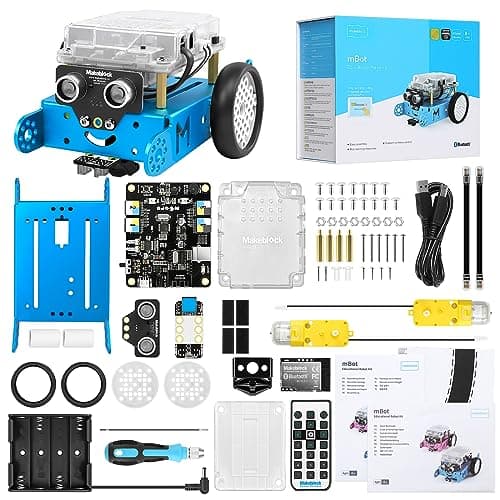
Age range: Manufacturer and the featured UK listing: 8 to 12. Developmental fit: a short mechanical build, then Scratch-style sequencing, obstacle and line sensors, then Arduino C. A STEM kit, not a talking companion.
Safety notes: listing copy includes a choking-hazard warning for small parts. The featured kit needs four AA batteries (not supplied) plus a CR2025 cell for the infrared remote. Keep loose cells away from younger siblings. Supervise the first build.
Parental involvement: budget an evening for screws, batteries, mBlock and Bluetooth pairing. Day one is still an adult job.
Privacy: coding uses Makeblock's mBlock software over Bluetooth. No camera on the standard two-wheel kit. Use a parent store account. Read smart toy privacy before you create a child login.
The classic mBot is a snap-together aluminium car: two motors, an ultrasonic sensor, a line follower, lights and a buzzer. Children drive it from the infrared remote, then drag blocks in mBlock (the same family of ideas as Scratch in UK classrooms), then open Arduino C on the same chassis if interest sticks. Assembly is deliberate: the child built the thing that later follows a line on paper.
This cut features standalone kit B07XR98YYQ, recorded in stock at £89.99 on 15 September 2026. It is not mBot2 and it is not the Ranger. Full write-up: Makeblock mBot review. Nearby: mBot alternatives and coding robots under £100.
£89.99 (price correct as of 15 September 2026). Check the current price on Amazon UK
2. Learning Resources Botley 2.0: Best screen-free remote coder
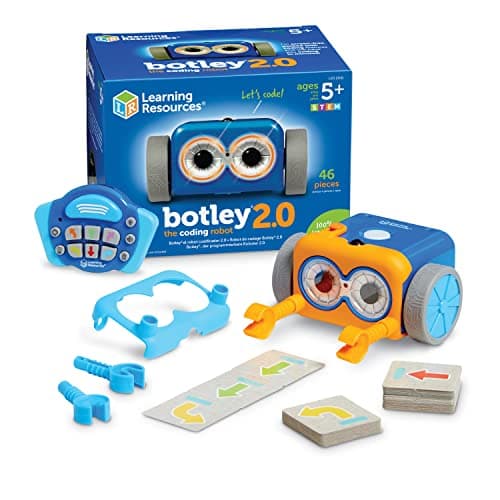
Age range: Learning Resources: ages 5+. Developmental fit: Key Stage 1 sequencing, prediction and debugging ("it turned too early, so we change the programme") without handing over a phone.
Safety notes: plastic robot and remote; small tiles or accessories depending on the box; AAA batteries not included (manufacturer copy for the activity set is five AAA: three in Botley, two in the remote). Choking-hazard warning for under-threes. Supervise floor play near stairs and pets.
Parental involvement: fit the cells, send the first sequence, and sit through one simple course. After that, owner reports describe children running the next challenge and calling an adult when a sequence fails.
Privacy: core play is screen-free. Learning Resources does not require a tablet, app, Wi-Fi or account for the remote programming described here. Optional classroom digital extras are not needed for the 150-step sequences.
Botley 2.0 is programmed with a handheld remote: forwards, turns, lights, sounds, and (when switched on) object detection. There is a real ceiling. Most children are ready for an app robot or a build kit by about nine or ten. That is a feature if you wanted no extra screen.
The default buy button is single-SKU B083T5G5ZK, recorded in stock at £69.95 on 15 September 2026. That page is usually a slimmer box than the 78-piece activity set.
Also note (scarce, not the default CTA): activity-set B083T58PKM showed £78.63 and only 3 left in stock. That is the ASIN on the shipped Botley 2.0 review. Read the title before you click.
£69.95 for B083T5G5ZK (price correct as of 15 September 2026). Check Botley 2.0 on Amazon UK
3. Apitor Robot X: Best build-and-code kit for ages 8-12
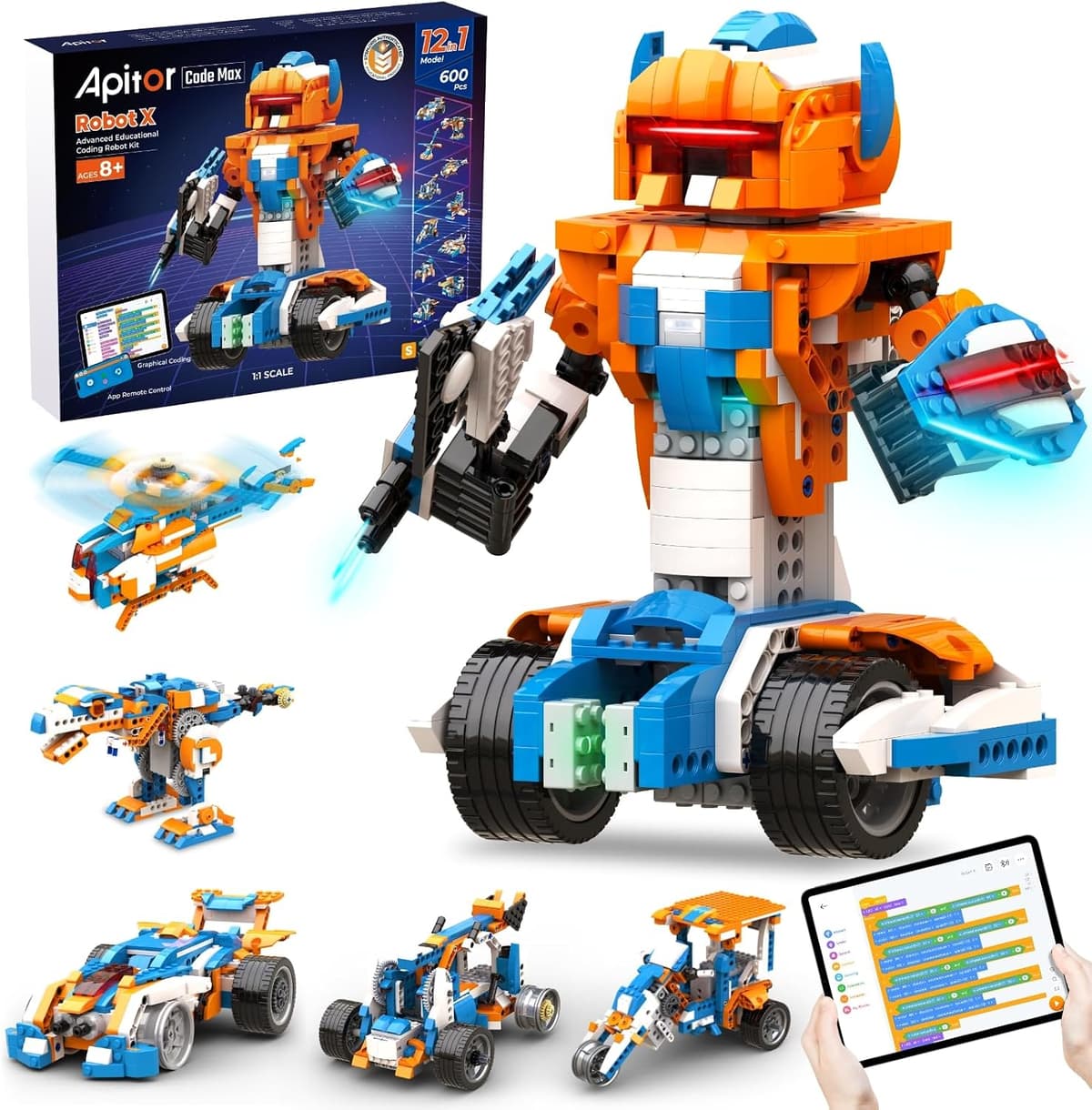
Age range: UK listing and pack copy often 8 to 12. The Associates converting title says kids 8-14. Same 12-in-1 kit (B0945W59HP). Developmental fit: a long first build, then Scratch-style blocks in the Apitor Kit app, then a published Python path. This is a construction-plus-code kit, not a ready-made floor robot.
Safety notes: 600+ small blocks, motors and sensors. Choking hazard for younger siblings. Listing copy says 3 AA batteries are required and not included. Supervise the first build and keep loose cells off the floor.
Parental involvement: high on evening one. Manufacturer copy asks a parent to build the first robot with the child. Budget a tablet or phone for the app, plus time for pairing.
Privacy: coding and remote driving use the free Apitor Kit app (iOS and Android). Treat that as a Bluetooth app plus a store account. Create the login yourself. The listed kit has no onboard camera. See smart toy privacy.
Robot X is the 12-in-1 Apitor box: 600+ blocks, a control unit with multicolour LEDs, two infrared sensors, one colour sensor and three motors. Children rebuild into different shapes, then programme line-follow, obstacle avoid and LED sequences from the app. It is a featured default CTA on this hub for families who wanted build-and-code, not a spare note.
Featured ASIN B0945W59HP. This ASIN was not on the 15 September 2026 Creators featured file. A live Amazon UK listing check the same day showed the page In stock at £99.99, sold by Apitor Technology Co., Ltd. and sent from Amazon Fulfillment. We do not invent a Creators availability type for it. Write-up: Apitor Robot X review.
Also note (Creators pull, not the featured CTA): Apitor Robot J (B083B82JZ7) is the smaller 6-in-1 / Scratch Jr kit. The same Creators file recorded it in stock at £52.99. It is a different product. If you wanted the converting 12-in-1 box, stay on B0945W59HP.
£99.99 (price correct as of 15 September 2026, live listing check). Check Apitor Robot X on Amazon UK
4. Code & Go Robot Mouse Rechargeable: Best younger screen-free starter
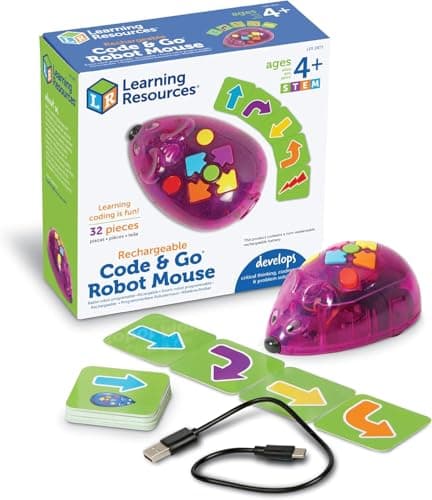
Age range: Learning Resources: ages 4+. Developmental fit: four-direction sequencing, card planning, then "why did it go the wrong way?" debugging. This is the Bee-Bot idea in a home-friendly mouse.
Safety notes: small mouse and cards. USB charging needs an adult. Not a toy for under-threes.
Parental involvement: sit through the first few sequences. Card-before-button planning is the valuable habit.
Privacy: no app, no account, no Wi-Fi for the coding that ships in the box.
Jack stores a line of forwards, backs and turns, then runs it. Children tap buttons on the shell or lay out picture cards first. Four directions will bore a confident eight-year-old. Use it as a first language, then move to Botley, indi or mBot.
The featured buy is rechargeable B0D322HW1F, recorded in stock at £37.99 on 15 September 2026. This set is the mouse and cards. The maze mat is often a separate accessory. Read the title if you wanted a printed course from day one.
Also note (scarce, not the default CTA): classic battery mouse B01B14XK00 showed £33.95 and only 8 left in stock. That ASIN is on the Code & Go Robot Mouse review. The hub CTA stays on the rechargeable pack.
£37.99 (price correct as of 15 September 2026). Check the rechargeable Code & Go mouse on Amazon UK
5. MatataStudio Tale-Bot Pro: Best screenless kit for ages 3-5
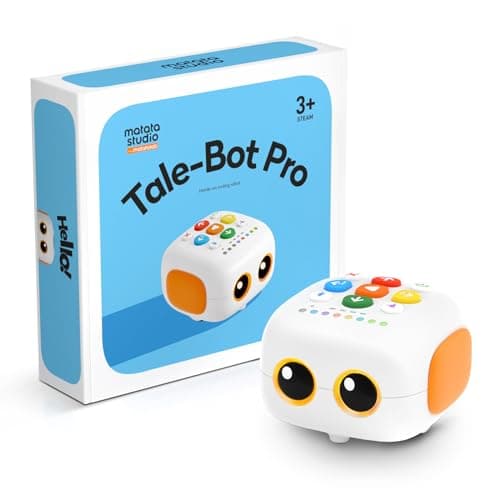
Age range: MatataStudio: 3 to 5. Developmental fit: cause and effect, colour-button sequences, story maps and spoken prompts before a child can read a Scratch block. Over-sixes who already sequence well will outgrow it.
Safety notes: small cards, clip-on wings or arms, and washable pens. USB-C charging. Supervise threes around loose parts and the cable. This is an early-years floor robot, not a teething toy.
Parental involvement: high for the first week. A three-year-old needs an adult to turn buttons into a story. Recording a voice on the cards is an adult setup job.
Privacy: core play is screen-free button coding. No tablet is required. If you later add MatataStudio apps, treat those as a new privacy check.
Tale-Bot Pro arrives built. Chunky colour buttons store a programme, then the robot follows the map. Manufacturer copy describes talking OID cards, up to 256 commands and brick-compatible side parts. The optional Activity Box is sold separately.
Featured ASIN B0CZ6R182M, recorded in stock at £96.99 on 15 September 2026. VinciBot, the same brand's 8-12 kit, is not on this beginners cut. Write-up: Tale-Bot Pro review. Nearby: screen-free coding toys.
£96.99 (price correct as of 15 September 2026). Check Tale-Bot Pro on Amazon UK
6. Sphero Mini (Golf SKU): Best budget app-based ball
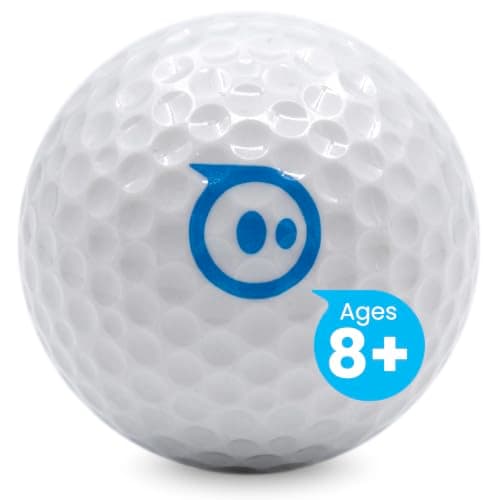
Age range: Sphero: ages 8+. Developmental fit: joystick driving first, then Draw paths, then Scratch-style blocks in Sphero Edu. Tabletop play suits a kitchen table more than a long hallway.
Safety notes: small ball, small parts, rechargeable pack. Keep the charger away from younger siblings. Treat 8+ as the coding age.
Parental involvement: install the app, pair Bluetooth, and approve the Sphero account.
Privacy: Bluetooth to a phone or tablet. Sphero Play and Sphero Edu are vendor apps. Create the account yourself. See smart toy privacy.
Sphero Mini shrinks the ball robot to pocket size. Driving mode needs no coding knowledge. The value is the shared Sphero Edu ladder: a child who outgrows Mini is not starting from zero on BOLT. The featured UK listing is the Golf SKU.
Featured ASIN B086Z4MQP2, recorded in stock but scarce ("Only 5 left in stock") at £48.99 on 15 September 2026. The older Sphero Mini review covers the Mini idea on a different SKU. This hub CTAs the Golf listing we pulled.
£48.99 (price correct as of 15 September 2026). Scarce on this check. Check Sphero Mini Golf on Amazon UK
7. Sphero BOLT: Best coding ladder if the budget stretches
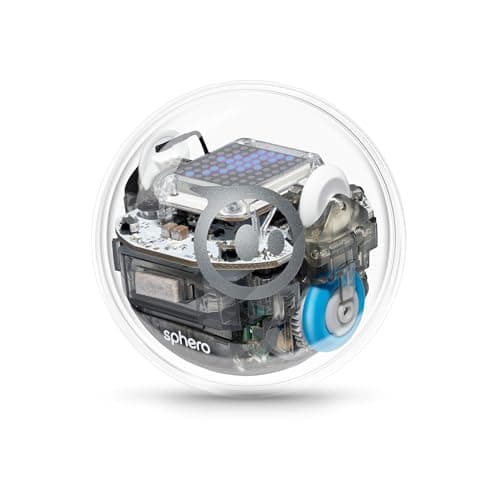
Age range: Sphero and the coding apps: ages 8+. Amazon catalogue fields on this listing have shown a lower band. Treat that as messy retail metadata, not a reason to hand a connected ball to a toddler.
Developmental fit: Draw, then blocks, then JavaScript in Sphero Edu. Sensors (gyro, accelerometer, compass, light, infrared) support programmes that react to the room, not only a pre-drawn path.
Safety notes: sealed sphere, internal rechargeable pack, inductive charging base. Keep the charger away from younger children.
Parental involvement: high on evening one (account, pairing, first charge). Lower once the ball is on the floor.
Privacy: Bluetooth plus a Sphero account. No onboard camera on BOLT. Use a parent login.
BOLT is the ready-made premium ball: an 8×8 LED matrix, a published sensor suite, and years of runway in Sphero Edu. It is a weak first buy if you wanted screen-free play or a £40 experiment. It is a strong second robot after Mini.
Featured ASIN B07DLM5DL7, recorded in stock but scarce ("Only 11 left in stock") at £186.00 on 15 September 2026. Do not CTA BOLT+ (B0DBLRXTHN). That listing was out of stock on this pull. Write-up: Sphero BOLT review.
£186.00 (price correct as of 15 September 2026). Scarce on this check. Check Sphero BOLT on Amazon UK
8. Sphero indi: Best colour-tile robot for ages 4+
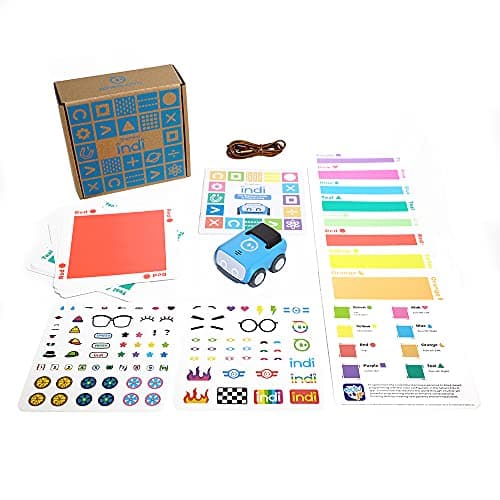
Age range: Sphero: ages 4+. Developmental fit: cause and effect on the floor. Each colour tile is a command (go, stop, turns, celebrate, slow). Children build a maze, then debug the path by moving tiles, not by tapping a screen.
Safety notes: small tiles, a small car, rechargeable pack. Needs floor space for a useful maze. Supervise around pets who will steal tiles. Not a toy for under-threes.
Parental involvement: lay out the first three-tile course with the child. After that, the loop is "build, watch, move a tile."
Privacy: core maze play is screen-free. If you later pair a Sphero app, the same account rules as Mini and BOLT apply.
indi suits the Sphero brand without another tablet session. Skip it if you have no floor space, or if the child already wants typed code.
Featured ASIN B09BRK1QWX, recorded in stock but scarce ("Only 15 left in stock") at £124.99 on 15 September 2026. Background: Sphero indi review.
£124.99 (price correct as of 15 September 2026). Scarce on this check. Check Sphero indi on Amazon UK
9. Sillbird 5-in-1 STEM kit: Best value build-and-drive set
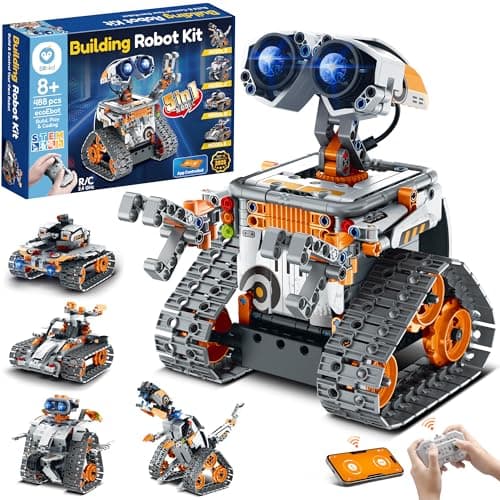
Age range: listing: 8 to 13 (some pack copy also mentions 6+ for building with help). Developmental fit: patience, fine motor skill, following a long instruction sequence, then remote driving. Coding is lighter than mBot or BOLT. Treat it as a construction kit with a programmable twist.
Safety notes: 488 small pieces, motors, a rechargeable pack. Choking hazard for younger siblings. Only one model can be built at a time. Plan a table and a tray for leftover pins.
Parental involvement: high during the first build. Younger children in the age band need an adult for fiddly steps. Driving afterwards is more independent.
Privacy: a companion app adds path, gyro and a simple programme mode. The kit also includes a physical remote, so you can delay the app. If you do install it, use a parent store account.
Sillbird's box is five shapes (wall-climber, explorer, mech dinosaur, tank, stunt car) from one parts pile: build, drive, take apart, build the next. Right pick when the child asked for "a robot I make" and you do not need Scratch depth yet. Wrong pick if classroom-style block coding is the main event. For that lane, use featured Apitor Robot X or mBot.
Featured ASIN B0DHKJ6P7T, recorded in stock at £49.99 on 15 September 2026. Write-up: Sillbird 5-in-1 review. Nearby: coding robots under £50.
£49.99 (price correct as of 15 September 2026). Check the Sillbird 5-in-1 kit on Amazon UK
10. BBC micro:bit V2: Best table-top coding board (not a robot)
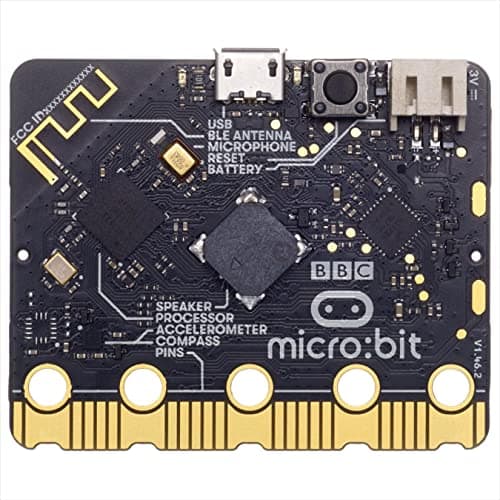
Age range: treat as 8+ for independent use (KS2 and up). Younger children can join if an adult handles USB and the browser. Developmental fit: block coding in Microsoft MakeCode, then Python on the same board. Sensors, a 5×5 LED matrix, buttons, speaker and microphone on V2. This is electronics-plus-code, not a floor robot.
Safety notes: exposed circuit board, gold edge connector, USB cable. Not a chew toy. Keep away from drinks. Supervise crocodile-clip projects.
Parental involvement: an adult should own the first USB flash and any Bluetooth pairing.
Privacy: programmes live on the board and on the computer you use to write them. Treat the family laptop account as the parent control.
The micro:bit is on a robots page because families who type "first coding robot" often need a first coding path, and this board is the cheapest clean one on the pull. Children scroll text on 25 LEDs or react to tilt. Buy mBot or Apitor if movement was the brief.
Featured ASIN B08NGKK3XW, recorded in stock at £27.13 on 15 September 2026. Background: BBC micro:bit V2 review.
£27.13 (price correct as of 15 September 2026). Check the BBC micro:bit V2 on Amazon UK
How to choose
Start with age and screens. Under 6: Tale-Bot Pro, Code & Go or indi, and plan to sit on the floor. Ages 5 to 8 with no tablet: Botley 2.0. Ages 8 to 12 with a spare device: mBot. Build-and-code for 8 to 12: Apitor Robot X. Drive-first builders: Sillbird. Table-top "real code": micro:bit, or mBot if they also want wheels.
Then filter on data. No vendor account? Drop mBot, Apitor Robot X, Mini, BOLT and the Sillbird app. No screen at all? Drop those plus the micro:bit. See smart toy privacy UK 2026.
Treat budget as a snapshot. Under £40: Code & Go rechargeable and the micro:bit. Around £50: Sillbird and Sphero Mini (Mini was scarce). Around £70 to £100: Botley, mBot, Apitor Robot X, Tale-Bot Pro. Above that: indi and BOLT. Those bands move. We do not claim any figure is the lowest price in the UK.
Plan an adult for setup on every kit with screws, Bluetooth or USB. Screen-free remotes still need batteries. Do not buy the ceiling first. BOLT is a poor beginner if the child has never finished a five-step sequence. Code & Go is a poor 10-year-old gift if they already write Scratch at school.
Not featured on this cut
Sphero BOLT+ (B0DBLRXTHN). Out of stock on the 15 September 2026 Creators pull. No buy button.
Previous hub ASINs we did not rematch: Snap Circuits Jr. Plus (B07VPDWXST), Osmo Coding Starter Kit (B08FXS6285), an older Sphero Mini colour (B072B6QVVW), VinciBot (B0CZ6Q8L4X), Cooper (B0DXC4KFL7) and Codey Rocky (B07CGH8NZ7). They were not in the verified featured set. We do not invent replacement ASINs or prices.
Apitor Robot J (B083B82JZ7). Creators pull: in stock at £52.99 on 15 September 2026. Also-note only. The featured Apitor CTA is Robot X (B0945W59HP).
How we picked these
Nine featured ASINs come from the 15 September 2026 Amazon Creators API UK file: marketplace www.amazon.co.uk, tag aitoys-21. We recorded the listed price, the availability type, and a primary m.media-amazon.com image that returned HTTP 200. We do not guess image hashes.
Apitor Robot X (B0945W59HP) is the featured Apitor default because Phil confirmed that converting Associates ASIN. It was not on the 15 September 2026 Creators featured file. Creators credentials were not available here for a fresh GetItems call, so we do not print a fake Creators IN_STOCK type. A live Amazon UK product page the same day showed the listing In stock at £99.99. That is not an explicit out-of-stock mark, so we did not fall back to Robot J.
We read manufacturer specifications for ages, power, sensors and connectivity, and recent verified-purchase comments for faults reported more than once. Picks are ordered by who they suit (age, screens, build versus ready-made), not by commission. That does not change because AIToys.co.uk earns from qualifying purchases. Full process: how we choose.
Verdict
For most UK families buying a first coding robot for a child of about eight to twelve, Makeblock mBot at about £89.99 (B07XR98YYQ) is the complete beginners kit on this cut. Read the mBot review, then check the live listing.
No extra screen: Botley 2.0 at about £69.95 (B083T5G5ZK). Featured build-and-code: Apitor Robot X at about £99.99 (B0945W59HP). Younger screen-free: the rechargeable Code & Go Robot Mouse at about £37.99. Under-fives: Tale-Bot Pro at about £96.99. App ball without BOLT money: Sphero Mini Golf at about £48.99 (scarce on this check). Longer Sphero ladder: BOLT at about £186.00. Colour tiles: indi at about £124.99. Drive-first builders: Sillbird at about £49.99. Table-top code: micro:bit V2 at about £27.13.
Confirm the live Amazon UK price, seller and returns window before you buy. Next step: how to choose a first coding robot and screen-free versus screen-based.
As an Amazon Associate, AIToys.co.uk earns from qualifying purchases. Snapshot prices and availability above are correct as of 15 September 2026.
Read next
Best mBot Alternatives UK 2026: Coding Robots Like the Makeblock mBot
Loved the Makeblock mBot? Here are the best alternatives in the UK for 2026: coding robots across every budget, from £30 screen-free starters to advanced kits.
Best STEM Kits Under £100 UK 2026-9 Top Picks for Every Age
Nine STEM kits under £100 for UK families, plus a hydraulic hand and a scarce LEGO Technic moon rover. Updated September 2026.
Best Coding Robots Under £100 UK 2026-10 Top Picks for Every Age
The 10 best coding robots under £100 in the UK for 2026: expert picks for ages 3 to 14. In-stock products, honest reviews, and where to buy.