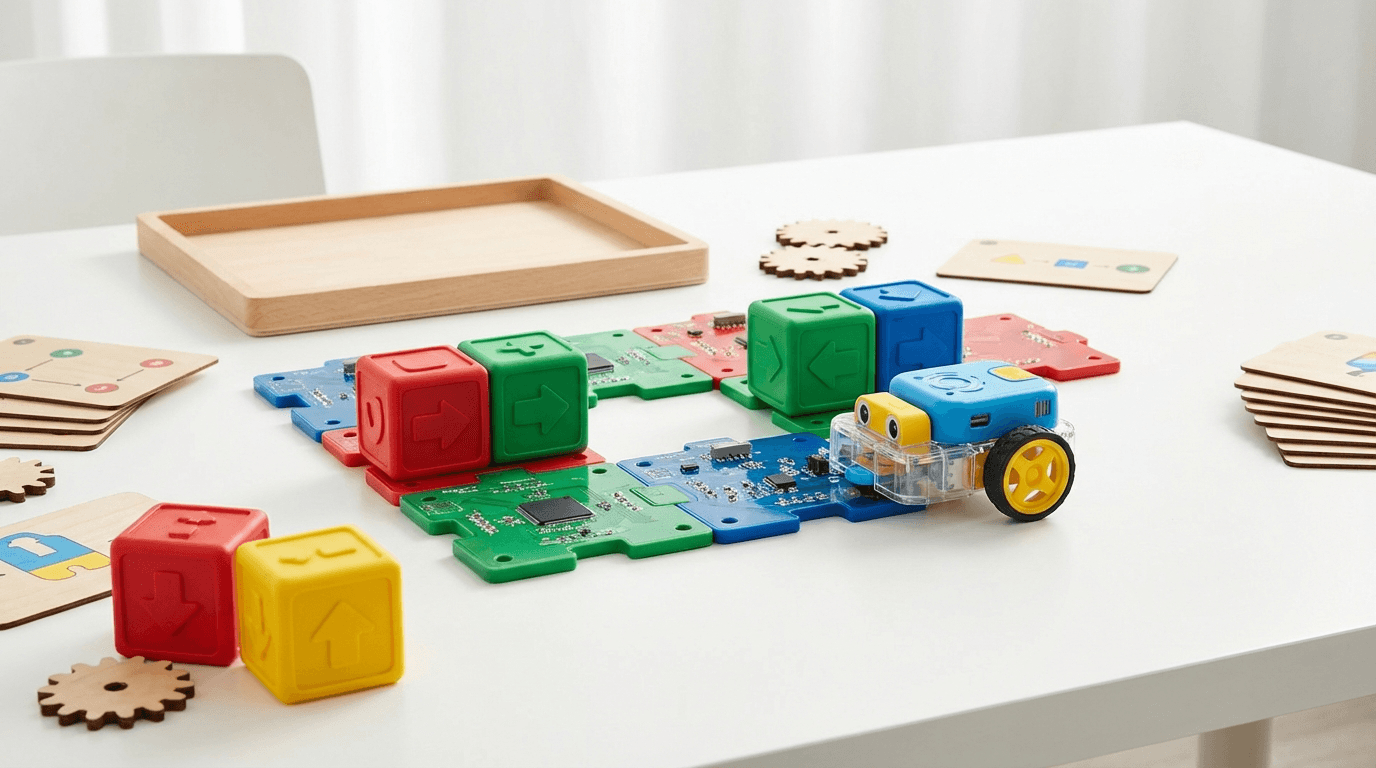
Best Screen-Free Coding Toys UK 2026-9 Top Picks for Device-Free Learning
The best screen-free coding toys for kids in the UK: no tablet, no smartphone required. Expert picks for every age from 3 to 14, with honest pros and cons.
Many parents want their children to learn coding, but they don't want to hand them yet another screen to stare at. The good news: some of the best coding education available today requires absolutely no tablet, smartphone, or computer.
Screen-free coding toys teach children the same computational thinking skills as app-based alternatives (sequencing, loops, conditionals, and debugging) but using physical buttons, coloured tiles, coding cards, and real-world objects. They're often better for younger children, less prone to distraction, and can be used anywhere without a Wi-Fi connection.
We've rounded up the nine best screen-free coding toys available in the UK in 2026, spanning ages 3 to 14. Every product in this guide was checked on Amazon UK on the day of publication and had a working buy button. Prices are approximate and correct at the time of writing (July 2026); always check the live price before you buy.
At a Glance: Best Screen-Free Coding Toys UK 2026
| Product | Age Range | Approx. Price | Best For |
|---|---|---|---|
| Botley 2.0 Activity Set | 5-10 | ~£68 | Best overall, younger beginners |
| Code & Go Robot Mouse | 4-8 | ~£34 | Best budget starter |
| MatataStudio Tale-Bot Pro | 3-6 | ~£90 | Best for preschoolers |
| Coding Critters MagiCoders | 4-7 | ~£49 | Imaginative, story-led play |
| Switcheroo Coding Crew | 4-8 | ~£65 | Screen-free coding without a robot |
| Cooper the STEM Robot | 5-8 | ~£58 | Early readers & storytelling |
| Snap Circuits JR. Plus SC-110 | 8-14 | ~£47 | Electronics & circuit logic |
| MatataStudio VinciBot | 8-12 | ~£85 | Step-up (cards now, app later) |
| BBC micro:bit V2 | 10-14 | ~£28 | Advanced, real hardware |
1. Botley 2.0 Activity Set: Best Overall Screen-Free Coding Robot
Ages: 5-10 | Approx. Price: £68 | ASIN: B083T58PKM
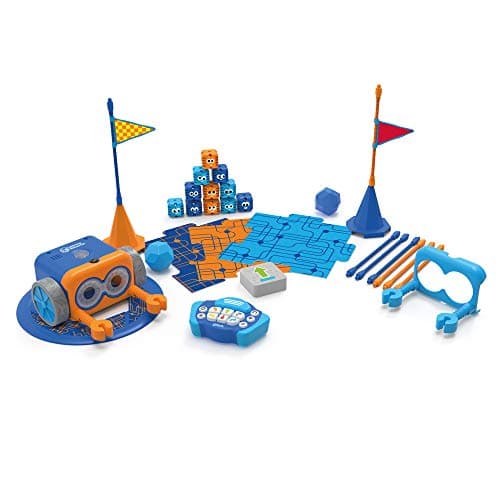
Botley 2.0 by Learning Resources is the gold standard for screen-free coding with young children. Everything is controlled via a physical remote programmer: press the arrow buttons to build a sequence, then watch Botley trot off and follow your instructions exactly. No app, no tablet, not even a Bluetooth connection.
What makes Botley special is how naturally it introduces real programming concepts. Children lay out the maze pieces, programme a route, and observe whether it works. If it doesn't, they debug: adjusting the sequence, re-running, and refining. That's genuine computational thinking happening on the living-room floor.
This Activity Set is the generous 78-piece box: the robot, remote, detachable arms (so Botley can push and carry objects), obstacle pieces, coding cards, and challenge guides that scale in difficulty. Version 2.0 also adds loop and if/then conditional programming, so the same toy grows with the child.
What We Like
- Completely screen-free: no device whatsoever required
- Introduces loops and conditionals without any jargon
- Chunky, tactile remote is easy for young hands
- Generous 78-piece set with activities that grow in difficulty
- Robust build quality that survives enthusiastic play
What Could Be Better
- Children aged 9-10 may outgrow it fairly quickly
- Remote requires batteries (3 x AAA, not included)
- The robot itself needs USB charging via the included cable
Our Verdict
Botley 2.0 is the best introductory screen-free coding robot for the 5-9 age bracket. It's intuitive enough for absolute beginners yet layered enough to keep curious children engaged for months. Our top pick.
🛒 Check Price on Amazon UKAs an Amazon Associate, AIToys.co.uk earns from qualifying purchases.
👉 Love the idea of screen-free learning? See our full Botley 2.0 review for a deep dive into how it works in practice.
2. Code & Go Robot Mouse: Best Budget Starter
Ages: 4-8 | Approx. Price: £34 | ASIN: B01B14XK00
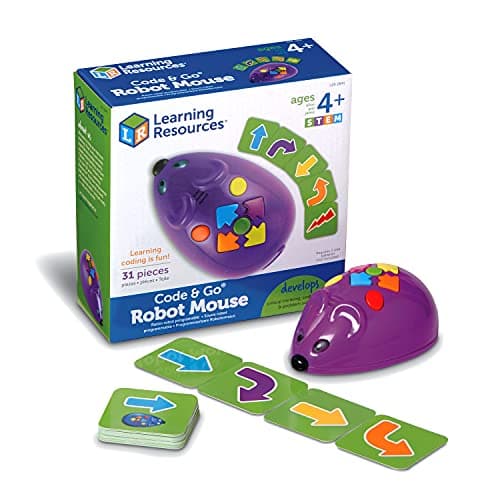
Colby the Code & Go Robot Mouse is the most affordable proper coding toy in this guide, and one of the best-loved screen-free STEM sets for early years. Children build a maze from the included walls, decide where the cheese goes, and then programme Colby's route by pressing the direction buttons on his back. Press "go" and he scurries off: turning, bumping, and squeaking exactly as instructed.
The set comes with 30 double-sided coding cards, 16 maze walls, tunnels, and cheese, so children can plan a sequence away from the mouse first (using the cards) and then key it in. That card-first approach is a lovely, concrete introduction to writing an algorithm before you run it.
It's simple by design (there are no loops or conditionals here) but for a four- or five-year-old taking their very first steps in sequencing and debugging, that simplicity is the point.
What We Like
- Excellent value: genuine coding logic for around £34
- Card-first planning teaches "write your algorithm, then run it"
- Bright, tactile and immediately engaging for young children
- Works with any other Code & Go maze sets to expand
- No screen, no app, no internet required
What Could Be Better
- Sequencing only: no loops or conditionals to grow into
- Needs 3 x AAA batteries (not included)
- Most children move on by around age 7-8
Our Verdict
For a first coding toy on a budget, the Code & Go Robot Mouse is hard to beat. It nails the fundamentals of sequencing and debugging in a package that four- and five-year-olds adore.
👉 Want the detail? Read our full Code & Go Robot Mouse review.
3. MatataStudio Tale-Bot Pro: Best for Preschoolers
Ages: 3-6 | Approx. Price: £90 | ASIN: B0CZ6R182M
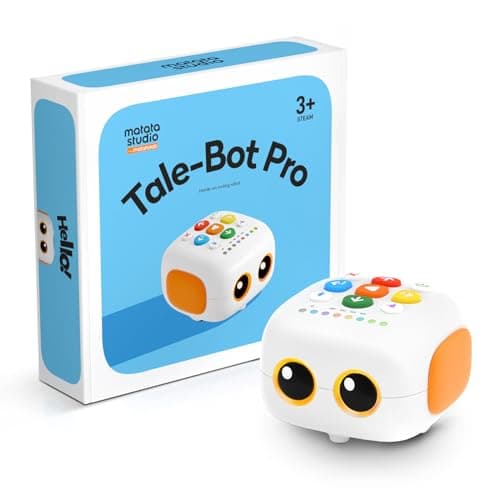
The Tale-Bot Pro is purpose-built for the very youngest coders. There are big, satisfying direction buttons right on top of the robot, so a three-year-old can press a sequence (forward, forward, turn, go) and immediately watch it play out. It's tactile, chunky, and completely screen-free: no app is needed for the core experience.
What lifts it above a basic floor robot is the sensory feedback. Tale-Bot talks, plays sounds, has a little light-up face, and rolls across illustrated "adventure" maps (city, farm, and so on) that give the coding a story and a purpose. That narrative wrapper is exactly what keeps pre-schoolers engaged, turning abstract sequencing into "let's drive to the bakery".
It's one of the pricier picks here, and for a three-year-old that's worth weighing up, but the build quality is excellent and there's a clear upgrade path into MatataStudio's card-based coding as your child grows.
What We Like
- Genuinely suitable from age 3: huge, simple buttons
- Story maps give the coding a purpose young children understand
- Talks, lights up and reacts, so it feels alive
- Screen-free out of the box; grows into card coding later
- Rechargeable: no constant battery changes
What Could Be Better
- One of the more expensive picks for the age group
- Younger toddlers will need adult help at first
- The extra maps and card packs are sold separately
Our Verdict
If you want a first coding toy that genuinely works for a three- or four-year-old (not one that claims to and frustrates them) the Tale-Bot Pro is the one to buy. The best screen-free option for pre-schoolers.
👉 See it in action: our full MatataStudio Tale-Bot Pro review covers the maps and coding modes in detail.
4. Coding Critters MagiCoders: Best for Imaginative Play
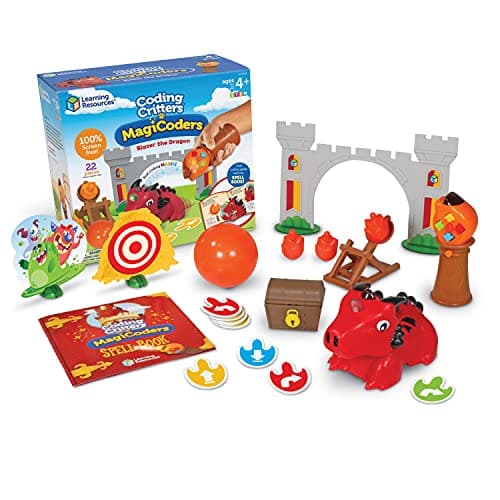
Ages: 4-7 | Approx. Price: £49 | ASIN: B097F34KJ9
Coding Critters MagiCoders takes the "coding as play" idea further than almost anything else on this list. Blazer the Dragon is programmed by casting "spells": children wave the wand and use the buttons to build a sequence of movements, then send Blazer off to complete a quest around the included storybook play mat. There's no screen anywhere in sight.
The genius here is the disguise: children think they're playing pretend with a friendly dragon, but they're actually sequencing, testing, and debugging. The included interactive storybook sets challenges that quietly ramp up the coding difficulty, so the learning is baked into the story rather than bolted on.
For a child who lights up at characters and narrative far more than at buttons and mazes, this is the screen-free coding toy most likely to actually get played with: again and again.
What We Like
- "Spell-casting" framing makes coding feel like magic, not homework
- Interactive storybook builds sequencing and debugging into a quest
- Brilliant for imaginative, character-led children
- Completely screen-free and self-contained
- Collectible characters if your child gets hooked
What Could Be Better
- Story-led approach won't suit children who prefer pure logic
- Needs batteries (included to start, then replaceable)
- Coding depth is modest: it's a first step, not a journey's end
Our Verdict
If your child is more Hogwarts than Silicon Valley, Coding Critters MagiCoders is the screen-free coding toy that will actually hold their attention. A clever, story-first introduction to computational thinking.
👉 More detail: read our Coding Critters review.
5. Switcheroo Coding Crew: Best Screen-Free Coding Without a Robot
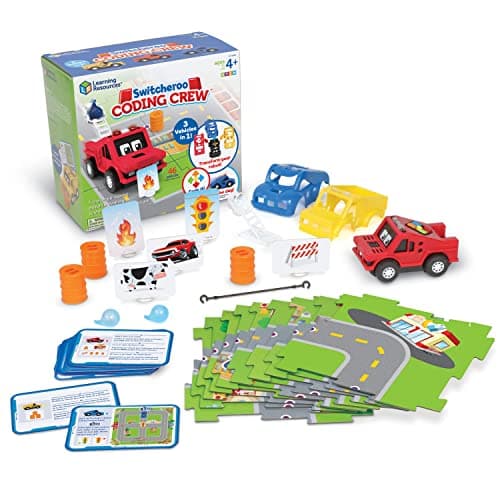
Ages: 4-8 | Approx. Price: £65 | ASIN: B09SVRLNMY
Not every child wants a wheeled robot, and Switcheroo Coding Crew proves you don't need one to teach coding. This 46-piece set is built around physical coding tiles that children arrange to programme a route and a set of actions for their character to perform across the play scenes. No batteries, no charging, and nothing to break.
Because the "code" is tangible tiles you can pick up, rearrange, and swap, it's wonderfully forgiving. Children experiment freely, see instantly why a sequence didn't work, and try again: the debugging loop made physical. It's a lovely option for travel, for classrooms, and for households actively trying to cut screen time and battery-powered clutter.
The trade-off is that it leans more towards a puzzle-and-play set than a "wow" gadget, so it makes less of an immediate impression than a robot that scoots across the floor. But for pure, distraction-free coding logic, that restraint is a strength.
What We Like
- Screen-free and battery-free: genuinely play-anywhere
- Tangible tiles make sequencing and debugging concrete
- Nothing to charge, break, or update
- Great for travel and shared/classroom use
- Strong value for a full 46-piece set
What Could Be Better
- Less instantly exciting than a moving robot
- Smaller pieces need tidying to avoid losses
- Appeals more to methodical than action-led children
Our Verdict
Switcheroo Coding Crew is the pick for parents who want coding logic with zero screens and zero batteries. A calm, tactile, endlessly re-arrangeable introduction to sequencing.
6. Cooper the STEM Robot: Best for Early Readers & Storytelling
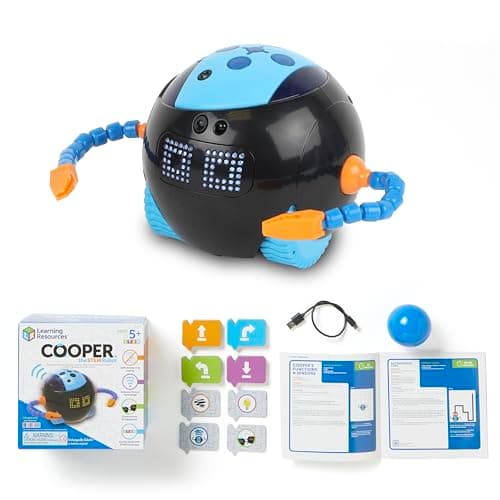
Ages: 5-8 | Approx. Price: £58 | ASIN: B0DXC4KFL7
Cooper is a friendly, chunky robot that blends screen-free coding with early literacy and storytelling. Children programme Cooper using physical inputs, then he trundles off, chats, and reacts: turning a coding exercise into a little narrative adventure. It's a natural fit for the reception-to-Year-3 age group who are learning to read and to sequence at the same time.
What we like about Cooper is that the coding is never abstract. Every sequence has a character and an outcome, which helps children who find button-and-maze robots a bit dry to stay engaged. The build is sturdy and squishy-friendly, aimed squarely at younger hands, and everything works without a phone or tablet in sight.
It sits in the mid-price band, so it's an investment rather than a stocking-filler, but for a child who loves characters and stories more than pure logic, Cooper earns its place.
What We Like
- Combines screen-free coding with storytelling and early reading
- Warm, characterful design that younger children bond with
- Sturdy, tactile build made for small hands
- No app or device needed
- A good bridge between "toy" and "coding tool"
What Could Be Better
- Mid-range price for what is still an early-years toy
- Less open-ended than a classic programmable floor robot
- Newer model, so fewer add-ons than Botley or Code & Go
Our Verdict
Cooper the STEM Robot is the storytelling pick: ideal for early readers who learn best when the coding comes wrapped in a character and a plot. A charming, screen-free introduction for 5-8s.
7. Snap Circuits JR. Plus SC-110: Best for Electronics Explorers
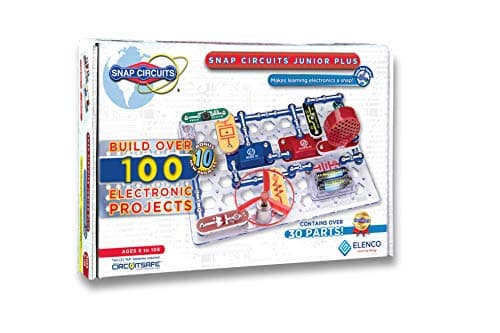
Ages: 8-14 | Approx. Price: £47 | ASIN: B07VPDWXST
Snap Circuits takes a different route to screen-free STEM. Rather than programming a robot, children build real, working electronic circuits by snapping together colour-coded components. LEDs, resistors, switches, a fan, a motor, and more. The SC-110 kit includes 30-plus parts and a full-colour manual with over 110 projects.
While it isn't a "coding robot", Snap Circuits teaches the foundational logic that underpins all programming: cause and effect, sequencing, systematic troubleshooting, and iterative design. A child who understands how a circuit routes power has a real head start when they later meet variables, inputs, and outputs in code.
The snap-fit system is genuinely clever. Components click onto a plastic grid, so circuits are easy to assemble, modify, and take apart. Projects run from a simple lamp up to sirens, a photosensor light, and a flying-saucer spinner. No soldering, no cutting, no mains electricity.
What We Like
- Teaches electronics fundamentals that underpin all coding
- Colour-coded components are close to foolproof to connect
- 110+ projects give enormous replay value
- Completely screen-free: no app or device needed
- Excellent value for the component count
What Could Be Better
- Not a "coding robot": a different flavour of STEM
- Small parts mean it's genuinely 8+, not for little ones
- Initial setup benefits from a bit of adult help
Our Verdict
Snap Circuits JR. Plus is a brilliant addition to any older child's STEM shelf. It teaches a different but equally valuable dimension of computational thinking, and it's superb value at around £47.
👉 Full breakdown: our Snap Circuits JR. Plus SC-110 review walks through the best projects.
🏬 Also available on the high street: Browse coding robots & STEM toys at The Entertainer →
8. MatataStudio VinciBot: Best Step-Up (Cards Now, App Later)
Ages: 8-12 | Approx. Price: £85 | ASIN: B0CZ6Q8L4X
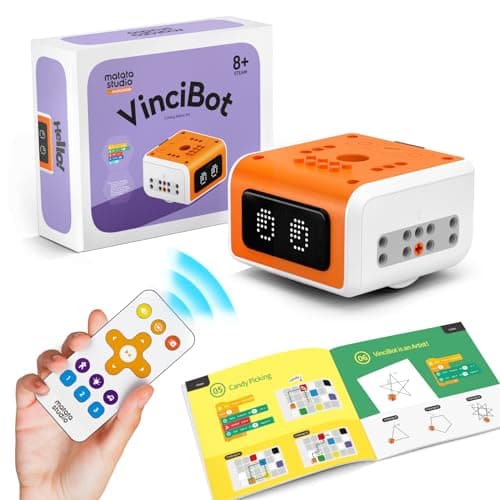
VinciBot is the honest "graduation" pick in this guide. Out of the box you can drive and programme it with the physical controller and MatataStudio's coding cards (genuinely screen-free) but its real ceiling comes from an optional Scratch-style app that unlocks block coding, sensors, line-following, and AI features like colour and gesture recognition. We've included it precisely because it's the natural next step once a child is ready to move beyond fully screen-free toys.
That dual nature is the appeal. Younger siblings can play with the cards and controller with no device at all, while an older child can graduate to app-based programming on the same robot, so it stretches from screen-free tinkering right up to real block coding.
Be clear-eyed about it, though: to reach VinciBot's full potential you will bring a screen into the mix. If your goal is strictly no-screen-ever, choose one of the picks above. If you want one robot that spans screen-free play today and proper coding tomorrow, VinciBot is the smart buy.
What We Like
- Screen-free with the controller and coding cards to start
- Grows into full Scratch-style block coding via the app
- Genuinely capable: sensors, line-following, and AI features
- One robot that spans a wide age and skill range
- Strong build quality typical of MatataStudio
What Could Be Better
- Full potential is screen-optional, not screen-free
- Premium price for the category
- The best features need the companion app and a device
Our Verdict
VinciBot is the step-up: screen-free enough for card-based play now, with a real coding future when your child is ready. The best bridge in this guide from screen-free toys to genuine programming.
👉 Thinking ahead? Our MatataStudio VinciBot review covers the app and AI features in depth.
9. BBC micro:bit V2: Best for Older Kids & Real Coding
Ages: 10-14 | Approx. Price: £28 | ASIN: B08NGKK3XW
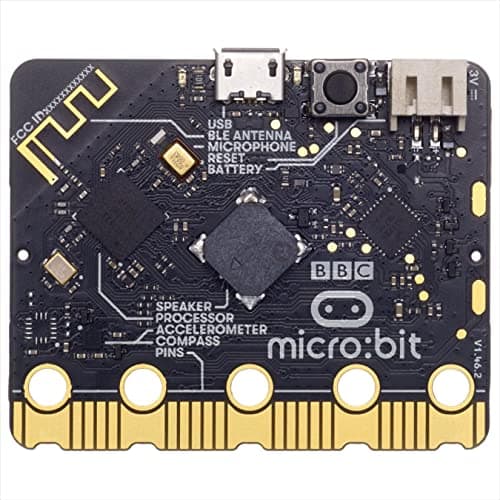
The BBC micro:bit V2 is one of the most successful educational computing devices ever made: used in UK schools for years and endorsed across the national computing curriculum. The V2 adds a built-in microphone, speaker, and touch-sensitive logo to the original's LED matrix, motion sensor, radio, and Bluetooth.
At its simplest, children programme the micro:bit's LED display to scroll messages, react to movement, or play sounds: with the device itself as the output, not a screen. More advanced users build step counters, weather stations, musical instruments, and wireless messaging between boards, coding in Blocks, Python, or JavaScript.
One honest caveat: you do need a computer or tablet to write the programmes. But once a program is flashed onto the board, the micro:bit runs entirely standalone. No screen, no internet, no ongoing connection. The physical-computing experience is genuinely screen-free in use, which is why it earns its place as the pick for older, more serious young coders.
What We Like
- Outstanding value: a real programmable computer for around £28
- Backed by years of UK school curriculum use
- Enormous community, tutorials, and project library
- Genuinely open-ended: the ceiling is very high
- Prepares children directly for GCSE Computer Science
What Could Be Better
- Needs a computer/tablet to write code (not screen-free to programme)
- No wheels or movement out of the box: robotics needs add-ons
- Less instantly engaging than a wheeled robot for young children
Our Verdict
The micro:bit V2 is extraordinary value and the ideal step into real programming for children aged 10-plus. If your child is serious about learning to code, this is where to start.
👉 Curious what it can do? Our BBC micro:bit V2 review goes deep on the projects.
How We Chose These Products
Our full selection and verification process, including what we don't do, is on the how we choose page.
Every product in this guide meets the following criteria:
Genuinely screen-free (or clearly screen-optional): The core learning experience doesn't require a smartphone, tablet, or computer to function. Where an app extends the toy (as with VinciBot and micro:bit) we've said so plainly rather than pretending otherwise.
In stock on Amazon UK: Every product here was checked on the day of publication and had a working buy button. There's no point recommending a toy you can't actually buy, so we re-verify this guide regularly and swap out anything that goes out of stock.
Educational substance: We've chosen products that teach transferable skills (sequencing, loops, conditionals, cause-and-effect, and circuit logic) not just entertainment toys with a "coding" label stuck on the box.
Age-appropriate and honest: We've been straight about age ranges and about what each toy does and doesn't do. A toy rated 5+ that genuinely engages a five-year-old is very different from one that frustrates them.
Screen-Free vs App-Based: Which Is Better?
Neither is universally better: it depends on the child and the context.
Screen-free is better when:
- Your child is under 8 and doesn't yet have great tablet coordination
- You're trying to reduce overall screen time in the household
- You want a coding toy that works anywhere: no Wi-Fi, nothing to update
- Your child learns better with physical, tactile feedback
App-based is better when:
- Your child is 8-plus and confident with a tablet
- You want deeper programming options and richer visual feedback
- The app adds real educational value, not just gamification
- You're happy managing screen time alongside the toy
For many families the best answer is one of each: a screen-free robot for younger children or low-screen days, and an app-capable option like VinciBot for focused sessions as they grow. For a fuller comparison, see our guide: Screen-Free vs Screen-Based Coding Toys: Which Is Better for Kids?
Comparison Table
| Product | Age | Approx. Price | Screen Required? | Best Skill Taught |
|---|---|---|---|---|
| Botley 2.0 Activity Set | 5-10 | ~£68 | Never | Sequencing + conditionals |
| Code & Go Robot Mouse | 4-8 | ~£34 | Never | Sequencing + debugging |
| MatataStudio Tale-Bot Pro | 3-6 | ~£90 | Never | First sequencing (preschool) |
| Coding Critters MagiCoders | 4-7 | ~£49 | Never | Story-led sequencing |
| Switcheroo Coding Crew | 4-8 | ~£65 | Never | Tile-based coding logic |
| Cooper the STEM Robot | 5-8 | ~£58 | Never | Coding + early literacy |
| Snap Circuits JR. Plus | 8-14 | ~£47 | Never | Electronics + circuit logic |
| MatataStudio VinciBot | 8-12 | ~£85 | Optional | Cards → block coding + AI |
| BBC micro:bit V2 | 10-14 | ~£28 | For programming | Physical computing |
Frequently Asked Questions
Are screen-free coding toys genuinely educational?
Yes. Many educational researchers argue that screen-free physical coding toys are more effective for young children than app-based alternatives. Physical manipulation of objects, immediate cause-and-effect feedback, and the absence of digital distraction all support deeper learning. Early-years STEM studies consistently show that hands-on, tactile learning improves retention of computational concepts in children under 8.
What age should children start learning to code?
Most experts agree children can begin engaging with coding concepts from around age 3-4 using age-appropriate tools like the Tale-Bot Pro or the Code & Go Robot Mouse. Formal programming (Scratch, Python) typically becomes accessible at 7-8. Screen-free coding toys are ideal for the 3-7 window, when fine motor skills and abstract reasoning are still developing. For more detail, see our article: UK Schools Are Teaching Coding from Age 5. Here's How to Help at Home.
Do screen-free coding toys get boring quickly?
The better ones don't. Botley 2.0, Snap Circuits, and the micro:bit all have enough content to engage children for months or years. The risk is buying a toy that's too simple for the child's age, which is why we've listed age ranges above. A 10-year-old given the Code & Go Robot Mouse will outgrow it in weeks; the same child given Snap Circuits or a micro:bit will be engaged for years.
Can screen-free coding toys be used in schools?
Absolutely. The BBC micro:bit is used across UK primary and secondary schools and sits within the national computing curriculum, while Botley 2.0 and the Code & Go Robot Mouse are popular in reception and Key Stage 1 classrooms. If you're a parent buying for home learning to complement school, these products will align well with what teachers already use.
Are these toys suitable for girls as well as boys?
Yes. Every product here is gender-neutral in design and appeal. Coding Critters and Switcheroo Coding Crew tend to be particularly popular with girls, though individual interests vary widely. If you'd like more guidance, our Best STEM Toys for Girls UK 2026 guide explores this in more depth.
Our Final Recommendation
For ages 3-5: Start with the MatataStudio Tale-Bot Pro: big buttons, story maps, and a genuinely preschool-friendly design make it the best first coding toy for little ones. On a tighter budget, the Code & Go Robot Mouse nails the fundamentals for around £34.
For ages 5-8: Botley 2.0 Activity Set is our overall winner: the most intuitive introduction to coding logic for young children, with loops and conditionals to grow into and a generous set that stays fresh for months.
For ages 8-14: Snap Circuits JR. Plus for hands-on electronics, or the BBC micro:bit V2 at around £28 for the best step into real programming. When your child is ready to bridge from screen-free play to proper coding, VinciBot does both on one robot.
Want to explore app-based options too? See our Best Coding Robots Under £100 UK 2026 for a broader view of what's available.
Read next
Best Coding Robots Under £100 UK 2026-10 Top Picks for Every Age
The 10 best coding robots under £100 in the UK for 2026: expert picks for ages 3 to 14. In-stock products, honest reviews, and where to buy.
Best STEM Kits Under £100 UK 2026-9 Top Picks for Every Age
Nine STEM kits under £100 for UK families, plus a hydraulic hand and a scarce LEGO Technic moon rover. Updated September 2026.
Best STEM Toys UK 2026: Our Top Picks by Age and Budget
Researched shortlist of the best STEM toys for UK kids in 2026. Coding robots, science kits and electronics, with prices checked 22 September 2026.