Affiliate Disclosure: This article contains affiliate links. When you purchase through these links, we may earn a small commission at no extra cost to you. We only recommend products we genuinely believe in.
Introduction
As parents, we're constantly looking for ways to prepare our children for a tech-driven future. The BBC micro:bit V2 (available on Amazon UK (see button above)) stands out as a powerful, yet accessible, tool designed to ignite a passion for coding and electronics in young minds. This pocket-sized programmable computer builds on the legacy of its predecessor with enhanced features, aiming to transform children from passive consumers of technology into active creators. But does it deliver? In this in-depth review, we'll explore everything UK parents need to know about the micro:bit V2, from its educational benefits and exciting features to its practicality and value.
Quick Verdict
Rating: 4.5/5 Price: Check button above for current price Age Range: 8-11+ years Perfect for: Children beginning their coding journey, those interested in electronics, STEM education, creative projects. Not for: Children seeking an out-of-the-box self-playing robot, or advanced users needing full-fledged computing power.
👉 Check Latest Price for BBC micro:bit V2 on Amazon UKAs an Amazon Associate, AIToys.co.uk earns from qualifying purchases.
What is the BBC micro:bit V2?
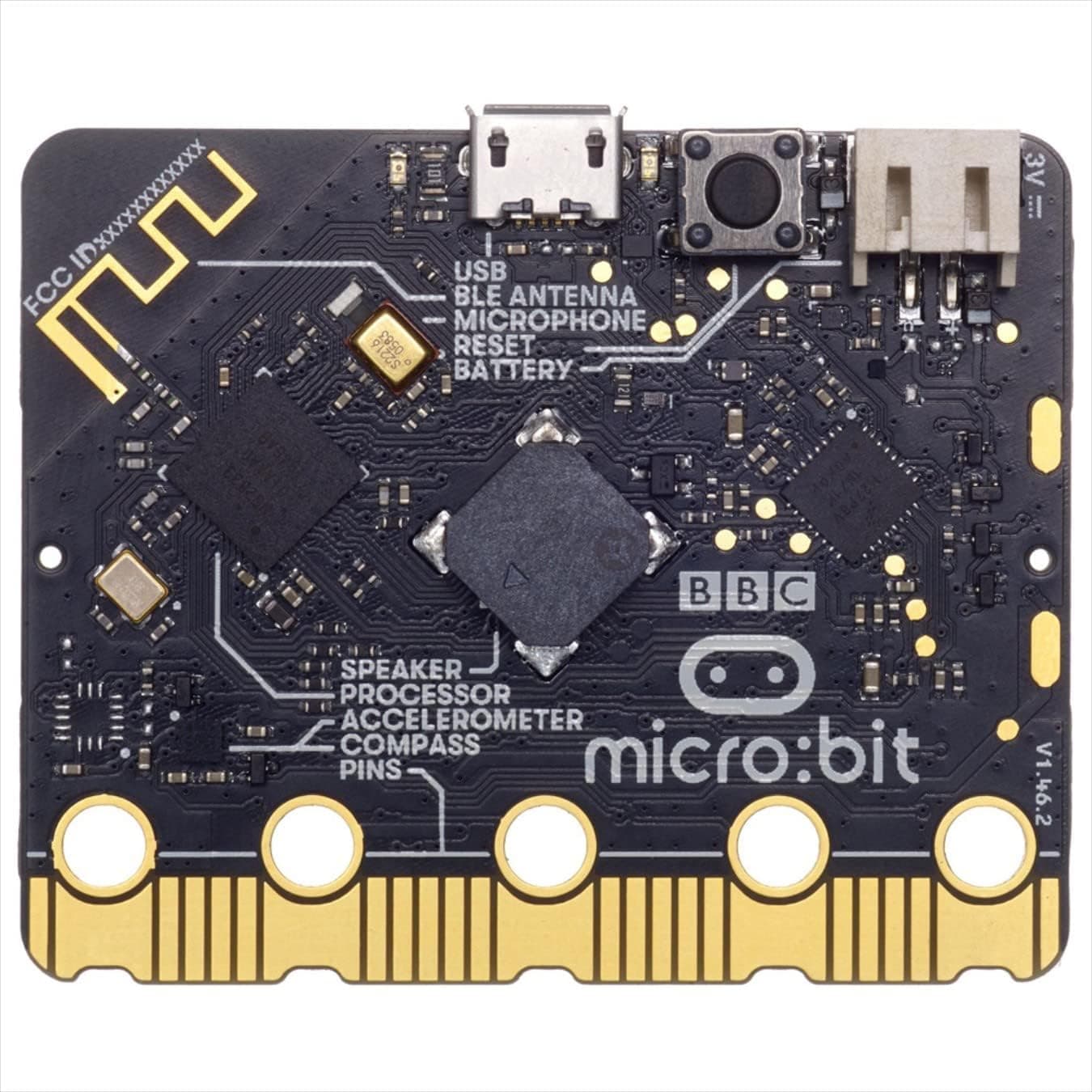
The BBC micro:bit V2 is a small, codeable circuit board equipped with an array of sensors and features. It's essentially an entry-level computing device designed to make learning to code engaging and hands-on. Developed by the BBC in partnership with educational organisations, its primary goal is to inspire digital creativity and computational thinking skills.
Unlike a traditional computer, the micro:bit is designed to interact with the physical world. Children can program it to display text or images, play tunes, control other devices, or react to its environment using its built-in sensors.
Key Features and Improvements in V2
The second version of the micro:bit comes packed with significant upgrades that enhance its educational potential and ease of use:
- Built-in Speaker & Microphone: A major improvement! The V2 can now produce sounds and react to noise without needing external components, making projects like simple musical instruments or sound-activated games much easier to create.
- Upgraded Processor: A more powerful Nordic Semiconductor nRF52833 processor means faster performance and more complex possibilities, even opening doors for basic machine learning applications.
- Touch Sensor: The BBC logo on the board now doubles as a capacitive touch sensor.
- 25 Programmable LEDs: A 5x5 grid of red LEDs allows for displaying patterns, numbers, or scrolling text.
- Two Programmable Buttons: A simple way to receive input for games or control commands.
- Motion Sensor: An accelerometer and magnetometer detect movement, tilt, and even compass direction.
- Light & Temperature Sensors: The micro:bit can sense ambient light levels and local temperature.
- Radio & Bluetooth: Enables communication with other micro:bits, phones, or computers, paving the way for multi-device projects and simple robotics.
- Expansion Pins: Gold-plated edge connector for attaching crocodile clips or 4mm banana plugs, allowing connection to a vast array of external components.
Currently available on BBC micro:bit V2. Amazon UK. Prices may vary.
Getting Started: Unboxing & First Steps
(Video: Unboxing the New Micro:bit V2! by The Micro:bit Educational Foundation)
The micro:bit is designed for ease of use. Once unboxed, you typically connect it to a computer via a micro-USB cable. The official website, microbit.org, provides straightforward online editors (MakeCode and Python) directly in your browser. From there, it's a simple drag-and-drop or text-based coding process, which is then 'flashed' onto the micro:bit.
How Does the micro:bit V2 Teach Coding?
The micro:bit V2 supports several programming languages, catering to different skill levels:
- Microsoft MakeCode Editor: This is the primary and most accessible environment. It's a block-based visual editor, similar to Scratch, where children drag and drop code blocks. This eliminates syntax errors and makes coding intuitive. MakeCode also allows users to switch to JavaScript or Python, offering a smooth transition to text-based coding.
- Python Editor: For slightly older or more advanced users, the official Python editor provides a text-based environment to write microPython code, giving more flexibility and an introduction to a widely-used programming language.
- Mobile Apps: Available for iOS and Android, these apps allow users to code on the go and transfer programs to the micro:bit via Bluetooth.
The hands-on nature of the micro:bit is its biggest strength. Children don't just see code on a screen; they see it come to life on a physical device, instantly understanding concepts like inputs, outputs, loops, and conditions.
Educational Benefits for UK Children
- Computational Thinking: Encourages problem-solving, logical reasoning, and algorithmic design.
- Creativity & Innovation: Provides a platform for children to design, build, and invent their own gadgets and games.
- STEM Skills: Introduces fundamental concepts in Science, Technology, Engineering, and Maths in a fun and practical way.
- Introduction to Electronics: Children learn about basic circuits and how to connect external components.
- Digital Literacy: Empowers children to understand and control the technology around them, rather than just consuming it.
- Curriculum Alignment: The micro:bit is widely used in UK schools and aligns well with the computing curriculum.
Our Hands-On Experience: Pros and Cons
Having reviewed numerous coding toys, the BBC micro:bit V2 truly stands out for its blend of simplicity and power.
Pros:
- Highly Accessible: The MakeCode editor is incredibly user-friendly for beginners, making it easy for even 8-year-olds to get started.
- Rich Feature Set: The V2's built-in speaker, microphone, and improved processor significant expand project possibilities without needing additional purchases.
- Vast Community & Resources: The official micro:bit website, BBC Teach, and numerous educational communities offer a wealth of free projects, tutorials, and support. This is a huge advantage for parents and educators alike.
- Durability: The board is robust and designed for classroom use, able to withstand enthusiastic handling.
- Affordable: For the functionality it offers, the micro:bit V2 is very reasonably priced (typically under £20-£25 for a single board), making it an excellent entry point into electronics and coding.
- Scalable Learning: From block coding to Python, and from simple displays to complex projects involving external sensors or robotics, the micro:bit grows with your child's skills.
Cons:
- Connectivity (Minor Issue): As noted by Raspberry Pi Official Magazine, the V2 still requires a USB cable for initial programming and power, and its wireless capabilities, while present, aren't always as seamless as a fully integrated IoT device might be. This is a small hurdle for absolute beginners.
- Requires Independent Learning: While resources are abundant, success often depends on a child's willingness to follow tutorials or parents' involvement. It's not a toy that teaches itself.
- Not a "Robot": It's a microcontroller, not a robot straight out of the box. To make it move or perform complex robotic tasks, additional components (motors, chassis) are required. Parents expecting a ready-to-play robot might be disappointed if they don't buy a kit.
Price & Where to Buy
The BBC micro:bit V2 is readily available in the UK. You can find it on Amazon UK, as well as educational electronics suppliers. Price-wise, a single micro:bit V2 board typically costs between £15 and £25. Starter kits, which include batteries, a USB cable, and some basic components, usually range from £25 to £40.
🛒 Buy the BBC micro:bit V2 on Amazon UK
Conclusion & Our Verdict
The BBC micro:bit V2 is an exceptional educational tool for children aged 8 and up. Its well-thought-out design, accessible programming environments, and robust community support make it an ideal choice for introducing kids to the exciting world of coding and physical computing. The V2's enhancements, especially the built-in speaker and microphone, add significant value, allowing for more creative and interactive projects.
While it's important to set expectations (it's a microcontroller, not a ready-made robot), the micro:bit V2 offers unparalleled potential for open-ended learning and innovation. For its affordability, functionality, and immense educational value, we highly recommend the BBC micro:bit V2 for any UK parent looking to inspire their child's tech journey.
It truly empowers children to be creators, not just consumers, of digital technology.
Related reading
Frequently Asked Questions (FAQs)
Q1: What age is the BBC micro:bit V2 suitable for?
A: The BBC micro:bit V2 is officially recommended for children aged 8 to 11, though many activities are suitable for older children and even adults who are beginners in coding or electronics. Younger children can use it with adult guidance.
Q2: Do I need to buy anything else with the micro:bit V2?
A: To get started, you'll ideally need a USB cable for programming (if you don't have one already), and a battery pack with 2x AAA batteries for portable power. Many retailers offer "starter kits" that include these essentials.
Q3: Is the micro:bit V2 difficult to learn?
A: No, it's designed to be very approachable! Using the Microsoft MakeCode block-based editor, beginners can start programming almost immediately without worrying about syntax. More advanced users can progress to Python.
Q4: Can the micro:bit V2 connect to other devices?
A: Yes, it features both radio and Bluetooth capabilities. This allows it to communicate wirelessly with other micro:bits, smartphones, and even some robots, opening up possibilities for networked projects.
Q5: What's the main difference between micro:bit V1 and V2?
A: The V2 includes a built-in speaker, microphone, and a more powerful processor. It also has a touch-sensitive logo. These additions make it easier to create sound-based projects and can handle more complex coding tasks, including basic machine learning.