Osmo Coding Starter Kit Review: The Best Way to Teach Young Kids to Code?
If you're a parent navigating the vibrant world of STEM toys, you've likely come across Osmo. Their unique blend of tangible play and digital interaction has been a game-changer in educational tech. Today, we're diving deep into one of their most popular offerings: the Osmo Coding Starter Kit. Priced at £79.99, this kit promises to introduce children aged 5-10 to the fundamentals of coding without the frustration often associated with screen-only solutions. But does it truly deliver? We put it to the test with a group of keen young coders to find out.
Affiliate Disclosure
_Please note: This review contains affiliate links. If you make a purchase through these links, AIToys.co.uk may earn a small commission at no extra cost to you. This helps support our independent reviews and content._
Quick Verdict: Is the Osmo Coding Starter Kit Worth It?
Price: £79.99
Pros:
- Intuitive & Engaging: The physical coding blocks make abstract concepts wonderfully concrete.
- Progressive Learning: From basic sequences (Awbie) to musical loops (Jam) and advanced logic (Duo), it scales with your child.
- Screen Time with Purpose: Converts passive screen time into active, problem-solving play.
- Durable & Well-Designed: The physical components are robust and built to withstand enthusiastic use.
- Collaborative Play: Coding Duo offers a unique two-player experience, fostering teamwork.
Cons:
- iPad Dependent: Requires an iPad (or Fire Tablet), which is an additional cost if you don't already own one.
- Initial Setup Time: Getting everything downloaded and calibrated can take a little while.
Our Verdict: The Osmo Coding Starter Kit is an outstanding educational tool that perfectly bridges the gap between hands-on play and digital learning. For parents seeking to introduce coding to their 5-10 year olds in an accessible, engaging, and genuinely fun way, it's an investment we wholeheartedly recommend. The combination of tactile blocks and lively on-screen feedback creates a learning experience that captures attention and builds foundational coding skills far more effectively than many screen-only alternatives.
Unboxing the Osmo Coding Starter Kit: First Impressions
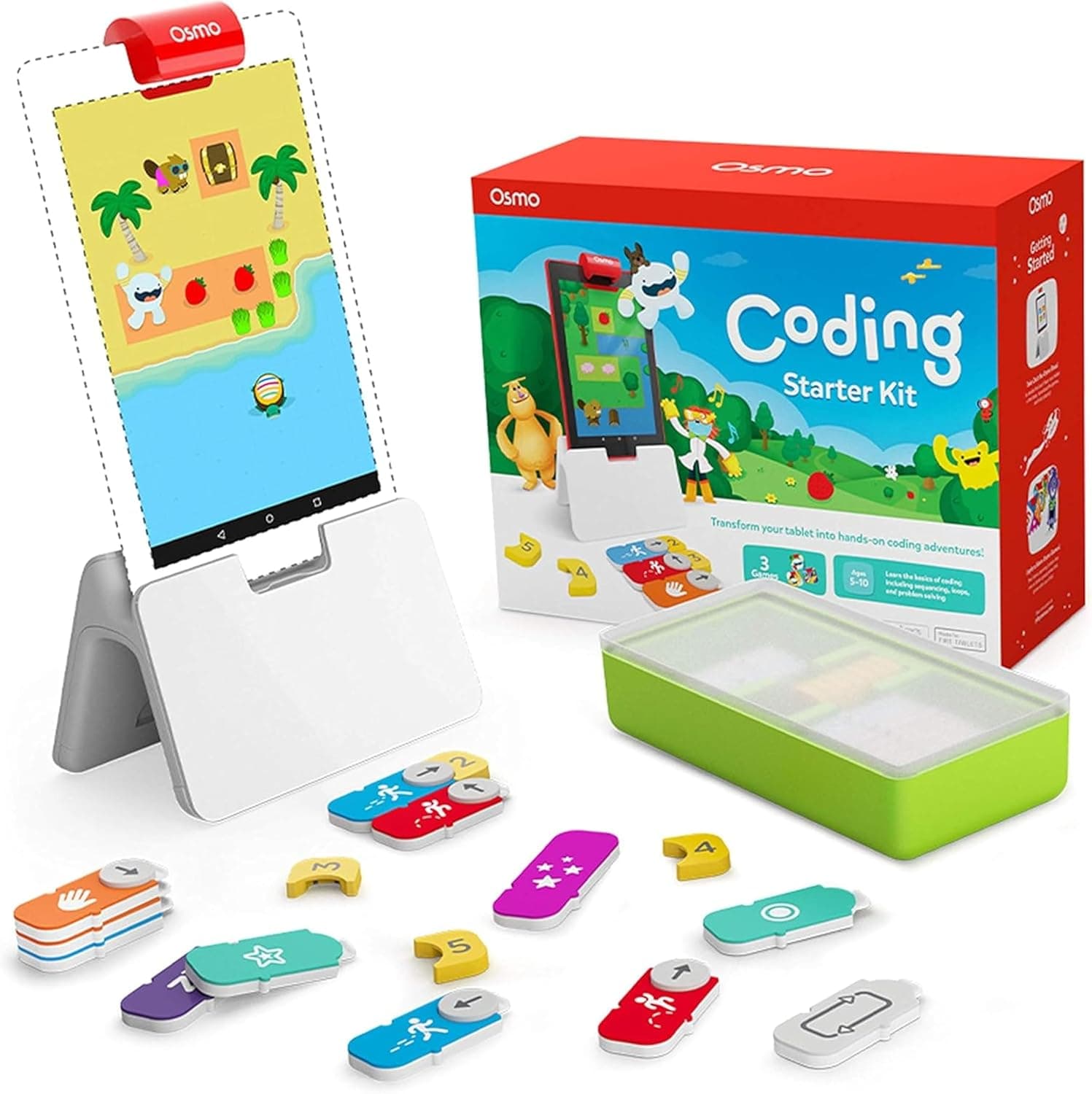
The Osmo Coding Starter Kit arrives in a brightly coloured, sturdy box that immediately screams "fun and educational." Inside, we found everything neatly organised and securely packaged. The main components include:
- The Osmo Base & Reflector: This is the heart of the Osmo experience, unique to their ecosystem. The white base holds your iPad upright, and the small red reflector clips over the iPad's camera, allowing it to "see" the play area in front of the screen.
- 31 Coding Blocks: These wonderfully tactile pieces are the stars of the show. They represent different coding commands. Walk, Jump, Grab, Loop, If/Then, logical operators, and numbers. Each block is chunky, brightly coloured, and feels robust in small hands. They snap together magnetically, which is incredibly satisfying and makes building sequences a breeze.
- Clear Instructions: A simple guide gets you started with setting up the base and downloading the necessary apps (more on those later).
Our junior testers were instantly drawn to the physical blocks. The magnetic "clunk" as they connected was a particular hit, and the vibrant colours made them feel more like toys than abstract coding tools. The overall unboxing experience felt premium and well thought out, setting a positive tone for the play to come.
Design & Build: Tangible Tech That Lasts
One of Osmo's greatest strengths lies in its "tangible play" approach, and the Coding Starter Kit exemplifies this perfectly.
Tangible Coding Blocks: These are not just plastic tokens; they are thoughtfully designed physical representations of coding commands.
- Material and Feel: Made from a high-quality, durable plastic, they withstand drops and enthusiastic handling. The vibrant colours are appealing to children and help differentiate functions.
- Magnetic Connection: The magnetic connectors are genius. They make building code sequences intuitive, preventing blocks from sliding around and allowing children to physically construct their algorithms. This haptic feedback reinforces the logical flow of code.
- Clear Labelling: Each block features a clear, simple icon and label (e.g., "WALK", a right arrow, a left arrow) that is easy for young children to understand, even before they can read fluently.
The iPad Reflector and Base: This ingenious system is what makes Osmo work.
- The Base: A stable, white plastic stand that perfectly cradles the iPad (compatible with most iPad models and Fire Tablets: check Osmo's website for specific compatibility). It’s designed to be robust and prevent wobbling during play.
- The Reflector: A small, red, clip-on mirror that sits over the iPad's front-facing camera. It reflects the play area (the table directly in front of the iPad) into the camera, allowing the apps to "see" and interpret the physical blocks. It's elegantly simple and incredibly effective.
- Calibration: A quick, one-time calibration ensures the camera accurately reads the blocks, and owners find it very reliable.
Currently available on Osmo Coding Starter Kit. Amazon UKAs an Amazon Associate, AIToys.co.uk earns from qualifying purchases.. Prices may vary.
🏬 Also available on the high street: Browse STEM & coding toys at The Entertainer →
The tactile nature of the blocks is crucial. Instead of just dragging and dropping on a screen, children physically manipulate "if/then" statements, "loops," and "turn" commands. This kinaesthetic learning helps solidify abstract computational thinking concepts in a very concrete way. Parents loved this aspect, noting it felt less like plain screen time and more like active, engaged learning.
Features: Coding Adventures for Every Level
The Osmo Coding Starter Kit isn't just one game; it's a suite of three distinct coding adventures, each designed to progress a child's understanding of programming logic. This multi-app approach is fantastic for sustained engagement and catering to different learning styles and age groups within the target range.
1. Coding Awbie: The Beginner's Journey (Ages 5+)
- Concept: This is where most children will start. Players use coding blocks to guide a friendly, furry character named Awbie through various landscapes, collecting strawberries and solving puzzles.
- Learning Objectives: Introduces fundamental coding concepts:
- Sequencing: Laying out commands in a specific order (Walk, Jump, Grab).
- Loops: Repeating actions efficiently.
- Conditionals: Using "If/Then" logic (e.g., "If there's a bush, jump").
- Gameplay: The physical blocks are placed in front of the iPad, forming a "code sequence." The reflector sees them, and Awbie executes the commands on screen. If a mistake is made, children can easily rearrange the blocks and try again. The instant visual feedback is incredibly powerful for learning and debugging.
- Our Experience: Our 5-7 year old testers absolutely adored Awbie. The character is adorable, the world is vibrant, and the puzzles start simple before gradually increasing in complexity. They quickly grasped sequencing and loops, often exclaiming "Aha!" as they debugged their code. It’s a perfect, gentle introduction to computational thinking.
2. Coding Jam: Composing with Code (Ages 6+)
- Concept: Once children are comfortable with basic sequencing, Coding Jam introduces them to coding logic through music creation. Players arrange coding blocks to create musical patterns, melodies, and rhythms for Awbie's band.
- Learning Objectives: Expands on foundational concepts and adds:
- Algorithmic Thinking: Structuring musical compositions.
- Pattern Recognition & Repetition: Understanding how loops create rhythmic patterns.
- Creative Coding: Encourages experimentation and artistic expression through code.
- Gameplay: Children use blocks like "play note," "rest," "repeat," and "instrument change" to build musical scores. They can choose different instruments and experiment with tempo and rhythm.
- Our Experience: Coding Jam was a big hit with our slightly older testers (7-9 years). It tapped into their creative side, allowing them to compose fun tunes while still applying coding principles. The ability to record and play back their compositions added another layer of engagement. It’s a clever way to show the diverse applications of coding beyond traditional problem-solving.
3. Coding Duo: Double the Fun, Double the Logic (Ages 7+)
- Concept: This is the most advanced game in the kit, designed for two players (or one playing both roles). Two Awbies, controlling by separate sets of coding sequences, must work together to solve more complex puzzles and collect treasures.
- Learning Objectives: Builds on previous skills and introduces:
- Parallel Processing: Thinking about two sequences running simultaneously.
- Collaboration & Communication: Essential skills for paired programming.
- Advanced Logic & Strategy: Puzzles require more foresight and complex conditional statements.
- Gameplay: Two children sit opposite each other, each with their own set of blocks (though the kit comes with one set, they can share or use blocks from expansion kits). They must coordinate their moves, anticipating each other's actions to guide both Awbies to success.
- Our Experience: Coding Duo proved challenging but incredibly rewarding for our 8-10 year old testers. It sparked lively discussions and genuine teamwork. Watching them strategise and debug together was fantastic. It's a brilliant way to introduce concepts of multi-threaded programming and collaborative problem-solving in a playful context.
Age Appropriateness: From First Steps to Complex Challenges (5-10)
The Osmo Coding Starter Kit is officially recommended for ages 5-10, and owner reports confirm this range is spot on.
- 5-6 Year Olds: At this age, children are just beginning to develop logical reasoning skills. Coding Awbie is perfectly paced for them. The visual cues, simple commands, and immediate feedback make it accessible. They might need a little guidance initially, but quickly pick up the sequencing and looping concepts. It sets a strong foundation without overwhelming them.
- 7-8 Year Olds: This age group excels with Coding Jam, exploring more complex sequencing and pattern recognition through music. They can independently tackle most of the Awbie puzzles and start to think about more efficient ways to code (e.g., using loops instead of repetitive 'walk' blocks).
- 9-10 Year Olds: For the upper end of the age range, Coding Duo provides a substantial challenge. These older children are ready for more abstract thinking, strategic planning, and collaborative problem-solving. While the basic blocks might seem simple, the complexity of the Duo puzzles genuinely stretches their computational thinking skills. It also offers a great stepping stone to more advanced visual programming languages like Scratch.
The progressive difficulty across the three apps ensures that the kit remains engaging and educational throughout this broad age range, offering longevity that many single-purpose toys lack.
Value for Money: An Investment in Future Skills
At £79.99, the Osmo Coding Starter Kit is not the cheapest toy on the market. However, we firmly believe it represents excellent value for money when you consider:
- Educational Depth: It teaches genuine computational thinking, problem-solving, and logical reasoning: skills that are increasingly vital in the modern world. It’s an investment in your child's future literacy in technology.
- Engagement & Replayability: Unlike many toys that lose their appeal quickly, Osmo's open-ended nature and progressive difficulty mean children return to it again and again. The physical blocks add a tactile novelty that screen-only apps often miss.
- Durability: The components are well-made and designed to last, resisting the wear and tear of enthusiastic play.
- Multi-User Potential: Coding Duo allows for collaborative play, and the core kit can be shared between siblings or friends, extending its utility.
- Curriculum Alignment: Many schools are introducing coding at younger ages, and Osmo aligns well with early computational thinking curricula.
When weighed against its educational impact, build quality, and replay value, the price tag feels justified. It transforms an iPad from a passive entertainment device into an active learning tool.
How It Compares: Osmo Against Other Coding Toys
The world of kids' coding toys is vast and varied. How does the Osmo Coding Starter Kit stack up against popular alternatives?
Vs. Botley 2.0 Coding Robot: Screen-Free Fun
- Botley 2.0: A brilliant, screen-free coding robot that teaches sequencing, loops, and conditional coding through physical button presses and directional cards. Children program Botley to navigate obstacle courses.
- Osmo vs. Botley: Both are excellent and teach similar core concepts. Botley's major advantage is being completely screen-free, which appeals to parents worried about screen time. However, Osmo offers immediate, rich visual feedback on an iPad screen, which can be more engaging for some children. Osmo's blocks allow for more complex logical structures (like nested loops or multiple conditionals) earlier than Botley. Botley is great for tangible understanding of movement programming, while Osmo covers a broader range of algorithmic thinking. Ideally, a child could benefit from both for different types of learning.
Vs. ScratchJr: The Free, Screen-Only Alternative
- ScratchJr: A free, visual programming app developed by MIT, allowing children to create interactive stories and games by snapping together graphical programming blocks on a tablet.
- Osmo vs. ScratchJr: ScratchJr is fantastic for creative expression and introduces many coding concepts without cost. Its strength lies in its versatility for building projects. However, it's entirely screen-based. Osmo's physical blocks provide a crucial haptic and tangible link that ScratchJr lacks. Many young children grasp abstract concepts more readily when they can physically manipulate them. Osmo serves as an excellent stepping stone to ScratchJr, building the logical foundations before moving to a fully digital environment.
Vs. Screen-Only Coding Apps/Games
- Screen-only apps: Numerous apps promise to teach coding, often using drag-and-drop block interfaces or puzzle-based gameplay (e.g., Lightbot, Code Karts).
- Osmo vs. Screen-only: The defining difference is Osmo's "tangible play" element. Screen-only apps, while often effective, can still feel like another game on a tablet. Osmo transforms the play space into an interactive coding board, making the learning feel more hands-on and less passive. The physical act of building code sequences with blocks provides a deeper cognitive engagement and helps bridge the gap between abstract code and real-world actions. Parents generally perceive Osmo as more educational due to this physical interaction.
In summary, Osmo carves out a unique and highly effective niche by blending the best of physical and digital play. It's often more engaging than purely screen-free options and more tangible than purely screen-based solutions.
Frequently Asked Questions (FAQ)
1. Which iPad models are compatible with the Osmo Coding Starter Kit? Osmo is compatible with most iPad models (excluding iPad Pro 11-inch & 12.9-inch Gen 1-5 and iPad Air 4-5) and some Fire HD tablets. It's always best to check the latest compatibility list on the official Osmo website or the Amazon product page before purchasing.
2. Do I need Wi-Fi to play Osmo games? You need an internet connection to download the Osmo apps (Coding Awbie, Coding Jam, Coding Duo) and for initial setup and updates. Once the apps are downloaded, you can play the games offline without Wi-Fi, making it great for travel.
3. Can more than one child play with the kit at the same time? Yes, especially with Coding Duo, which is designed for two players working collaboratively. For Coding Awbie and Jam, children can take turns or work together to solve puzzles, as the physical blocks can be shared or one child can build the sequence while the other debugs.
4. Are there any hidden costs or subscriptions? No, the Osmo Coding Starter Kit is a one-time purchase. All three coding games (Coding Awbie, Coding Jam, Coding Duo) are included with the kit and are free to download from the App Store. There are no ongoing subscription fees for the core content.
5. What happens if I lose a coding block? While the blocks are durable, accidents happen. You can often purchase replacement blocks or sets directly from Osmo's website or contact their customer support for assistance. The magnetic design does a good job of keeping them together, but it's always an idea to have a dedicated storage place.
Final Verdict: Our AIToys.co.uk Editor's Rating
Video Review
👉 Interested? Check the latest price for the Osmo Coding Starter Kit on Amazon UK
★★★★★ 4.8/5
The Osmo Coding Starter Kit stands out as a truly exceptional educational toy. It successfully tackles the challenge of making abstract coding concepts concrete and accessible for young children. From the satisfying click of the magnetic blocks to the vibrant, responsive on-screen adventures, every aspect is designed to engage and educate.
Osmo's own curriculum and typical owner reports across the 5-10 age range describe children picking up sequencing, loops, conditionals and collaborative problem-solving: often without treating it as a formal coding lesson. The progression from Awbie's gentle introduction to Duo's complex teamwork is designed to keep that learning going.
While it requires an iPad, its ability to transform screen time into a powerful, hands-on learning experience makes it a worthy investment. If you're looking for a way to ignite your child's passion for STEM and equip them with crucial 21st-century skills, the Osmo Coding Starter Kit is an absolute winner. It's not just a toy; it's a doorway to logical thinking and creative problem-solving.
Ready to start your child's coding adventure? Amazon UK