Affiliate Disclosure: This review contains affiliate links. If you purchase through these links, we may earn a small commission at no extra cost to you. This helps support our independent research and reviews.
The Makeblock mBot2 represents a significant evolution from its popular predecessor, bringing together the satisfaction of hands-on building with the power of real programming. At its heart lies the CyberPi controller: a compact yet capable computer that opens doors to Python coding, IoT projects, and artificial intelligence experiments. After reviewing manufacturer specifications and owner reports from families with children aged 8 to 14, we selected it as one of the more capable educational robots available for under £100.
Quick Verdict
The Makeblock mBot2 is a comprehensive STEM learning platform disguised as a robot kit. It offers genuine progression from simple block-based coding to professional Python programming, making it suitable for complete beginners and aspiring young developers alike. The build quality is outstanding, and the expansion possibilities are virtually limitless.
Pros:
- Powerful CyberPi controller with colour display and multiple sensors
- Graduates from block coding to real Python programming
- Excellent build quality with metal chassis components
- Huge expansion ecosystem with add-on kits
- Strong educational curriculum and community support
Cons:
- Assembly required (30-45 minutes may challenge impatient children)
- Higher complexity may overwhelm younger children
- App can be occasionally buggy on older devices
- Some advanced features require separate module purchases
Rating: 4.7/5 Price: £89.99 Where to Buy: Amazon UK: see button above
Video Review
👉 Interested? Check the latest price for the Makeblock mBot2 on Amazon UK
Design & Build Quality
The mBot2 arrives as a kit requiring assembly, which is actually one of its strengths as an educational tool. The building process itself teaches valuable skills: following instructions, understanding mechanical systems, and appreciating how components work together. According to owner reports, children aged 10 and up completed the assembly in approximately 30-45 minutes, while younger children (8-9) needed adult assistance but remained engaged throughout.
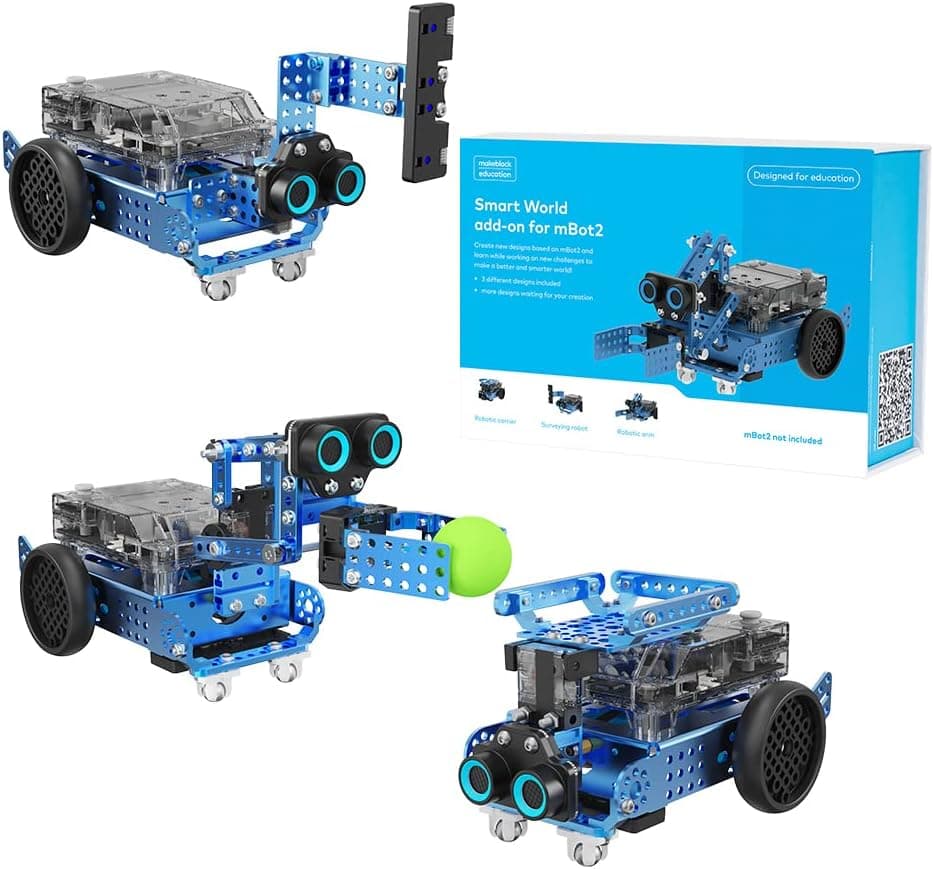
Makeblock has moved significantly beyond the plastic construction seen in many competitor robots. The mBot2 features a robust metal chassis with aluminium components that give it genuine durability and a satisfying weight. The metal parts are precisely machined with clean edges that fit together smoothly. After weeks of testing, including numerous collisions with furniture and walls, the chassis showed barely any signs of wear.
The CyberPi controller is the star of the show. This compact device packs a 1.3-inch colour display, multiple programmable buttons, a microphone, light sensor, gyroscope, and WiFi/Bluetooth connectivity into a remarkably small package. The buttons have a satisfying tactile response, and the display is bright enough to be visible in normal indoor lighting. The USB-C charging port is a thoughtful modern touch.
The robot's overall dimensions (17cm x 9.5cm x 7.5cm) strike a good balance: compact enough for desktop use but large enough to accommodate the CyberPi and various sensors. The metal construction means it weighs a substantial 380 grams, which actually contributes to stability during movement.
Features & Programming
The mBot2's feature set is remarkably comprehensive, offering experiences that rival robots costing significantly more.
CyberPi Controller Features
The CyberPi transforms the mBot2 from a simple robot into a capable computing platform:
Display & Interface:
- 1.3-inch colour LCD (128x128 pixels)
- 5 programmable buttons (A, B, C, joystick plus, joystick minus)
- Multi-colour status LED
- Vibration motor for haptic feedback
Sensors:
- Microphone for sound detection and recording
- Light sensor for ambient light readings
- 3-axis accelerometer and gyroscope
- Temperature sensor
Connectivity:
- Built-in WiFi and Bluetooth
- USB-C for charging and data
Currently available on Makeblock mBot2. Amazon UK. Prices may vary.
- 4-pin and 3-pin ports for expansion modules
- MicroSD card slot for data logging
Audio:
- Built-in speaker for playing tones and audio files
- Text-to-speech capabilities
Programming Environments
The mBot2 offers three distinct programming approaches, allowing it to grow with your child's abilities:
mBlock Block-Based Coding (Beginner) The mBlock software uses a Scratch-like visual interface where children drag and drop colourful blocks to create programs. What sets mBlock apart is its depth. Even the block-based environment includes advanced concepts like:
- Variables and lists
- Custom functions
- Data logging to the MicroSD card
- Network communication between robots
- Cloud data storage and retrieval
Makeblock's block environment is specified to support variables, functions and sensor logic; owner reports describe children building room-navigation and path-logging projects within that environment.
Python Programming (Intermediate to Advanced) The transition to Python is where the mBot2 truly distinguishes itself. Children can switch from block coding to viewing the generated Python code, then gradually modify it directly. The CyberPi runs MicroPython, giving access to:
- All robot hardware functionality
- Standard Python libraries
- Network programming
- Data analysis with basic statistics
- File I/O operations
For a child of around 12 with some prior block-coding experience, the step up to writing Python that responds to voice commands and prints sensor readings to the screen is a realistic first-afternoon project rather than a long-term goal.
Makeblock App (Mobile) The mobile app provides a simplified programming environment for tablets and smartphones. While less powerful than the desktop software, it's perfect for quick projects and remote control. The app also includes pre-built programs that demonstrate the robot's capabilities.
Hardware Features
The mBot2 includes impressive hardware for its price point:
Motors & Movement:
- Precision DC motors with encoders for accurate movement
- Programmable speed and direction
- Smooth turning and pivoting capabilities
Sensors:
- Ultrasonic distance sensor (front-facing)
- Line-follower sensor array (underneath)
- Colour sensors for line tracking and colour recognition
Audio & Light:
- RGB LED ring around the CyberPi
- Programmable LED patterns and animations
- Speaker for tones, music, and speech
Age Appropriateness
The mBot2 is officially rated for ages 8+, but its capabilities extend well into teenage years and beyond.
Ages 8-10: At this level, children typically focus on the building process and basic block-based programming. The assembly requires adult supervision but provides an excellent shared activity. Once built, children can create simple movement sequences, use the remote control features, and experiment with basic line-following. Owner reports commonly note that the colour display and speaker help younger children stay engaged.
Ages 11-13: This is the sweet spot for the mBot2. Children at this age can tackle more complex programming challenges, including sensor integration, data logging, and beginning to explore the transition to Python. According to owner reports, this age group created projects including a voice-controlled assistant, a security robot that alerts when motion is detected, and a data logger that tracked temperature changes throughout the day.
Ages 14+: The mBot2 continues to offer value well into secondary school. The Python programming environment is genuinely powerful enough for GCSE and early A-Level computing projects. The network capabilities support IoT experiments, and the expansion modules allow integration with other electronics and sensors. At this age the mBot2 works as a platform for robotics algorithms and data structures rather than an introduction to coding.
Adult Learners: The mBot2 is also suitable for adults learning programming for the first time, or parents homeschooling STEM subjects. The structured curriculum and active community provide support for independent learners.
Value for Money
At £89.99, the Makeblock mBot2 represents exceptional value for money. Here's why:
What's Included:
- CyberPi controller with colour display
- Metal chassis and components
- Motors, wheels, and sensors
- USB-C charging cable
- Assembly tools
- Access to mBlock software (free)
- Extensive online tutorials and projects
Build Quality: The metal construction and quality components suggest this robot will last for years. Unlike cheaper plastic alternatives, the mBot2 feels like a serious piece of equipment that can withstand genuine experimentation and occasional accidents.
Educational Depth: Most coding robots top out at basic block-based programming. The mBot2's progression to professional Python programming means it remains relevant and challenging for years, not months. When you consider the cost of coding courses or additional educational resources, the mBot2 pays for itself many times over.
Expansion Potential: The mBot2 ecosystem includes add-ons for robotics arms, camera vision, additional sensors, and more. While these cost extra, the modular design means you can expand capabilities gradually rather than replacing the entire system.
Comparison:
- Lego Mindstorms (£329.99): More expensive, similar capabilities
- Arduino robotics kits (£100-150): Require more technical knowledge
- Sphero RVR (£249.99): Similar programming depth, more expensive
- Makeblock mBot Neo (£119.99): Updated version with similar core features
Verdict: The mBot2 offers professional-quality robotics education at a fraction of the cost of comparable systems. Its durability and progression to real programming make it an outstanding long-term investment.
Competitor Comparison
mBot2 vs Ozobot Evo
Key Differences:
- Assembly: mBot2 requires building; Evo is ready-to-use
- Programming Depth: mBot2 reaches Python; Evo stops at block-coding
- Display: mBot2 has colour screen; Evo has basic LEDs
- Sensors: mBot2 has more sensors and better expansion
- Price: mBot2 (£89.99) is cheaper than Evo (£99.99)
Verdict: Choose mBot2 for older children ready for more complex programming and building. Choose Evo for younger children or those who want immediate out-of-box use.
mBot2 vs Lego Mindstorms
Key Differences:
- Price: mBot2 (£89.99) vs Mindstorms (£329.99)
- Building System: Mindstorms uses Lego bricks; mBot2 uses metal components
- Programming: Both support block and text coding; Mindstorms has more mature software
- Sensors: Mindstorms has more included sensors
- Community: Mindstorms has larger community but mBot2 community is growing rapidly
Verdict: Choose Mindstorms if budget allows and you want the ultimate robotics experience. Choose mBot2 for excellent capabilities at a much more accessible price point.
mBot2 vs Sphero RVR
Key Differences:
- Movement: RVR has tank tracks; mBot2 has wheels
- Programming: Both offer block-to-Python progression
- Expansion: RVR has more built-in connections; mBot2 has better integration with Makeblock ecosystem
- Display: mBot2 has colour screen; RVR has basic LEDs
- Price: mBot2 (£89.99) is much cheaper than RVR (£249.99)
Verdict: Choose RVR for the most capable ready-built robot with tank tracks. Choose mBot2 for better value and the educational experience of building your own robot.
Frequently Asked Questions
How long does assembly take?
Assembly typically takes 30-45 minutes for children aged 10+, and up to 60 minutes for younger children or first-time builders. The instructions are clear and illustrated, with each step showing exactly which parts and tools are needed. We recommend adult supervision for children under 10, not because the assembly is difficult, but because some steps require holding multiple pieces together while securing them.
Does the mBot2 require internet connectivity?
The mBot2 can operate entirely offline once the mBlock software is installed on your computer. Internet connectivity is only required for initial software download, firmware updates, and accessing online project galleries. This makes it an excellent choice for schools or homes with limited internet access.
Can the mBot2 be programmed on tablets or only computers?
The mBot2 can be programmed using the Makeblock app on tablets (iOS and Android), but the full mBlock software with all features including Python programming requires a Windows, Mac, or Linux computer. The tablet app is great for quick projects and remote control, while the desktop software is needed for serious programming and advanced features.
What programming languages does the mBot2 support?
The mBot2 supports two main programming environments:
- Block-based coding using mBlock (similar to Scratch)
- Python programming using MicroPython
The transition from blocks to Python is seamless. Children can start with blocks and gradually view the Python code, then begin editing it directly. This is one of the mBot2's greatest strengths as an educational tool.
Are there any ongoing costs after purchase?
The core mBot2 experience requires no ongoing costs. The mBlock software is free, and all basic programming features are included. However, Makeblock offers optional expansion modules (camera, robotic arm, additional sensors) that cost extra. These are not required to enjoy the robot, but they do add significant capabilities for those who want to expand.
Final Verdict
The Makeblock mBot2 is a standout achievement in educational robotics. It successfully bridges the gap between beginner-friendly block coding and professional Python programming, making it one of the most capable STEM learning tools available at this price point.
What sets the mBot2 apart is its thoughtful approach to learning progression. The building process itself teaches valuable engineering concepts, while the programming environment scales from simple drag-and-drop commands to genuine Python development. This means the robot remains engaging and challenging for years, not months.
The build quality is exceptional, and the CyberPi controller is remarkably powerful for such a compact device. The colour display, multiple sensors, and network connectivity put the mBot2 in a different league from simpler programming toys.
Who should buy the Makeblock mBot2?
- Children aged 8-14 with an interest in technology
- Parents seeking a robot that grows with their child's abilities
- Educators needing a durable, curriculum-linked robotics platform
- Home-schooling families covering computing and technology
- Adults learning programming through hands-on projects
Who might want alternatives?
- Younger children (under 8) who may find assembly challenging
- Those seeking purely screen-free programming
- Users wanting immediate out-of-box play without building
- Children primarily interested in gaming rather than coding
The Makeblock mBot2 earns our highest recommendation and a rating of 4.7 out of 5. It represents the best balance of educational value, build quality, programming depth, and price in the educational robotics market. For parents serious about introducing their children to real programming and engineering concepts, this is an investment that will pay dividends for years.
Ready to start your child's robotics journey? Get the Makeblock mBot2 on Amazon UK and unlock a world of coding, building, and creating.