
Best Coding Robots Under £50 UK 2026-9 Top Picks for Every Age
The best coding robots under £50 in the UK for 2026-9 in-stock picks for ages 3-13. Screen-free robots, coding kits and STEM toys that teach real skills.
You don't need to spend a fortune to get your child started with coding. The best coding robots under £50 deliver genuine, age-appropriate STEM learning, and several of the most effective ones cost less than a family trip to the cinema. Whether you're shopping for a first robot for a curious three-year-old or a more capable kit for a tech-mad twelve-year-old, there's something in this price range that will genuinely impress.
We've researched the best options available right now on Amazon UK, and every single product below has been confirmed in stock and verified against the live Amazon listing at the time of writing. No fillers, no perpetually-unavailable picks, no inflated recommendations. Just honest, affordable robots and kits your kids will actually use. Prices move around on Amazon, so tap any "Check price" link for the current figure before you buy.
Quick Comparison
| Product | Age Range | Approx. Price | Coding Style | Screen Needed? |
|---|---|---|---|---|
| micro:bit V2 Go Starter Kit | 8+ | ~£17 | Blocks → Python/JavaScript | Computer to programme |
| Code & Go Robot Mouse | 4+ | ~£34 | Button sequencing (unplugged) | No |
| Apitor Robot Bear | 3-5 | ~£50 | Build + screen-free coding | No |
| Sillbird 5-in-1 STEM Robot | 8-13 | ~£50 | Build + app/remote control | App optional |
| Snap Circuits JR. Plus SC-110 | 8+ | ~£47 | Physical circuits & logic | No |
| Clementoni Mio Robot 2.0 | 8+ | ~£27 | Build + code | App |
| Apitor Robot G | 6+ | ~£33 | Motorised building (8-in-1) | No |
| Code & Go Robot Mouse Rechargeable | 4+ | ~£38 | Button sequencing (unplugged) | No |
| Coding Critters Rumble & Bumble | 4+ | ~£41 | Story-led screen-free coding | No |
1. micro:bit V2 Go Starter Kit: Best Overall for Real Coding
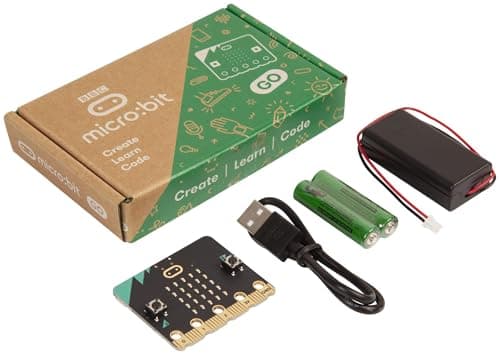
Age range: 8+ | Approx. price: £17
The BBC micro:bit is the UK's most beloved entry-level coding board, and the Go Starter Kit is the cheapest, most complete way into it. Over five million micro:bits have been handed out to British schoolchildren, so there's an enormous bank of free lessons, tutorials and projects to draw on, and this kit gives you the full V2 board, a battery pack and a USB cable for around £17.
The V2 adds a microphone, speaker and touch-sensitive logo to the original's 25-LED matrix, buttons, accelerometer, compass and Bluetooth. Children start with drag-and-drop MakeCode blocks, then progress to genuine Python and JavaScript as their confidence grows: the same languages professional developers use every day.
What we like:
- The cheapest pick here, yet teaches real, transferable programming
- Part of the UK national curriculum: teachers know it inside out
- Massive free community with thousands of ready-made projects
- Block coding that grows into Python and JavaScript
What could be better:
- It's a board, not a robot that trundles about: some children want movement
- You need a computer or tablet to write and upload programs
It's the best value in real coding you can buy, full stop. Read our full BBC micro:bit V2 review for a deeper look at how it teaches.
Around £17. Check price on Amazon UK →As an Amazon Associate, AIToys.co.uk earns from qualifying purchases.
🏬 Also available on the high street: Browse coding robots & STEM toys at The Entertainer →
2. Learning Resources Code & Go Robot Mouse: Best Screen-Free Pick for Young Coders
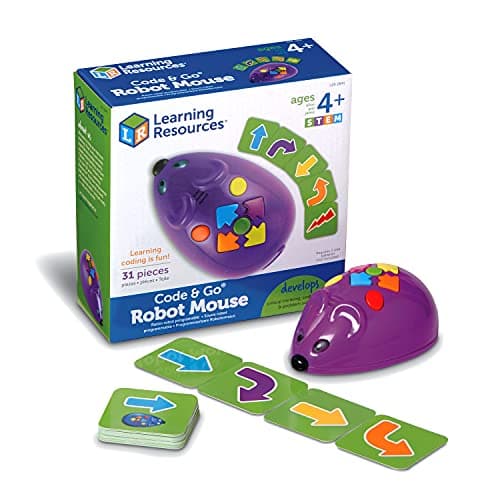
Age range: 4+ | Approx. price: £34
Colby the Robot Mouse is the classic introduction to coding for the early-years crowd, and for good reason. Children press the chunky directional buttons on Colby's back to build a sequence of moves, hit "go", and watch the mouse scurry off to follow their instructions exactly. If it doesn't reach the cheese, they debug and try again: proper computational thinking, no screen in sight.
The set includes 30 double-sided coding challenge cards that scale from simple to genuinely tricky, so it keeps pace as your child's logic sharpens. It's robust, brightly coloured and immediately intuitive for little hands.
What we like:
- Completely screen-free: ideal for ages 4-7
- Teaches sequencing, debugging and problem-solving without jargon
- 30 challenge cards keep it fresh for months
- Light-up nose and fun sounds reward each successful run
What could be better:
- Maze walls are sold separately (the Activity Set bundles them)
- Needs AA batteries (see the rechargeable version at number 8)
A faultless first coding toy. Pair it with a maze and it becomes a living-room logic puzzle your child will return to again and again.
Around £34. Check price on Amazon UK →
3. Apitor Robot Bear: Best Build-and-Code for Little Hands
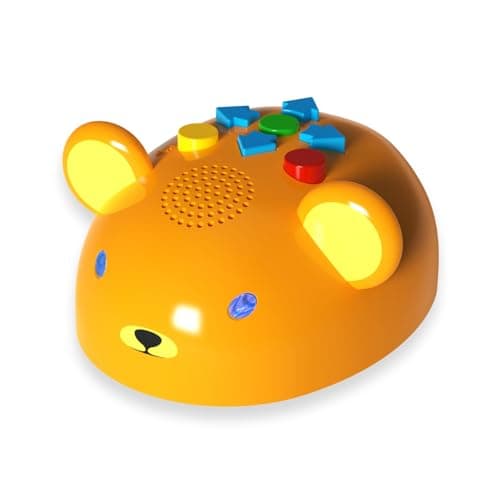
Age range: 3-5 | Approx. price: £50
Most coding robots start at age five or six, which leaves the very youngest builders out. The Apitor Robot Bear fixes that with a charming, screen-free coding toy designed specifically for three- to five-year-olds. Children snap together the chunky, brick-compatible pieces to build the bear, then use the included alphabet map and simple controls to send it on its way, complete with lights and friendly sounds.
It's a gentle, tactile introduction to two skills at once: building (fine motor and spatial reasoning) and sequencing (the foundation of coding). There's no app required, so there's nothing to download and no screen to manage.
What we like:
- One of the few genuine coding toys aimed at ages 3-5
- Screen-free, with satisfying lights and sounds
- Brick-building develops fine motor skills alongside logic
- Sturdy, large pieces suited to little hands
What could be better:
- Children will outgrow it by around age six
- More guided play than open-ended free building
If you want to spark an interest in robotics before school even starts, the Bear is a lovely, age-appropriate place to begin.
Around £50. Check price on Amazon UK →
4. Sillbird 5-in-1 STEM Robot: Best for Older Kids Who Love to Build
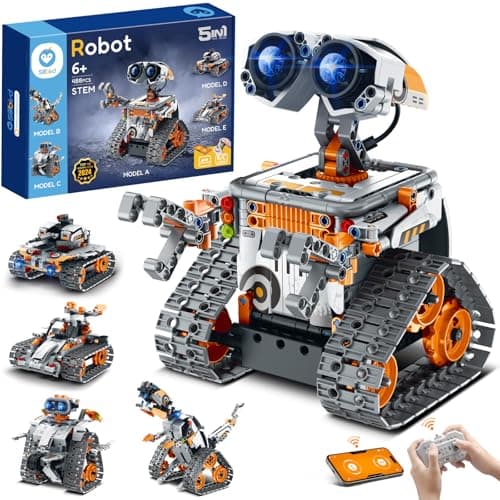
Age range: 8-13 | Approx. price: £50
For the eight-to-thirteen bracket, the Sillbird 5-in-1 is remarkable value. The 488-piece set builds into five different motorised models, and once assembled each one can be driven by the included remote or controlled and programmed through a free app. That combination (a proper engineering build followed by app-based control and simple programming) keeps children engaged far longer than a pre-built robot.
It hits the sweet spot between LEGO Technic-style construction and accessible coding, and at right around £50 it punches well above its price. Older children especially love that the build itself is a genuine challenge.
What we like:
- Five buildable models from one generous kit
- Remote and app control, plus simple programming
- A meaty build that rewards patience and problem-solving
- Excellent value for the piece count and features
What could be better:
- The build is involved: younger children may need a hand
- App control needs a compatible tablet or smartphone
It's our pick for keen builders ready to combine construction with code. See our full Sillbird 5-in-1 STEM Robot review for the detail.
Around £50. Check price on Amazon UK →
5. Snap Circuits JR. Plus SC-110: Best for Electronics and Circuits
Age range: 8+ | Approx. price: £47
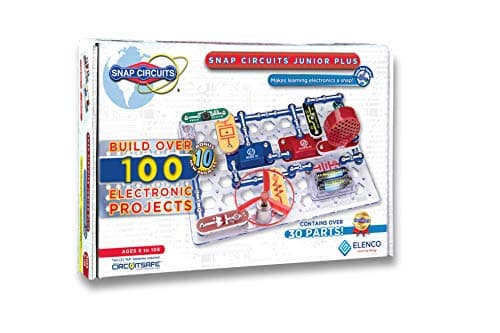
Snap Circuits JR. Plus isn't a robot that trundles about. It's a physical electronics kit that teaches the foundations underpinning all computing: circuits, logic and cause-and-effect. With colour-coded, snap-together components, children build over 110 working projects (alarms, fans, lights and radios) without soldering or tools. When the motor spins or the buzzer sounds, the satisfaction is immediate and real.
The SC-110 includes more than 30 parts and a full-colour project manual that scales in difficulty. It's the kind of kit that turns into a two-hour deep-dive with no screen time at all, and it's a brilliant fit for hands-on learners who want to understand how things actually work.
What we like:
- Genuinely educational: teaches real electronics, not gimmicks
- Completely screen-free
- 110+ projects scale from beginner to advanced
- Robust, reusable components
What could be better:
- Not strictly a "robot": it's an electronics kit
- Projects follow instructions, so it's less free-play than some rivals
A superb gateway into electronics and engineering. Read our full Snap Circuits JR. Plus SC-110 review before you buy.
Around £47. Check price on Amazon UK →
6. Clementoni Science Museum Mio Robot 2.0: Best Interactive Build-and-Code Robot
Age range: 8+ | Approx. price: £27
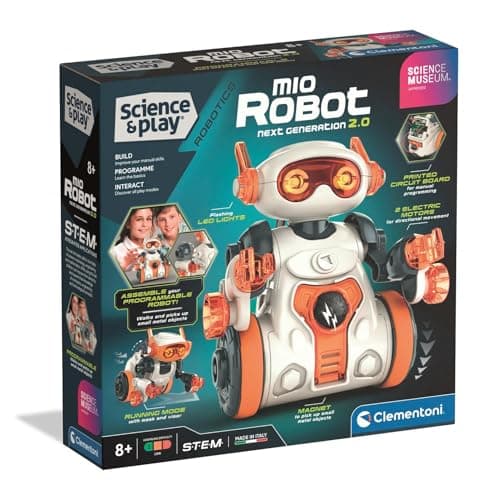
Clementoni's Mio Robot 2.0, sold under the trusted Science Museum brand in the UK, lets children build their own interactive robot and then code its behaviour: all for under £30. Mio has a magnetic arm, responds to its environment, and can be programmed to perform sequences, making it a tactile, engaging step up from button-press toys without the cost of a premium kit.
The build itself teaches how a robot's parts fit together, and the coding element introduces sequencing and simple logic in a way that feels like play. It's a smart, budget-friendly choice for curious eight-to-eleven-year-olds.
What we like:
- Build-and-code in one kit for under £30
- Reputable Science Museum-branded product
- Magnetic arm and sensors make Mio genuinely interactive
- Great bridge between toy robots and serious coding kits
What could be better:
- The companion app experience varies by device
- Build is fixed (one robot) rather than multi-model
For the price, it's one of the best value build-and-code robots on the list.
Around £27. Check price on Amazon UK →
7. Apitor Robot G: Best Motorised Building Robot
Age range: 6+ | Approx. price: £33
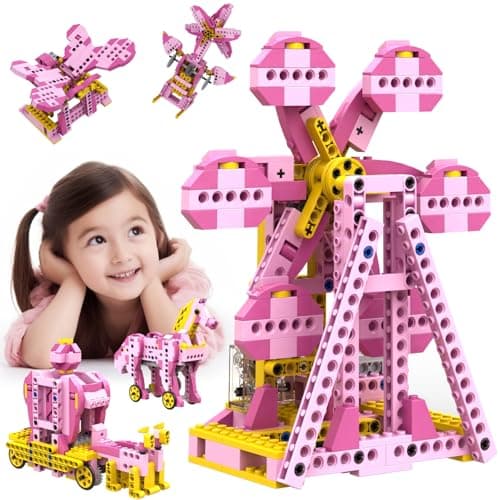
If your child is more interested in how robots are built than in writing code straight away, the Apitor Robot G is the perfect bridge. This 298-piece, 8-in-1 kit builds eight different motorised models: each one a small lesson in gears, motors and mechanical design. It's the engineering half of robotics, and it builds the spatial and problem-solving skills that make later coding click.
At around £33 it's an affordable, screen-free way to develop hands-on STEM confidence, and the eight builds give plenty of variety to keep children coming back.
What we like:
- Eight motorised models from one kit: excellent variety
- Develops mechanical and engineering understanding
- Screen-free and well-priced
- A natural stepping stone towards programmable robots
What could be better:
- It's a building and motor kit, so there's no on-board programming
- Some smaller pieces mean it's best supervised at the younger end
A great choice for budding engineers who love to build. Once they've mastered it, a programmable robot like the Sillbird above is the natural next step.
Around £33. Check price on Amazon UK →
8. Code & Go Robot Mouse Rechargeable: Best Rechargeable Screen-Free Robot
Age range: 4+ | Approx. price: £38
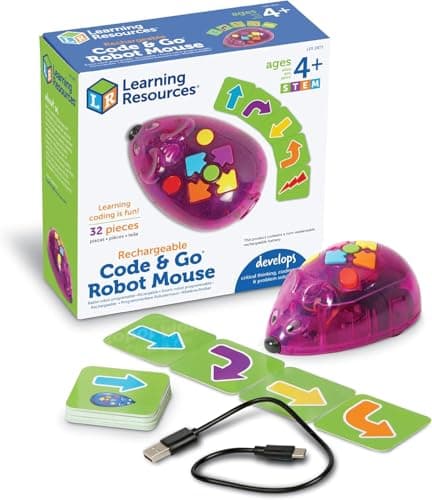
This is the same brilliant, screen-free Robot Mouse concept as our number two pick, but with a USB-C rechargeable battery built in, so you're never hunting for fresh AAs. For families who've been caught out by flat batteries on a rainy afternoon, that small upgrade is genuinely worth the few extra pounds.
Children still build sequences with the directional buttons and watch the mouse follow them exactly, learning sequencing and debugging through play. The rechargeable design also makes it a tidier, lower-waste option over the long run, and there are no hidden subscription costs, ever.
What we like:
- Rechargeable via USB-C: no disposable batteries
- The same proven, screen-free coding-by-buttons approach
- Lower running cost and less waste over time
- Intuitive enough for absolute beginners aged 4+
What could be better:
- A little pricier than the battery version
- Like the original, the maze set is a separate purchase
If you love the Robot Mouse idea but loathe buying batteries, this is the version to get.
Around £38. Check price on Amazon UK →
9. Learning Resources Coding Critters Rumble & Bumble: Best Screen-Free Coding Pet
Age range: 4+ | Approx. price: £41
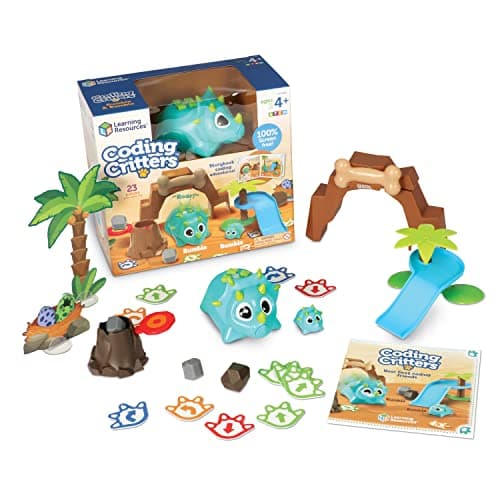
Coding Critters wrap genuine coding concepts in a story-led pet adventure that early-years children adore. Rumble is the programmable pet you guide around its world; Bumble is its little companion. Children programme Rumble's movements with screen-free, button-based sequencing, following the included storybook's challenges, so the coding feels like caring for a pet rather than a lesson.
It's a warm, narrative-driven way into computational thinking for ages four and up, and the characters give it real play value beyond the coding itself. A lovely gift that doesn't feel "educational" to the child receiving it.
What we like:
- Story-led coding that hides the learning inside play
- Completely screen-free
- Two characters add narrative and imaginative play
- Teaches sequencing and problem-solving for ages 4+
What could be better:
- Stock can be tight: check availability before you commit
- Younger toddlers will need help with the storybook challenges
A charming, screen-free coding companion. Read our full Coding Critters review for more.
Around £41. Check price on Amazon UK →
What to Look for in a Budget Coding Robot
Spending less doesn't mean settling for less. Here's what separates a genuinely useful coding robot from a disappointing gimmick: regardless of price.
1. A Real Coding Pathway
The best budget robots teach transferable skills. Look for ones that support visual or block coding for beginners (similar to Scratch), text-based coding such as JavaScript or Python for progression, and unplugged coding (physical buttons or cards, no screen) for the youngest children. Avoid toys that only offer a single proprietary app with no upgrade path.
2. The Right Age Fit
A robot that's too advanced gathers dust; one that's too simple gets outgrown in weeks. Match the toy to your child now, but check whether it has room to grow. The micro:bit and Sillbird kits, for instance, stay useful for years, while the Robot Mouse and Apitor Bear are perfect for the early-years stage.
3. Durability
Budget robots get dropped: a lot. Look for solid build quality: enclosed components, chunky pieces for younger children, and rechargeable batteries rather than disposable ones that add ongoing cost.
4. No Hidden Costs
The toy might be £35, but does the app demand a monthly subscription? Always check. Every robot on this list uses a completely free app or no app at all: there are no hidden charges lurking after purchase.
Budget Coding Robot FAQ
What's the best coding robot for under £50 in the UK?
For genuine, transferable coding skills, the micro:bit V2 Go Starter Kit is our top pick at around £17. It teaches real Python and JavaScript and is used throughout UK schools. For younger children, the Code & Go Robot Mouse is the best screen-free starting point. The right "best" depends entirely on your child's age.
Are cheap coding robots actually educational?
Yes, when they're the right ones. Price doesn't determine educational value. The micro:bit costs under £20 and is the same device used in UK classrooms to teach computing. What matters is whether the robot teaches transferable concepts (loops, sequences, conditionals, debugging) rather than offering a one-off novelty.
What age is right for a first coding robot?
- Ages 3-5: Apitor Robot Bear or the Code & Go Robot Mouse
- Ages 4-7: Coding Critters, Robot Mouse (classic or rechargeable)
- Ages 6-9: Apitor Robot G, Clementoni Mio Robot 2.0
- Ages 8-13: micro:bit V2, Sillbird 5-in-1, Snap Circuits JR. Plus
See our full guide to choosing your child's first coding robot for more detail.
Do I need a tablet or phone for these robots?
Not necessarily. The Code & Go Robot Mouse, Coding Critters, Apitor Bear, Apitor G and Snap Circuits are entirely screen-free. The Sillbird and Clementoni Mio use an app for their coding features, and the micro:bit needs a computer or tablet to write programs (though it runs them independently once uploaded).
Can these robots be used in schools?
Yes. The BBC micro:bit and Snap Circuits in particular are widely used in UK primary and secondary classrooms, with free curriculum-aligned resources available. If your child's school already uses one of these, getting the same kit at home creates a fantastic bridge between classroom and home learning.
How we picked these
Every product here was checked against its live Amazon UK listing before publication: in stock, the listing matching the model we describe, and the price recorded at the time of writing. We read the manufacturer's own specifications for the figures quoted, and work through recent verified-purchase reviews looking for the same fault reported repeatedly rather than one-off complaints.
Picks are ordered by who each product actually suits: age, budget, and whether an app or subscription is involved. Not by commission. AIToys.co.uk earns from qualifying purchases through the links on this page; that does not affect the order. The full process, including what we don't do, is on our how we choose page.
Our Verdict
Spending under £50 on a coding robot doesn't mean compromising on quality. Each pick on this list punches well above its price:
- micro:bit V2 Go Starter Kit: our top pick. Unbeatable value and a genuine path to Python and JavaScript.
- Code & Go Robot Mouse: the best screen-free introduction for ages 4+.
- Apitor Robot Bear: a rare, genuine coding toy for ages 3-5.
- Sillbird 5-in-1 STEM Robot: the best build-plus-code kit for older children.
- Snap Circuits JR. Plus: the best hands-on electronics kit for budding engineers.
- Clementoni Mio Robot 2.0: the best value build-and-code robot under £30.
- Apitor Robot G: the best motorised building kit for future engineers.
- Code & Go Robot Mouse Rechargeable: the Robot Mouse, minus the battery hassle.
- Coding Critters Rumble & Bumble: the most charming, story-led screen-free pick.
Ready to spend a little more? See our guide to the best coding robots under £100. Shopping for a specific age group? Our best AI toys for 6-8 year olds and best screen-free coding toys guides go deeper on age-appropriate choices.
All prices correct at the time of writing (18 June 2026). Amazon UK prices fluctuate: tap any link for the current price and confirm availability before you buy.
Read next
Best STEM Kits Under £100 UK 2026-9 Top Picks for Every Age
Nine STEM kits under £100 for UK families, plus a hydraulic hand and a scarce LEGO Technic moon rover. Updated September 2026.
Best Coding Robots Under £100 UK 2026-10 Top Picks for Every Age
The 10 best coding robots under £100 in the UK for 2026: expert picks for ages 3 to 14. In-stock products, honest reviews, and where to buy.
Best Screen-Free Coding Toys UK 2026-9 Top Picks for Device-Free Learning
The best screen-free coding toys for kids in the UK: no tablet, no smartphone required. Expert picks for every age from 3 to 14, with honest pros and cons.