Disclosure: This article contains affiliate links. As an Amazon Associate, AIToys.co.uk earns from qualifying purchases. If you buy through our links, we may earn a small commission at no extra cost to you. It never changes the price you pay, and it never changes our verdict.
If your child has already cut their teeth on a starter robot and is hungry for something meatier, the Makeblock mBot Ranger is one of the most capable kits you can hand a budding engineer without stepping up to bare Arduino boards. It is, quite literally, three robots in one box: a rugged tank, a wobbling self-balancing bot, and a three-wheeled racing car. Each one is built from the same aluminium parts and the same brain, and each one teaches something slightly different.
It sits a clear rung above the standard Makeblock mBot and the mBot2, and after spending time with it (and weighing it against the wider field) here is our honest assessment for UK families in 2026.
👉 In a hurry? Check the latest price on AmazonAs an Amazon Associate, AIToys.co.uk earns from qualifying purchases..
Quick Verdict: Makeblock mBot Ranger
The mBot Ranger earns a solid 4.2 out of 5. It is beautifully made, genuinely versatile, and offers a real learning runway from drag-and-drop blocks to text-based Arduino C. The three buildable forms keep curiosity alive far longer than a single fixed robot. It loses marks for a thirsty appetite for AA batteries, a fiddly battery compartment, and a price that demands commitment. For the right child (roughly 9 and up, with a bit of patience) it is a brilliant long-term companion.
Pros
- Three robots, one kit: tank, self-balancing bot and racing car, each a different challenge.
- Aluminium build: sturdy metal parts rather than flimsy plastic.
- Real coding progression: Makeblock's Scratch-based mBlock through to Arduino C.
- Generous sensors: ultrasonic, line-following, light, gyroscope, sound and temperature.
- Longevity: it grows with a child over years, not weeks.
Cons
- Battery-hungry: six AA cells drain in a couple of hours.
- Fiddly battery bay: cells can pop loose and are awkward to reseat.
- Assembly needed: around an hour, with help required for younger builders.
- Premium price: roughly £190 is a big step up from starter robots.
Key Features
The mBot Ranger is aimed at children aged 8 to 12, though Makeblock's own guidance leans towards 10+, and that feels about right for a child working largely independently. Here is what you are getting for the money.
Video: Everything STEM - useful review and demo (not filmed by AIToys).
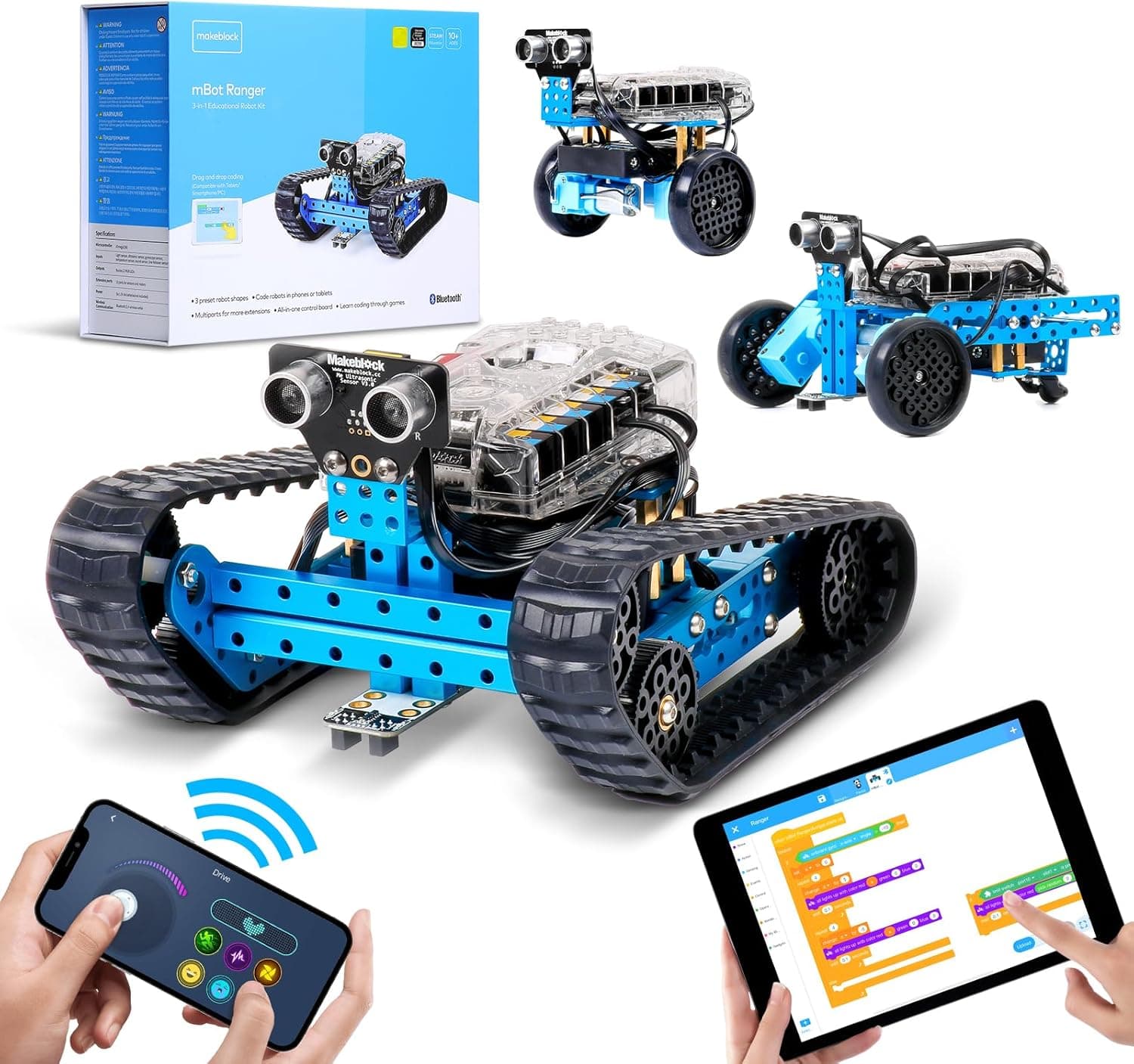
Three transformable builds. The headline feature is the 3-in-1 design. The "Land Raider" tank trundles over carpet and uneven floors on its caterpillar tracks. The "Nervous Bird" is a self-balancing robot that uses its gyroscope to stay upright: a brilliant, slightly mesmerising demonstration of feedback and correction. The "Dashing Raptor" is a nippy three-wheeled racer. Only one can be built at a time, so switching forms means a rebuild, but that is part of the learning.
An aluminium chassis. Unlike most robots in this bracket, the Ranger is built from anodised metal beams rather than plastic. It feels reassuringly solid, survives the inevitable knocks, and gives older children a taste of real mechanical construction.
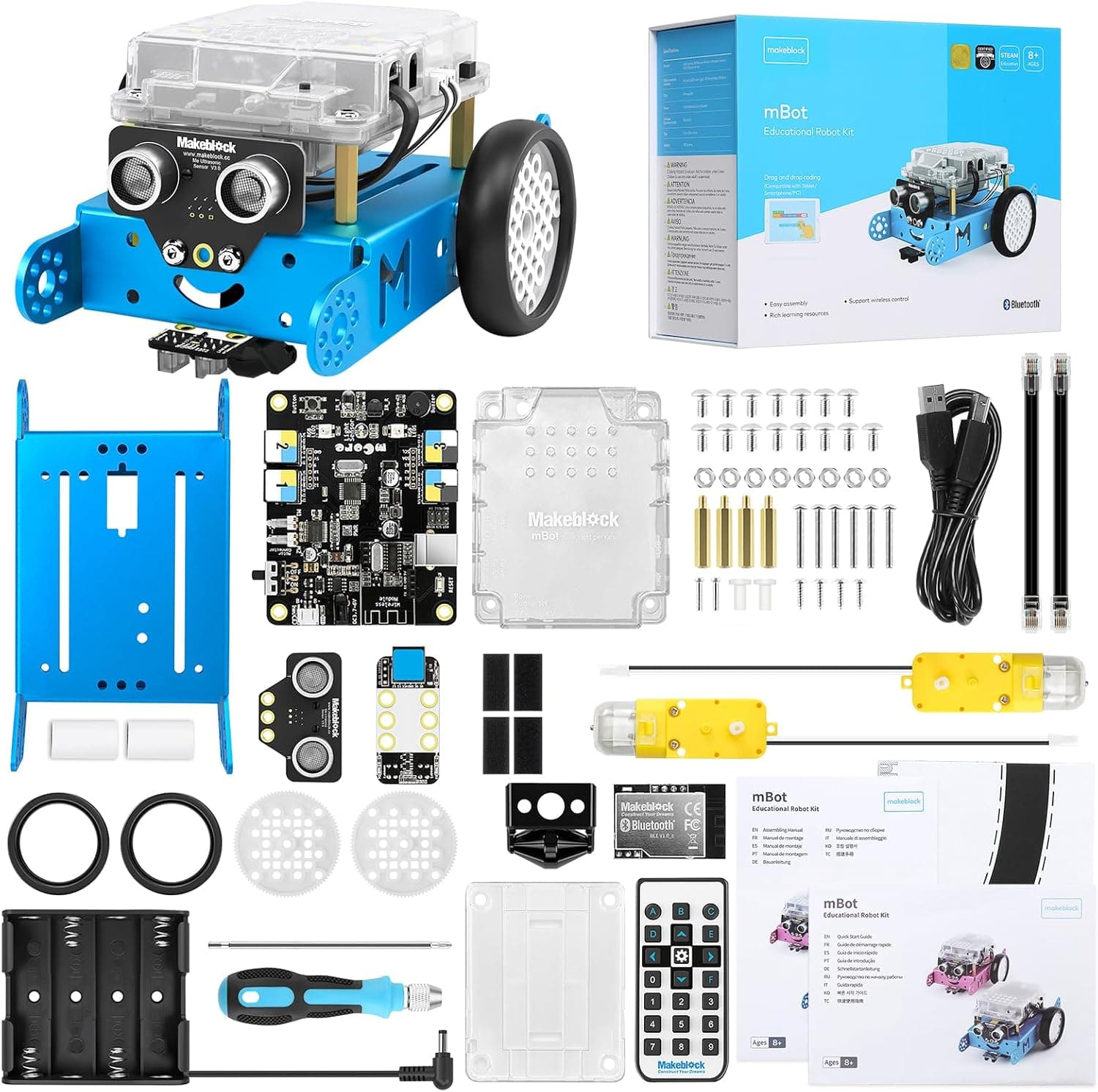
A proper sensor suite. On board you'll find an ultrasonic sensor for measuring distance and avoiding obstacles, a line-following sensor, two light sensors, a gyroscope, a sound sensor, a temperature sensor, a buzzer and 12 programmable RGB LEDs. That breadth is what makes the coding interesting. There is genuinely a lot to react to and control.
Scratch and Arduino coding. Programming is done through Makeblock's mBlock software, which is built on Scratch 3.0. Younger or newer coders drag and drop colourful blocks; as confidence grows, they can switch to writing Arduino C and see the "real" code underneath. That dual-mode approach is the Ranger's secret weapon.
Bluetooth control. A Bluetooth module lets children drive the robot from a phone or tablet, or run their uploaded programs untethered.
What We Like
The build quality is the first thing that stands out. So many kits in this price bracket are plastic that flexes and cracks; the Ranger's aluminium frame feels like a tool rather than a toy, and that matters when a child is going to be assembling and reassembling it.
The three-form concept is genuinely clever. A single-shape robot can feel "finished" once a child has driven it round the kitchen a few times. The Ranger resists that by offering three distinctly different machines, each of which rewards a different kind of experiment: balance and feedback with the Nervous Bird, traction and obstacle avoidance with the tank, speed and steering with the racer.
Most of all, we rate the learning progression. The jump from blocks to text is the single hardest step in a young person's coding journey, and the Ranger handles it gracefully within one piece of software. A child can start with drag-and-drop at eight and still be learning from the same robot at twelve, writing Arduino C. That kind of runway is exactly what we look for, and it's the same quality that makes the Sphero BOLT such a long-term favourite.
The self-balancing build deserves a special mention. Watching the Nervous Bird wobble, catch itself and settle upright is a genuinely captivating demonstration of how a gyroscope and a feedback loop work together. The kind of thing that makes an abstract idea click for a child in a way no worksheet ever could. It also tends to spark the most questions, which is exactly what you want from a STEM toy. Coding-club leaders and teachers often single the Ranger out for precisely this reason: a single kit quietly covers mechanics, electronics, sensing and programming in one afternoon, and the metal parts survive being passed around a classroom for a term without complaint.
What Could Be Better
Honesty matters more than hype, so here are the genuine drawbacks.
The battery situation is the most common gripe, and it's a fair one. The Ranger runs on six AA cells and it gets through them quickly. A couple of hours of active play, maybe less if the motors are working hard. Buy a set of good rechargeable AAs and a charger at the same time; treat it as part of the cost. The battery compartment itself is also fiddly, and the cells can pop loose if the robot takes a tumble, which means a bit of unclipping to reseat them.
Then there's the assembly. This is not a robot you switch on out of the box. Expect the first build to take around an hour, and younger children will need an adult alongside them. That's arguably a feature (building is half the learning), but it's worth knowing if you were hoping for instant gratification.
Finally, it can be a touch much for very young children. An eight-year-old will likely need support; a six- or seven-year-old will probably be happier with something gentler such as Botley 2.0 or another pick from our beginner coding robots guide. The Ranger rewards patience and a little reading ability.
Who Is It For?
The mBot Ranger is at its best for children aged roughly 9 to 13 who already enjoy building and are ready to move beyond a first robot. It suits the tinkerer who liked their starter kit but has started asking "what else can it do?", and it suits families happy to sit alongside their child for the first build or two.
It's a particularly strong choice if you want one robot that will last for years rather than being replaced as your child's skills grow. The Scratch-to-Arduino path means it can genuinely accompany a child from primary school into the early secondary years.
It is less suited to under-8s, to children who want to play immediately without building, or to parents on a tight budget: in which case the standard Makeblock mBot delivers much of the same DNA for a third of the price.
Value for Money
At around £190, the Ranger is unambiguously a premium purchase. Whether it represents good value depends on how it's used. As a one-off novelty, it's expensive. As a multi-year STEM investment that replaces several cheaper toys and carries a child from blocks to real code, it starts to look reasonable. Especially given the aluminium build that should survive years of handling.
Compared with the rest of the category, you are paying for breadth and longevity rather than instant fun. Cheaper robots get a child coding faster and with less fuss; the Ranger asks for more upfront effort and money but gives more back over time. If budget is the deciding factor, our best mBot alternatives round-up lays out the cheaper options side by side.
As always, Amazon prices move around, so we won't quote an exact figure: check the current price before you buy.
Setting Up and Getting Started
Set expectations about that first session, because the mBot Ranger is not a switch-on-and-go toy. Plan for around an hour to build your chosen form the first time, ideally with an adult on hand for the trickier steps. The printed instructions are clear, but some of the bracket-and-beam assemblies benefit from a second pair of hands. Once it's built, you install Makeblock's mBlock app on a phone, tablet or computer, pair over Bluetooth, and you're coding within minutes. We'd strongly suggest buying a set of rechargeable AA batteries and a charger at the same time as the robot; the six cells drain quickly under heavy use, and rechargeables pay for themselves within weeks while sparing you the frustration of a robot that dies mid-project. Keep the little screwdriver and any spare parts in a labelled box, too: with three forms to swap between, you'll be unscrewing and rebuilding regularly, and loose parts have a way of vanishing into carpets.
👉 See the latest mBot Ranger price on Amazon.
Verdict
The Makeblock mBot Ranger is one of the most rewarding coding robots you can buy for a child who's ready to go deeper. The three-in-one design, the aluminium build and the genuine Scratch-to-Arduino progression add up to a kit that earns its keep over years rather than weeks. You'll need to factor in rechargeable batteries and a bit of patience with assembly, and it's overkill for the very young, but for the right child, it's a superb long-term investment.
Our rating: 4.2 out of 5.
👉 Ready to build? Check the latest price on Amazon.
Age guidance reflects the manufacturer's recommended age. Always supervise younger children with small parts and batteries.