The Makeblock mBot is the original two-wheel coding car in Makeblock's family: a flat-pack aluminium kit that children program in mBlock, first with Scratch-style blocks and later with Arduino C. It is not the newer mBot2 and it is not the three-form mBot Ranger. This page is about the classic entry kit.
AIToys.co.uk selects and researches products from manufacturer specifications, official Makeblock pages, live Amazon UK listings and repeated owner reports. Prices and stock were checked on Amazon UK on 7 September 2026. Treat any figure as a snapshot and check the live listing before you buy. There is no score on this page: we do not invent ratings.
Quick answers for UK buyers
Is the Makeblock mBot still worth buying in 2026?
Yes, if you want a first coding robot for a child of about 8 to 12, you accept a short build, and you already have a tablet, phone or computer for mBlock. Makeblock still sells it as the entry kit: obstacle avoiding, line following, lights and sounds, then a route into text-based Arduino. It is a weaker buy if you wanted a screen-free starter such as Botley 2.0, a ready-made companion with no screws, or the Wi-Fi and Python step that sits on mBot2.
What age is the mBot for?
Makeblock and the featured Amazon UK listing rate it ages 8 to 12 (manufacturer recommended age: 8 years and up). That matches the screws, the app menus and the Scratch-to-Arduino path. A motivated seven-year-old can join in if an adult does the fiddly parts. The listing also carries a choking hazard warning: small parts, not for children under 3.
Developmental fit: sequencing, cause and effect, a little mechanical assembly, then block coding that can grow into real syntax. It is a STEM kit, not a talking AI pet.
Parental involvement: budget time for the first build, four AA cells, the CR2025 remote cell, app install and Bluetooth pairing. Owner reports often say an eight- or nine-year-old can follow the printed steps with only occasional help. Setup is still an adult job on day one.
Safety notes (manufacturer markings and listing copy, not a lab test): small parts; four AA cells not in the box; the infrared remote needs a CR2025 button battery, also not included, so keep loose cells out of reach; aluminium chassis with motors and cables. This is a connected coding toy (Bluetooth to mBlock), not a camera or microphone companion. Supervise younger siblings around screws and batteries.
mBot vs mBot2 vs Ranger: which should you buy?
They share a brand, not a job.
- Classic mBot (this review): entry two-wheel car, Scratch and Arduino, four AA cells, no Wi-Fi on Makeblock's comparison table. Featured ASIN B07XR98YYQ.
- mBot2: the step-up kit with CyberPi, Scratch and Python, Wi-Fi and a rechargeable pack in Makeblock's own table. Amazon UK showed B0919F9CKS around £169.99 on this check. Buy it if you already know you want Python and a newer controller, not as a silent substitute for the classic.
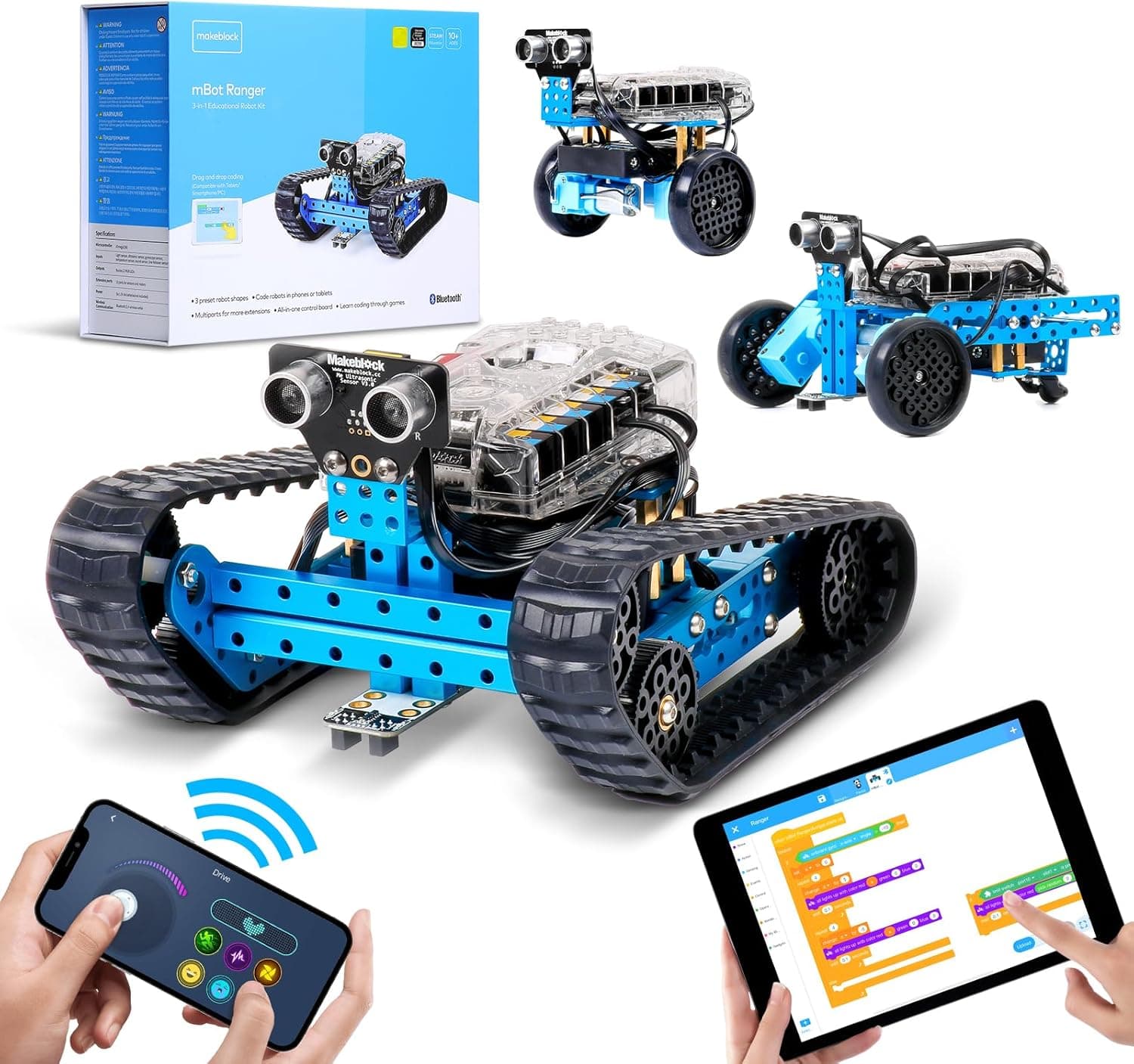
- mBot Ranger: three builds (tank, self-balancer, racer), more sensors, six AA cells. Amazon UK showed B07KG4JHBH around £139.92. Buy it when one kit needs to last several projects, not as a first 15-minute car.
If you are still choosing a first robot by age and screen rules, start with the guide to choosing a first coding robot. For other kits in a similar band, see mBot alternatives and coding robots under £100.
What batteries does it take?
Makeblock's product table and the B07XR98YYQ Amazon UK details say four AA batteries, not included. The same listing says the remote needs a CR2025 cell, also not included. Makeblock's own mBot page also lists an optional 3.7V rechargeable LiPo (about 1800 mAh on that spec sheet) as an alternative to AAs. Owner reports mix both: some families run rechargeable AAs from day one; some mention buying a LiPo separately. Do not assume a rechargeable pack is in the standard box.
Where can I buy the classic mBot in the UK?
The live Amazon UK pages we confirmed on 7 September 2026 are the standalone kit and a coding-box bundle of the same robot. Both showed as available, with free delivery quoted for 10 September 2026 (fastest 9 September). Use a full product page with tag aitoys-21, not a search-results link.
Check the classic mBot on Amazon UKAs an Amazon Associate, AIToys.co.uk earns from qualifying purchases.
As an Amazon Associate, AIToys.co.uk earns from qualifying purchases.
Around £89.99 for ASIN B07XR98YYQ on 7 September 2026. Price correct as of that date. Offers move. We never claim to show the lowest price.
A second live listing, B0CCYLQZMB, is the same classic robot plus Makeblock's Scratch Coding Box (four guided projects and extra lesson cards). It showed around £71.10 the same day, also available. Read the title: that box is extras around the entry mBot, not mBot2.
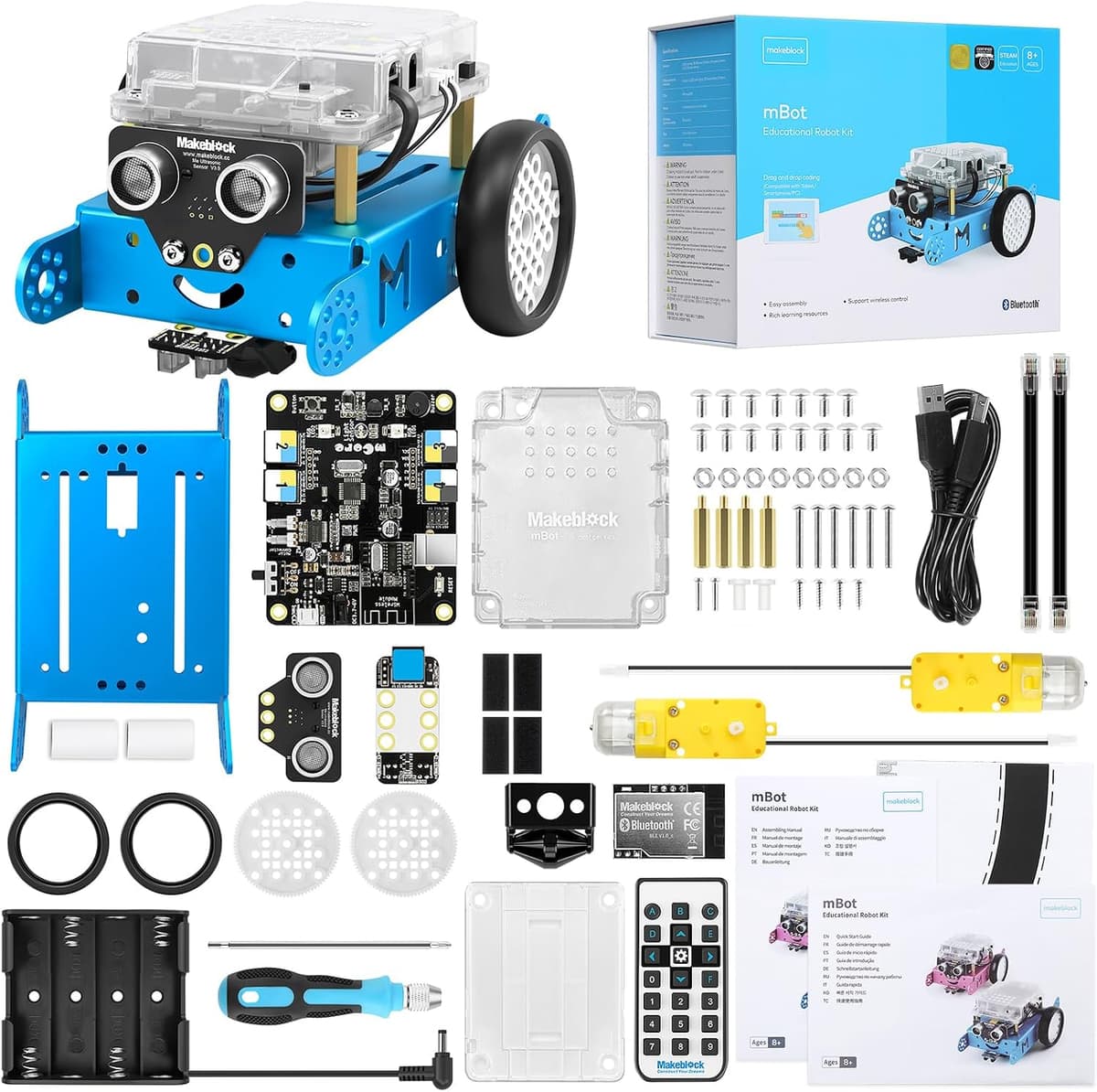
What the classic mBot actually is
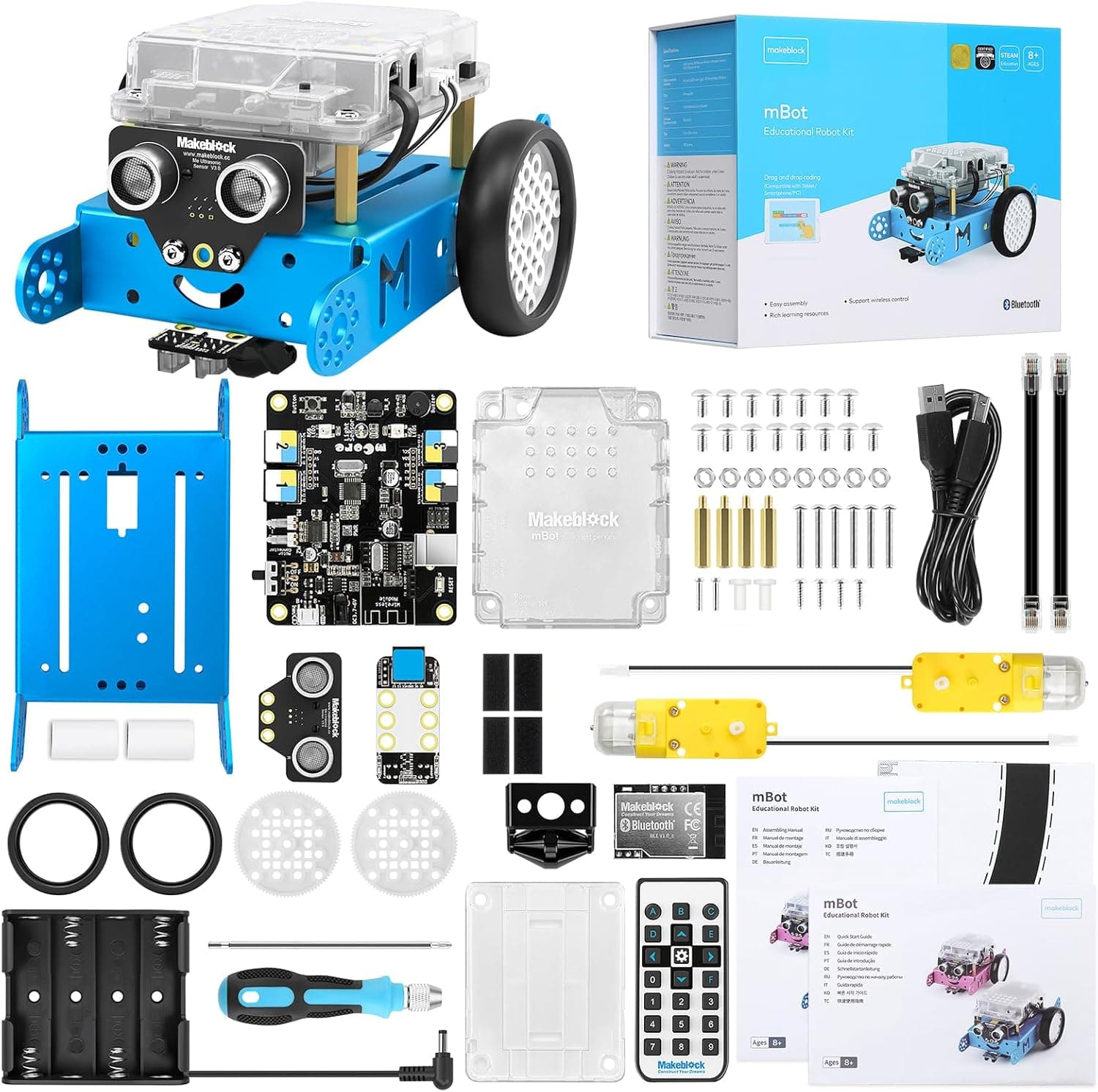
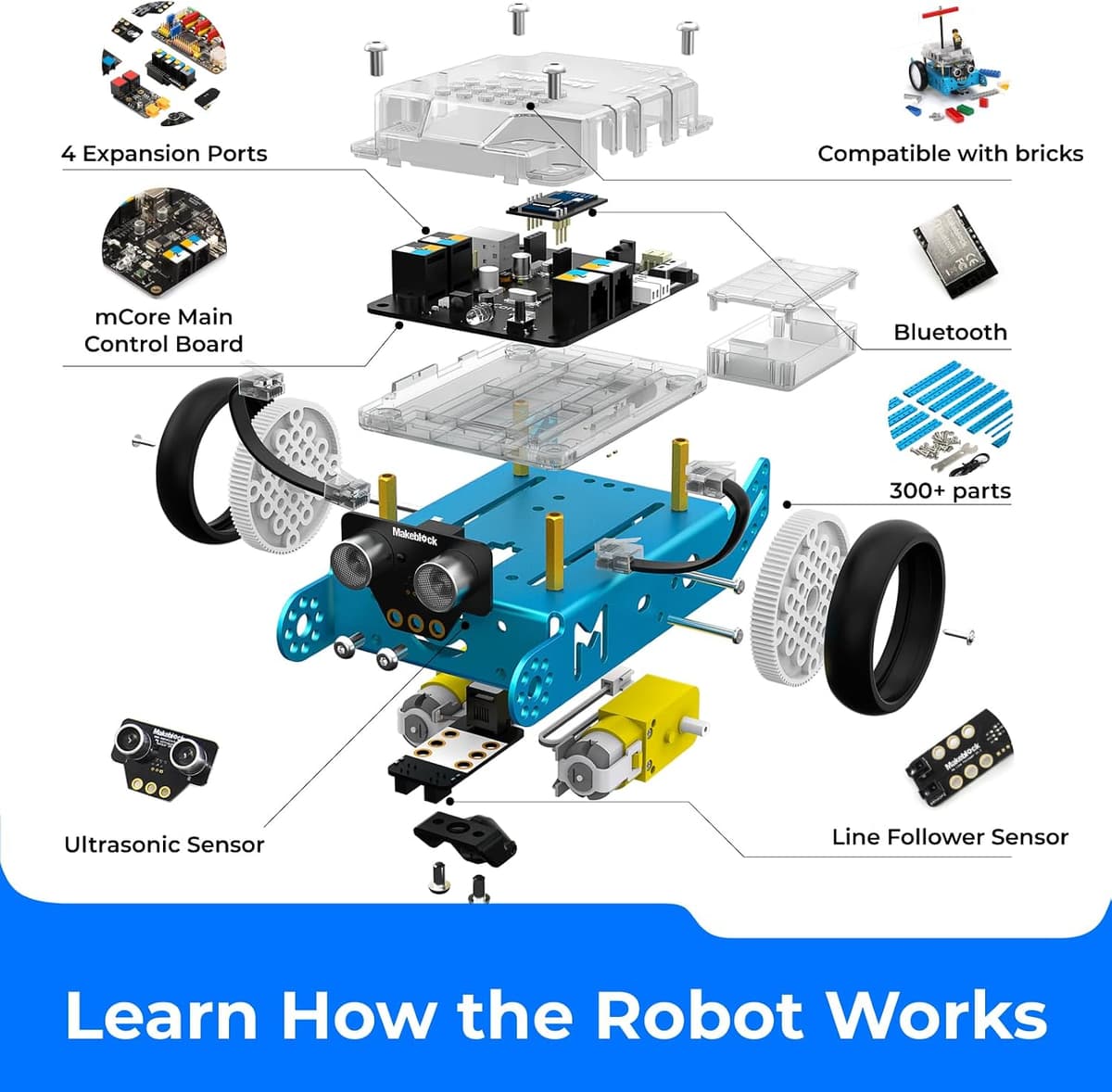
Makeblock's part number on the featured listing is P1050017 (model name mBot). The official mBot page describes an aluminium chassis, mCore controller, ultrasonic sensor, line follower, light sensor, IR emitter, buzzer, two motors, Bluetooth, USB and an optional 2.4GHz path depending on version. Assembled size on the Amazon UK table is 130 x 170 x 90 mm, about 500 g.
Video: Jordan Keyes - useful unboxing and review (not filmed by AIToys).
The standard UK box, from Makeblock's "About this item" copy, is a robotic car you build, then drive or code. Modes the listing calls out: detect obstacles, follow a line, make sounds and light signals, take IR remote commands, and talk to another mBot over infrared. Bluetooth is how phones and tablets join in.
Makeblock's comparison module on the same listing still labels this kit entry-level, Scratch / Arduino, Bluetooth yes, Wi-Fi no, four AA batteries not included. That is the cleanest way to tell it apart from mBot2 on a shop page that also pushes the rest of the range.
The chassis takes Makeblock add-on packs and, on Makeblock's spec sheet, LEGO-compatible bricks. That is why schools and clubs have used the same platform for years: one car can stay in the cupboard while the projects get harder. Treat that as manufacturer and community context, not a classroom trial by this site.
How the coding works
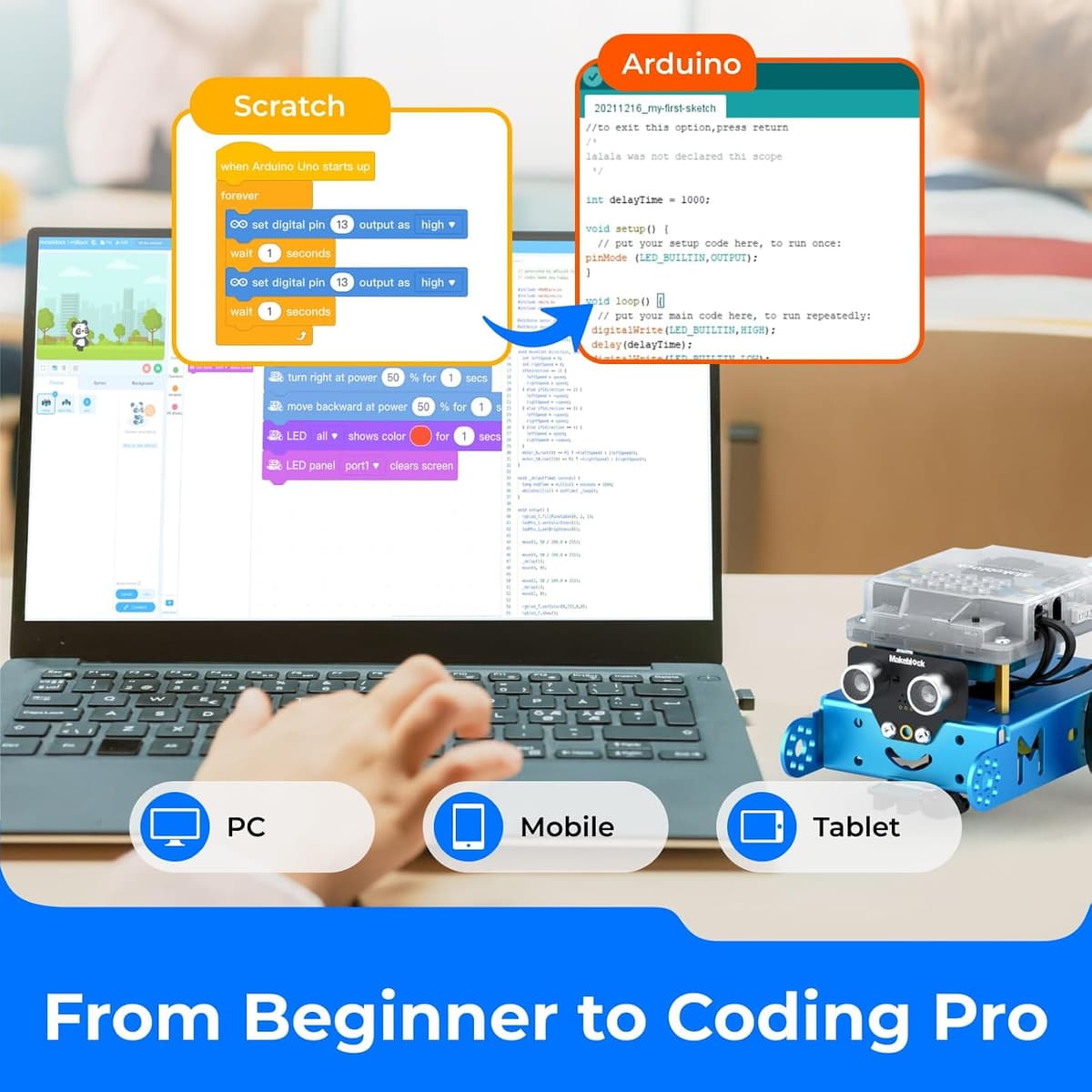
Programming lives in mBlock, Makeblock's free app and desktop software. Beginners snap colour blocks (the same visual idea as Scratch in many UK classrooms). The same project can later show Arduino C, which is the reason families buy mBot instead of a one-mode remote car.
Makeblock says mBlock runs on Windows, Mac, Linux, iOS and Android. You still need that device in the house. The robot is not a screen-free, button-only coder like Botley.
A typical first week, from Makeblock's project list and owner reports: assemble the car, fit batteries, pair Bluetooth, then try a square, flash the lights, beep when the ultrasonic sensor sees a chair, and follow black tape. The depth comes when a child starts changing the blocks, then peeking at the C.
UK owner reports mix easy 8- or 9-year-old builds with a real learning curve on install and pairing. A few mention Bluetooth dongles: a generic laptop adapter did not always behave. If your only computer has flaky Bluetooth, use a phone or tablet, or budget for Makeblock's branded adapter (sold separately).
Age range, developmental fit and what parents still have to do
Manufacturer age: 8 to 12. Safety marking: choking hazard, small parts, not suitable under 3.
Developmental fit. From eight, many children can drive with the remote and then drag a few blocks once an adult has paired the app. The useful stretch is the move from "it moved" to "I changed the program". That is why this kit sits in the same conversation as other first Scratch robots, not toddler floor robots.
Parental involvement. Plan an evening, not a two-minute unwrap. An adult should fit the AA holder, the button cell in the remote, and the first Bluetooth pair. After that, owner reports describe children leading the next project and calling a grown-up when a cable is loose or the app will not see the car. Keep spare AAs (or a charged LiPo if you buy one) so a flat pack does not kill the habit.
The remote uses a button battery. Fit it yourself, check the door closes, and store spares out of reach. The car has small screws: not a chew toy. Makeblock's pitch is sensors and code, not a talking companion. The privacy question is the usual connected-toy one: a phone or tablet on your network running the manufacturer's app. If the household rule is no apps at all, look at screen-free kits instead.
What you get, and what you still buy
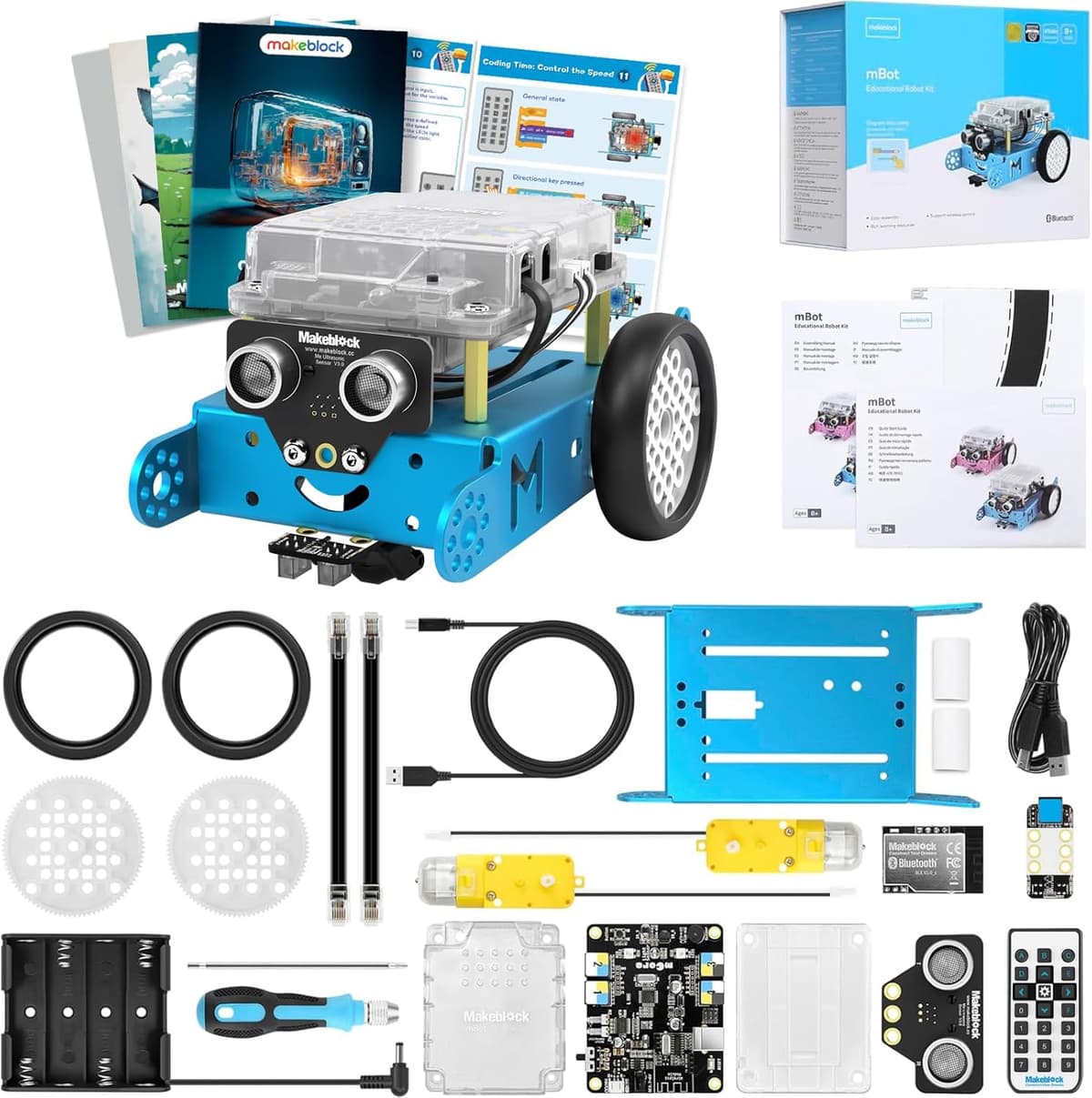
On B07XR98YYQ, Makeblock's listing describes the robot and components: chassis, mCore, motors, ultrasonic sensor, line follower, IR remote, USB cable, screwdriver, battery holder. Batteries are extra. A printed line map is a common include on mBot kits; check the live packing list if that matters to you.
The B0CCYLQZMB bundle (part P1050025, model mBot-K08-01) adds Makeblock's Coding Box: four guided projects (the listing names line-following, obstacle avoidance and remote control among them), visual instructions and coding tips. Amazon UK listed it as available at £71.10 on 7 September 2026. That is a snapshot, not a deal claim. If you want structured cards around the same car, read that listing. If you only want the robot, B07XR98YYQ is the page this review features.
Add-on packs (six-legged walker, light-and-sound, servo arms and the rest) are sold separately. They are how the same chassis stays interesting after the first fortnight. They are also how the spend grows. We are not featuring those packs here.
What could be better
The batteries are the honest tax on the price. Four AAs plus a CR2025 is a lot of loose cells for a birthday morning. Makeblock could put a charged pack in the box, as it does on mBot2. It does not, on this kit.
You need a separate device. That is fine in most houses and a deal-breaker if you wanted a self-contained, screen-free robot.
The standard car is basic until you set projects. Drive, sense, follow, avoid: that is the box. Fireworks usually wait for add-ons or a parent who is willing to set challenges.
Owner reports also flag fragility and support. One UK review described an "eye" damaged after a knock and a wheel that later snapped; another described a dead battery-pack plug on a second kit and no useful supplier contact. Those are not universal, but they are real. Treat it as a coding kit that needs care, not a bumper car.
Setup is not always "15 minutes and done". Makeblock's marketing uses a short build time. Owner reports include families who needed longer, plus Bluetooth pairing snags. If your child melts down when an app fails, stay in the room for session one.
Who it is for
A good match if the child is about 8 to 12, likes building a little before they code, and you want Scratch now with a published door into Arduino later. It also fits a parent who will sit through the first pair-and-drive evening and then step back.
A weaker match if the child is under eight and you wanted no screens and no screws (Botley, or another screen-free pick); if they have already outgrown Scratch and asked for Python or Wi-Fi (mBot2); or if you wanted one kit that rebuilds into three machines (Ranger). Confident tweens who only wanted a fast RC car will also find the coding step optional in a way that wastes the kit.
Value, without price promises
On 7 September 2026 the featured standalone kit was £89.99 and the coding-box bundle was £71.10, both available on Amazon UK. Those figures will move. We will not call either the lowest price or a guaranteed deal. Check the live page.
What you are paying for is an expandable, documented first robot with a real language path, not a polished toy with a sealed battery and a single app trick. Against flashier rivals it gives up convenience (AAs, a device, a short build). It keeps the thing most first-robot pages are actually about: a child writes a program and the machine does it.
(Amazon UK price and availability for B07XR98YYQ and B0CCYLQZMB correct as of 7 September 2026. Prices move.)
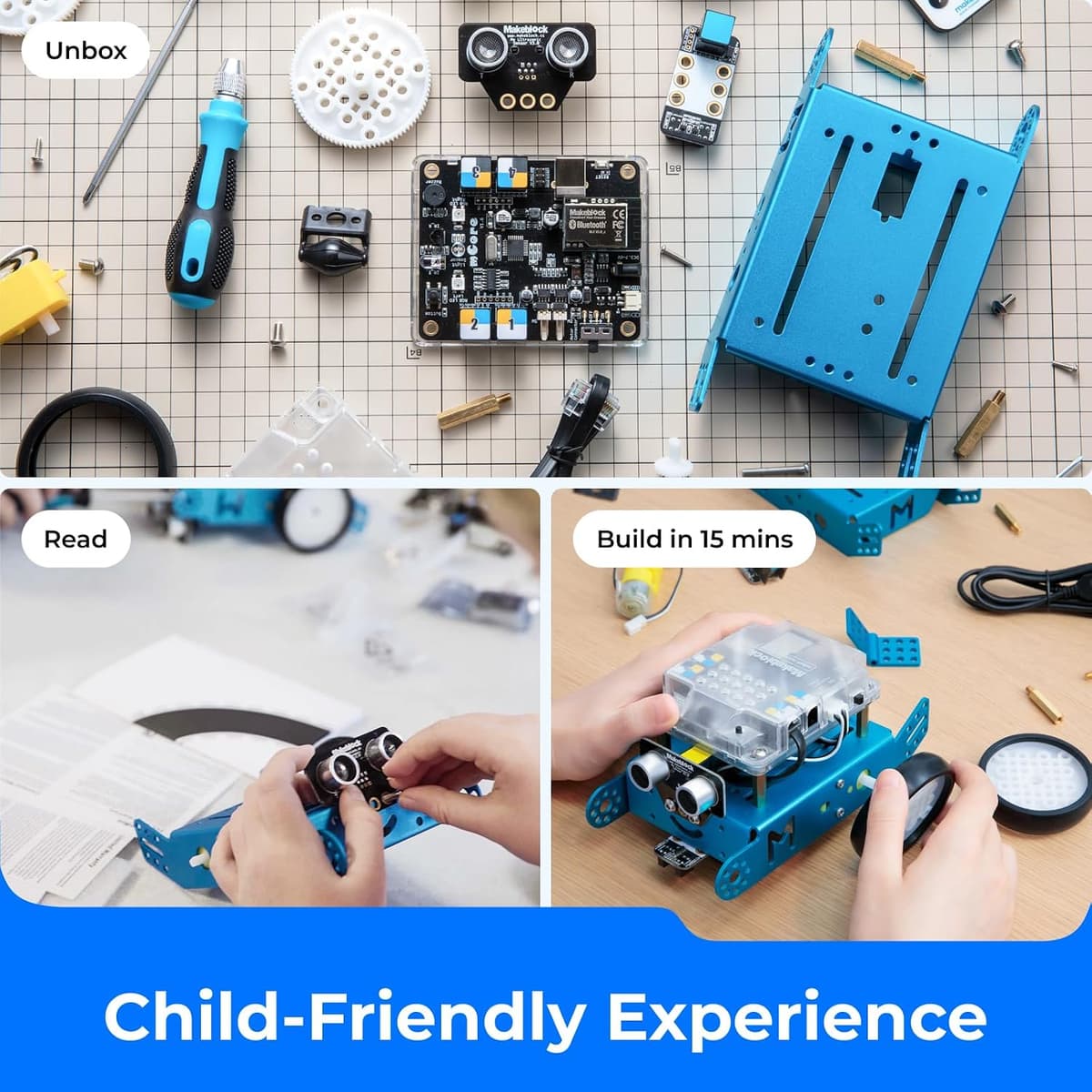
Setting up and getting started
Makeblock's listing says the car can be built in about 15 minutes with the included screwdriver. Owner reports stretch that: some children of eight or nine finished with light help; others needed longer. Colour-coded ports are the manufacturer's pitch for keeping time on coding, not on hunting screws.
Once it is together: fit four AAs or a compatible LiPo, fit the CR2025 in the remote, download mBlock, pair over Bluetooth, then try the remote before the first blocks. Useful extras from listings and owner reports: rechargeable AAs, black tape for a line track, and a tray for screws. mBlock skills carry across later Makeblock kits if they move to Ranger or mBot2.
See the latest classic mBot price on Amazon UK
FAQ
Is the Makeblock mBot still a good first coding robot in 2026?
For an 8-to-12-year-old who will accept a short build and a tablet or computer, yes. It is the entry Makeblock car with Scratch blocks and a published Arduino path. Skip it if you need screen-free play or you already wanted mBot2's Python and Wi-Fi.
Does the mBot need a tablet or computer?
Yes, for proper coding. mBlock is free, but it lives on a phone, tablet or computer. The infrared remote can drive the car without a program. That is play, not the coding lesson.
How long does the build take?
Makeblock's copy says about 15 minutes with one screwdriver. Owner reports vary. Plan a calm half-hour with an adult nearby, longer if it is the child's first electronics kit.
Are batteries included?
No. The featured kit needs four AA batteries. The remote needs a CR2025. Makeblock also documents an optional 3.7V LiPo. None of those are things to assume are in the box.
Is this the same as mBot2?
No. Classic mBot is the older mCore car, Scratch and Arduino, AA power, no Wi-Fi on Makeblock's table. mBot2 is the CyberPi kit with Scratch, Python, Wi-Fi and a rechargeable pack. The names look similar in search results. Read the title.
Is it safe for younger siblings?
The listing marks small parts and a choking hazard under 3. The remote uses a button battery. An adult should fit cells and keep spares away from toddlers. The car itself is a small wheeled kit, not a soft toy.
Where should I buy it in the UK?
Amazon UK had the standalone kit (B07XR98YYQ, about £89.99) and the coding-box bundle (B0CCYLQZMB, about £71.10) available on 7 September 2026. Check the live page. Tag aitoys-21 on the product URL.
Verdict
The classic Makeblock mBot remains a clear first coding robot for UK families who want a short build, Scratch-style blocks, and a documented step toward Arduino, without paying mBot2 money. Manufacturer specs, the live Amazon UK listing and owner reports line up on the same kit: aluminium car, sensors, IR remote, mBlock, four AAs and a device in the house.
Budget rechargeable batteries and an adult for session one. Accept that the box is basic until you set projects, and that some owners report fiddly pairing or parts that dislike knocks. Do that, and you have an entry robot you can actually buy in the UK today, with a path into the rest of the Makeblock line if interest sticks.
No star score on this page. Amazon UK showed 4.4 from 704 ratings on B07XR98YYQ on 7 September 2026. That is shoppers' feedback, not ours.
Check the classic mBot on Amazon UK
Prices and Amazon UK availability correct as of 7 September 2026. As an Amazon Associate, AIToys.co.uk earns from qualifying purchases.
Age guidance reflects the manufacturer's recommended age. Always supervise younger children with small parts and batteries.
Related reading:
- Makeblock mBot2 review: the Python and Wi-Fi step-up
- Makeblock mBot Ranger review: three builds when one car is not enough
- Botley 2.0 review: screen-free coding if you want no tablet
- How to choose a first coding robot
- Best mBot alternatives UK 2026
- Best coding robots under £100