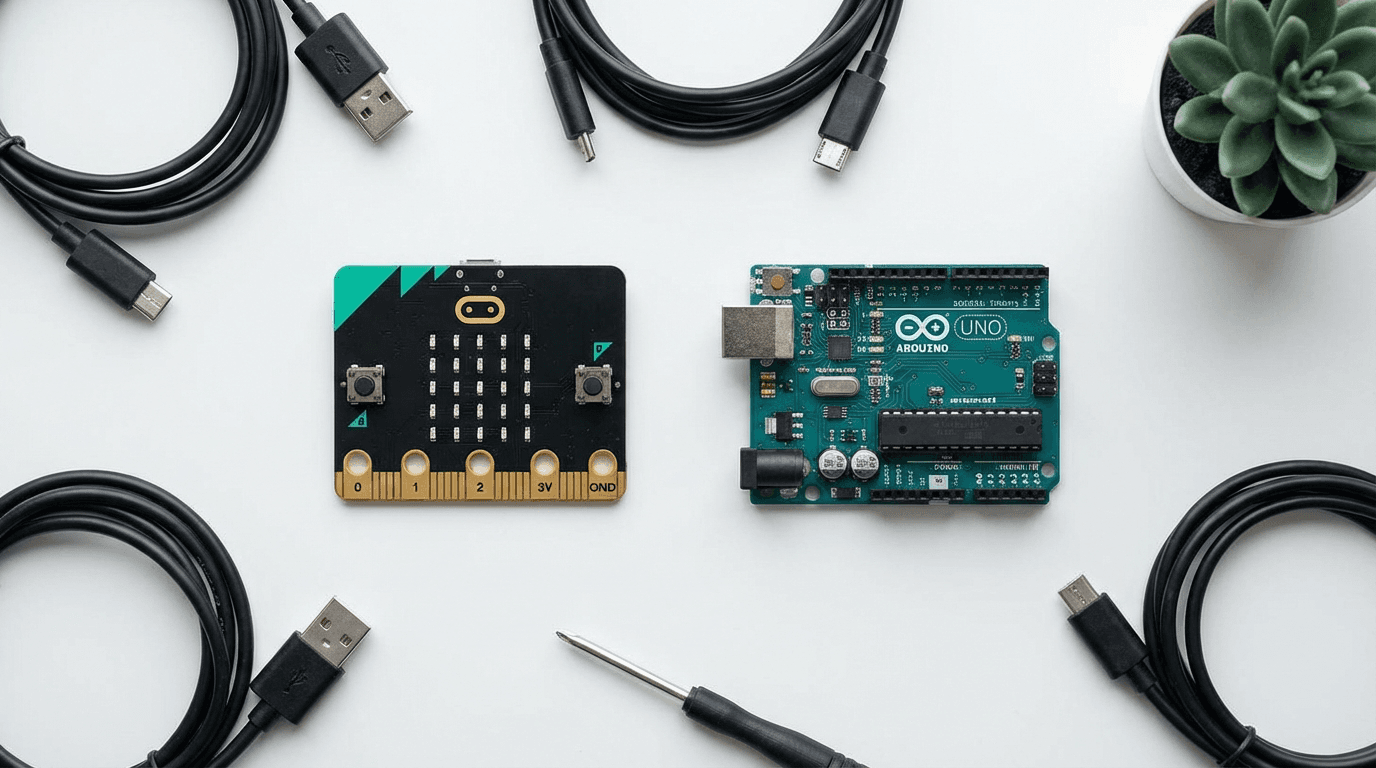
BBC micro:bit V2 vs Arduino Uno: Which Is Best for Kids Learning to Code in 2026?
BBC micro:bit V2 vs Arduino Uno: which coding board is best for your child? Expert UK comparison covering age suitability, ease of use, cost, and…
If you've been searching "micro:bit vs Arduino for kids" and ended up going round in circles, you're not alone. Both are brilliant little circuit boards that can transform a child's relationship with technology. But they're designed with very different learners in mind, and picking the wrong one could mean an expensive paperweight sitting on a shelf.
This guide cuts through the confusion. We've seen both boards extensively with children across a range of ages and abilities, and we'll give you a straight answer on which one is right for your child right now, and which they might grow into later.
Quick Summary
| BBC micro:bit V2 | Arduino Uno R3 | |
|---|---|---|
| Best for | Ages 8-14, beginners | Ages 12+, intermediate/advanced |
| Programming | MakeCode (block), Python | C/C++, basic Python |
| Setup difficulty | ⭐ Very easy | ⭐⭐⭐ Moderate-complex |
| Built-in sensors | 10+ (speaker, mic, temp, accelerometer…) | None (all add-ons) |
| Price | ~£15-18 | ~£35-50 (starter kit) |
| UK curriculum | ✅ Yes. Key Stage 2 & 3 | ❌ Not directly |
| Battery/portable | ✅ AAA batteries | ❌ USB power only |
| Buy on Amazon UK | B08NGKK3XW | B009UKZV0A |
Bottom line up front: If your child is 8-13 and new to coding, get the micro:bit. It's designed from the ground up for children, works out of the box, and integrates with the UK school curriculum. If they're 12+ and already comfortable with code, or they have a parent/mentor willing to guide them through electronics, the Arduino opens up far more advanced possibilities.
The BBC micro:bit V2
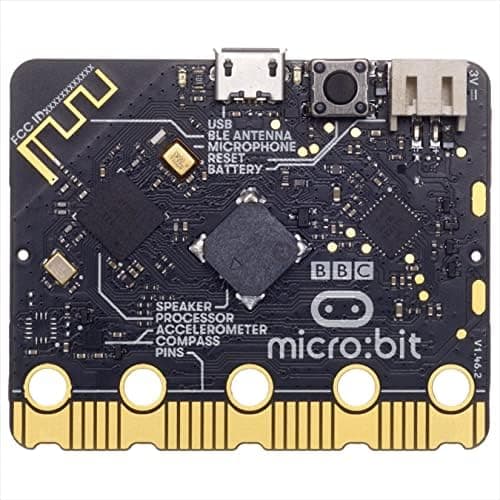
The BBC micro:bit V2 was developed in partnership with the BBC and introduced to every Year 7 child in the UK for free back in 2016. The V2, released in 2021, upgraded almost everything: a built-in speaker and microphone were added, the processor got a serious boost (Nordic nRF52833 vs the original's nRF51822), and there's now a touch-sensitive logo that acts as an input button.
What makes the micro:bit genuinely special for children is its MakeCode editor: a drag-and-drop block coding interface that runs entirely in the browser. No software to install, no drivers to configure. A child can go from unpacking the box to making an LED pattern flash in under 10 minutes. That's not marketing speak: we've seen it happen.
What's packed into the micro:bit V2
The V2 packs an extraordinary amount of technology into a board no bigger than a credit card:
- 25-LED display: doubles as an output screen for messages, animations, and sensor data
- Two programmable buttons (A and B)
- Touch-sensitive logo: a third input, unique to V2
- Accelerometer and compass: tilt and direction sensing
- Temperature sensor: reads ambient temperature
- Light sensor: using the LED matrix
- Microphone: clap detection, sound level monitoring
- Speaker: plays tones and melodies without any extra components
- Bluetooth Low Energy: connect to phones, tablets, other micro:bits
- Edge connector: 25 GPIO pins (5 large, 20 small) for add-on accessories
- USB and battery connector: works off 2× AAA batteries, making it fully portable
The sheer density of built-in sensors means children can create genuinely useful projects without buying any extra components. A weather station, a step counter, a reaction timer, a dice simulator, a radio message sender: all achievable with just the board and some code.
Programming the micro:bit
MakeCode (blocks): The recommended starting point. Drag, drop, click. No syntax errors. Children see immediate results on the LED display. The interface includes a simulator so they can test code before uploading. This is what most UK schools use for Key Stage 2 and 3.
MicroPython: Once blocks feel limiting (usually around age 11-12), children can switch to text-based Python in the same browser editor. The transition is handled brilliantly. You can actually see the Python that your blocks would generate, helping children understand the connection.
JavaScript: Also supported via MakeCode. A natural next step after Python for older learners.
The curriculum alignment is important. If your child's school uses micro:bit (very common in UK state schools), a home micro:bit means their school learning reinforces their home projects and vice versa. This double-exposure is powerful for retention.
Who the micro:bit is perfect for
- Ages 8-11 (Year 4-6): MakeCode blocks, LED animations, simple games, reaction timers
- Ages 11-13 (Year 7-9): MicroPython, sensors, radio messaging between two micro:bits, data logging
- Ages 13+ with support: GPIO pins, external sensors, servo motors: approaching Arduino territory
- Children who lose interest quickly: immediate results keep them engaged
- Girls learning to code: research consistently shows block-based coding has better gender parity in uptake
Micro:bit limitations
The V2 is wonderful but it's not infinitely expandable. The GPIO pins are small and awkward (designed for crocodile clips, not a breadboard). If a child wants to build complex circuits with multiple sensors, they'll quickly outgrow the edge connector format. The MakeCode editor, while excellent, also doesn't teach proper software engineering practices. It's a learning tool, not a professional environment.
🛒 BBC micro:bit V2. Check Price on Amazon UK
The Arduino Uno R3 (Starter Kit)
The Arduino Uno is the most popular microcontroller development board in the world. It's been used in schools, universities, maker spaces, and professional prototyping environments for nearly two decades. The Uno R3 is the current standard: the version most tutorials, books, and YouTube channels refer to when they just say "Arduino."
Unlike the micro:bit, an Arduino Uno does nothing out of the box. No built-in display, no LEDs other than a power indicator, no sensors, no speaker. It's a blank canvas, and that's both its greatest strength and its biggest barrier for younger children.
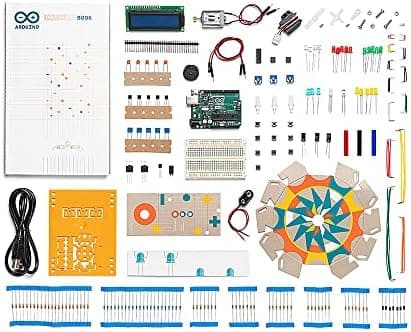
The Arduino Starter Kit (ASIN B009UKZV0A) solves this by bundling the Uno R3 with 170+ components: LEDs, resistors, capacitors, a breadboard, servo motors, a small LCD screen, photoresistors, a buzzer, buttons, and detailed project cards covering 15 projects from beginner to advanced. This is the version we recommend if you're just getting started: a bare Arduino board without components leaves you at a dead end immediately.
What makes Arduino powerful
Arduino's programming language is C/C++ with a simplified library layer (called "sketches"). This means children are writing real, professional-grade code from their very first project. There's no simplification, no drag-and-drop. It's the genuine article.
The ecosystem is staggering: there are thousands of compatible "shields" (add-on boards) and sensors covering everything from GPS modules to motor drivers to WiFi chips to camera interfaces. Any project a child can imagine almost certainly has an existing Arduino library for it.
The Arduino IDE (Integrated Development Environment) is the primary tool. It's a desktop application (Mac, Windows, Linux) with syntax highlighting, a serial monitor for debugging, and a library manager. There's also a web-based editor that has improved significantly. The learning curve for setting this up is real. There are driver installations, COM port configurations, and the occasional mysterious compilation error that requires Stack Overflow to resolve. For a child working alone, this can be extremely frustrating.
Who Arduino is right for
- Ages 12+ with a tech-curious parent willing to help: the setup process benefits hugely from a patient adult
- Children who've outgrown the micro:bit and want more depth
- Teen hobbyists and makers: robotics, home automation, custom gadgets
- Children taking GCSE Computer Science or A-Level Electronics: Arduino is excellent preparation for both
- Children who enjoy electronics as much as coding: breadboarding circuits is half the fun
The key challenge: the learning curve
Let's be honest. We've seen many well-intentioned Arduino purchases gather dust. The most common scenario: parent buys starter kit, child attempts first project, hits a compiler error or wiring confusion, gets frustrated, and the kit goes on a shelf.
The children who thrive with Arduino typically have one of the following:
- A tech-savvy parent or sibling who can debug alongside them
- A structured course (YouTube, online classes, school maker club)
- A particular project they're burning to build (robot arm, weather station, laser harp) that motivates them through the frustration
Without one of these, the micro:bit will almost always serve a child better.
🛒 Arduino Starter Kit. Check Price on Amazon UK
Head-to-Head Comparison
Ease of Getting Started
micro:bit wins decisively. Plug in via USB, go to makecode.microbit.org in any browser, drag some blocks, click "Download", drag the file to the micro:bit drive that appears. Done. Working in under 5 minutes.
Arduino requires: downloading the Arduino IDE (or setting up the web editor), installing USB drivers (sometimes), selecting the correct board type (Uno R3), selecting the correct COM port, writing (or copying) your first sketch, and uploading. Each of these steps has failure modes. Getting from unboxing to working first project realistically takes 30-60 minutes even for a tech-comfortable adult.
Winner: micro:bit 🏆
Programming Depth and Career Relevance
Arduino wins significantly. C++ is used in professional embedded systems, robotics, and game development. Learning Arduino C/C++ teaches data types, memory management, hardware registers, and real-time programming: concepts that transfer directly to professional embedded engineering.
MicroPython on the micro:bit is genuinely Python (a top-5 professional language), so it's not without value. But MakeCode blocks, while excellent for beginners, don't translate directly to any professional skill.
Winner: Arduino 🏆
Cost (to actually do interesting projects)
The micro:bit V2 costs around £15-18 on Amazon UK. Out of the box, with zero additional spending, a child can build 20+ distinct projects using the built-in hardware.
Arduino is cheaper as a bare board (~£20-25) but you need components to do anything interesting. The full Arduino Starter Kit runs £35-50. Comparable components bought separately would cost more. And as projects grow in ambition, the cost grows with them: sensors, shields, and modules add up quickly.
Winner: micro:bit 🏆 (for getting started; Arduino can be comparable if you buy the full starter kit)
Project Variety and Advanced Ceiling
Arduino wins, and it's not close. The Arduino ecosystem is decades old with an almost incomprehensible range of compatible sensors, shields, and libraries. There are Arduino-based 3D printers, CNC machines, robots, smart mirrors, and home automation systems.
The micro:bit tops out considerably earlier. Once you've exhausted the built-in sensors and the "go:bits" expansion accessories, you're reaching the limits of what the platform was designed for. It's a feature, not a bug, but it does mean the micro:bit is a gateway to more advanced platforms rather than an endpoint in itself.
Winner: Arduino 🏆
UK Curriculum Alignment
micro:bit wins by a mile. The BBC micro:bit is part of the UK national computing curriculum. Most state secondary schools that teach programming use micro:bits in Year 7 and Year 8. The micro:bit Educational Foundation produces free curriculum materials aligned with Key Stage 3.
Arduino isn't specifically mentioned in the curriculum, though it's widely used in sixth form and university maker programmes.
Winner: micro:bit 🏆
Portability
micro:bit wins. The V2 runs off 2× AAA batteries with a battery pack that comes included in some bundles. Your child can take their project to a friend's house, on a car trip, or to school without needing a computer or mains power.
Arduino runs entirely off USB power (or can use an optional barrel jack adapter). It's not designed for portable, standalone projects without extra power circuitry.
Winner: micro:bit 🏆
Community and Learning Resources
This one is closer than you'd expect. Both have enormous communities.
The micro:bit has microbit.org with hundreds of free projects, a school network of millions of students, and strong YouTube tutorials. The content is specifically designed for children and beginners.
Arduino has perhaps the largest hobbyist electronics community in the world. Stack Overflow, Arduino forums, Instructables, YouTube: there are literally millions of tutorials. However, most are written for adults with some technical background.
Winner: Draw (micro:bit better for kids; Arduino better for teens/adults)
Which Should You Buy?
Buy the BBC micro:bit V2 if:
- Your child is 8-12 years old
- They're new to coding and electronics
- You want something that works out of the box with no adult involvement
- Your child's school uses micro:bit (most UK secondaries do)
- Budget is under £20
- Your child is interest-testing: you don't want a big investment if they lose interest
- They want to carry their project around or take it to school
👉 Ready to buy? Check the latest price for the BBC micro:bit V2 on Amazon UK
Currently £15-18 on Amazon UK. BBC micro:bit V2. Prices may vary.
Buy the Arduino Starter Kit if:
- Your child is 12+ and shows genuine sustained interest in electronics/coding
- There's a parent, sibling, or mentor who can help troubleshoot
- Your child has already outgrown the micro:bit
- They have a specific ambitious project in mind
- They're studying GCSE Computer Science or planning A-Level Electronics
- You want a platform with a virtually unlimited ceiling
👉 Ready to buy? Check the latest price for the Arduino Starter Kit on Amazon UK
Currently around £35-50 on Amazon UK. Arduino Starter Kit. Prices may vary.
The Smart Parent Move: Start with micro:bit, Graduate to Arduino
Here's a path that works incredibly well and avoids frustration:
- Ages 8-10: BBC micro:bit V2 in MakeCode blocks. Make LEDs flash, games, step counters.
- Ages 11-12: Upgrade to MicroPython on the micro:bit. Learn proper programming concepts.
- Ages 12-13: If they're still engaged and asking "what else can I do?", introduce the Arduino Starter Kit.
- Ages 13+: Progress to more advanced platforms: Raspberry Pi 5 for software/Linux work, or Arduino Mega/ESP32 for advanced electronics.
This progression ensures children are never fighting with tools that are beyond them, and always have headroom to grow.
Alternatives Worth Considering
If neither fits perfectly, these alternatives are worth a look:
Raspberry Pi Zero 2 W (~£15): More powerful than both. Runs full Linux, can do AI/ML projects, but requires more setup. Best for teens with a specific project goal. See our Raspberry Pi 5 guide for kids for context on the platform.
Makeblock mBot 2 (~£130): A complete robot kit that uses an Arduino-compatible controller but hides the complexity. Children write code to make a physical robot move. Check our mBot 2 review.
Osmo Coding Starter Kit (~£80): For younger children (ages 5-8) who aren't ready for either micro:bit or Arduino. Physical blocks, iPad-based, no real coding. See our Osmo Coding review.
Makeblock mBot (~£130): A beginner coding robot that bridges between pure play and serious programming. Great for ages 6-10. Our Dash review covers it in depth.
Related reading
Frequently Asked Questions
Can a 10-year-old use Arduino?
A 10-year-old can, but it's challenging. They'll need patient adult support for setup and debugging. Most 10-year-olds will have a better experience with the BBC micro:bit V2, which is specifically designed for their age group, and save Arduino for when they're 12-13.
Does BBC micro:bit come with everything you need?
The BBC micro:bit V2 comes with a USB cable and some versions include a battery pack. You can build many projects with just the board itself. The built-in sensors (speaker, microphone, accelerometer, LEDs, temperature sensor) make it genuinely self-contained. For more advanced projects, you'd want crocodile clip leads and basic components like LEDs and buzzers.
Is Arduino better than micro:bit for GCSE Computer Science?
For GCSE CS specifically, both are useful for understanding computational thinking and hardware/software interaction. However, Arduino C/C++ teaches concepts (variables, data types, loops, conditionals, functions) that directly align with the programming principles assessed in GCSE. MicroPython on the micro:bit is also excellent preparation. Either works, but an Arduino Starter Kit alongside a GCSE textbook is particularly powerful.
Can you upgrade from micro:bit to Arduino?
Yes, and this is actually the recommended progression. The concepts learned on micro:bit (loops, variables, conditionals, input/output, events) transfer directly to Arduino programming. Many children find Arduino significantly easier if they've already grasped the concepts on micro:bit, because they can focus on learning C++ syntax rather than learning programming and syntax simultaneously.
Which is better for girls?
Research from the micro:bit Educational Foundation and various academic studies suggests that visual, block-based coding environments show significantly better gender parity in engagement than text-based environments. MakeCode on the micro:bit also emphasises creativity and making (projects like music, wearables, and interactive art) which tends to appeal to a broader demographic. That said, many girls love Arduino too. What matters most is the child's specific interests and what they want to build.
Our Verdict
Both of these boards are excellent investments in your child's future, but only if the match is right for their age and experience level.
BBC micro:bit V2 is the better choice for most families reading this guide. It's designed for kids, works immediately, costs less, and is aligned with UK schools. If your child loses interest after three months, you're out £15-18. If they love it, they'll have a foundation that sets them up brilliantly for the next stage.
Arduino Starter Kit is genuinely transformative for the right child at the right age. If a 13-year-old with genuine enthusiasm gets this as a birthday present, with a parent willing to troubleshoot alongside them, it can ignite a passion for engineering that shapes their entire career. Just don't give it to a frustrated 9-year-old who wanted something simpler.
When in doubt: start with micro:bit. You can always level up.
🛒 BBC micro:bit V2 on Amazon UK 🛒 Arduino Starter Kit on Amazon UK
Also read:
Read next
Arduino Starter Kit Review UK 2026: Is It Worth It for Kids & Beginners?
Honest Arduino Starter Kit K000007 review for UK parents. 15 hands-on projects, what's included, best age, and whether it's worth the price. Expert verdict.
Best STEM Kits Under £100 UK 2026-9 Top Picks for Every Age
Nine STEM kits under £100 for UK families, plus a hydraulic hand and a scarce LEGO Technic moon rover. Updated September 2026.
Best Easter Gifts: AI Toys & STEM Kits for Kids UK 2026
Looking for the perfect Easter gift for kids who love tech? Our curated guide to the best AI toys, coding robots, and STEM kits available in the UK this…