Raspberry Pi 5 for Kids UK 2026: Age Guide, Projects & Getting Started
Is Raspberry Pi 5 right for your child? Learn age suitability, starter projects, accessories and where to buy in the UK in 2026.
What Is the Raspberry Pi 5?
The Raspberry Pi 5 is the latest and most powerful version of the beloved single-board computer from the Raspberry Pi Foundation. A UK-based charity whose mission is to put affordable computing in the hands of children and adults worldwide. Released in late 2023 and now widely available across the UK, the Raspberry Pi 5 is a credit card-sized computer that costs around £50-£80 depending on the RAM configuration.
Unlike a toy or game console, it's a real, fully functional computer. It runs Linux-based operating systems, can connect to monitors and keyboards, browse the internet, run Python scripts, control physical components via GPIO pins, and much more. That versatility is precisely what makes it so exciting (and occasionally challenging) for families.
Is the Raspberry Pi 5 Suitable for Children?
The honest answer is: it depends on the child and the context.
Age 8-10: At this age, Raspberry Pi works best with strong parental involvement. Most 8-10 year olds can follow guided projects and tutorials, but setting up the device from scratch will likely require adult help. The reward is high: children this age often love lighting up LEDs or programming a simple alarm.
Age 11-13: This is arguably the sweet spot for the Raspberry Pi 5. Children at this age can typically follow written tutorials independently, troubleshoot basic issues, and start experimenting with Python. They can grasp concepts like file systems, terminal commands, and basic electronics.
Age 14+: Teenagers who are interested in tech can get the most from a Raspberry Pi 5. At this level, it becomes a genuine tool for building projects: from retro gaming consoles and weather stations to home automation systems and machine learning experiments.
If your child has already used Scratch, built with LEGO Technic, or shown an interest in how computers work, a Raspberry Pi 5 is an excellent next step.
What You Need to Get Started
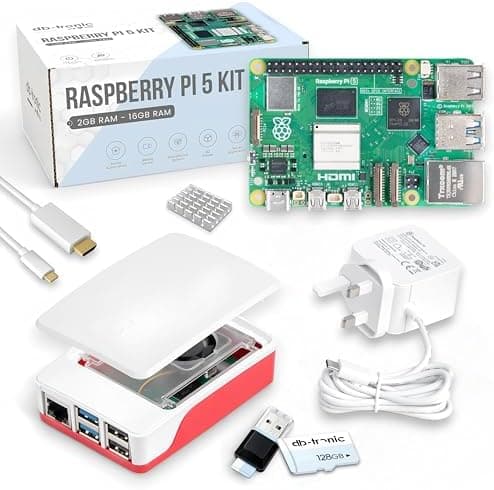
The Raspberry Pi 5 itself is not a complete out-of-the-box experience. You'll need a few additional components:
Essential:
- Raspberry Pi 5 board (4GB or 8GB RAM: 4GB is fine for most children's projects)
- MicroSD card (32GB or 64GB, Class 10 recommended)
- Power supply: the official 27W USB-C PSU is recommended for the Pi 5
- Micro HDMI to HDMI cable (the Pi 5 uses micro HDMI ports)
- USB keyboard and mouse
- Monitor or TV with HDMI input
Recommended:
- Official Raspberry Pi 5 case: protects the board and looks tidy
- Official active cooler: the Pi 5 runs warmer than previous models under load
The good news: many retailers sell complete starter kits that bundle these essentials. Pimoroni, The Pi Hut, and RS Components are the three main UK retailers, and all offer excellent starter bundles.
Setting It Up
Setting up the Raspberry Pi 5 for the first time takes roughly 30-60 minutes and involves:
- Writing the OS to the microSD card using Raspberry Pi Imager (free download). Choose Raspberry Pi OS (the recommended option. It's beginner-friendly and well-supported).
- Inserting the card, connecting peripherals, and powering on.
- Following the first-run setup wizard: set timezone, language, Wi-Fi, and update the software.
The Raspberry Pi Foundation provides excellent official documentation at raspberrypi.com, and there are thousands of community tutorials available online.
Starter Projects for Children
One of the best things about the Raspberry Pi 5 is the enormous library of projects. Here are some well-suited for children:
Beginner (Ages 8-11)
- Flashing LEDs: connect a simple LED circuit to the GPIO pins and write a Python script to make it blink. A classic first project that teaches basic electronics and coding in one go.
- Digital dice: a simple Python script using a GUI library that simulates dice rolls. Introduces randomness and basic programming logic.
- Scratch on Raspberry Pi: if your child already knows Scratch, they can run it directly on the Pi and create games.
Intermediate (Ages 11-14)
- Temperature and humidity monitor: connect a DHT11 sensor and display readings on screen. Great introduction to sensors and data.
- Simple web server: host a basic website from the Pi on your home network. Teaches networking and HTML basics.
- Retro gaming emulator (RetroPie): install RetroPie to turn the Pi into a retro gaming console. A hugely motivating project that also teaches Linux basics.
- Minecraft Pi Edition: a version of Minecraft designed for the Raspberry Pi with a Python API, letting children code their way around a Minecraft world.
Advanced (Ages 14+)
- AI camera projects: using the official Raspberry Pi Camera Module and Python libraries like OpenCV to detect objects or faces.
- Home automation: controlling smart plugs or lights via Python scripts.
- Weather station: combining multiple sensors to log temperature, humidity and pressure to a spreadsheet or website.
- Machine learning on the edge: the Pi 5 is powerful enough for lightweight ML models, and there are excellent beginner tutorials for image classification.
Where to Buy in the UK
- Pimoroni (pimoroni.com): excellent starter kits, accessories, and very good documentation
- The Pi Hut (thepihut.com): wide range, great for accessories
- RS Components (uk.rs-online.com): reliable stockist, often has good availability
- Amazon UK: convenient, but check you're buying genuine Raspberry Pi products
Prices as of 2026: the Raspberry Pi 5 4GB is around £50, and 8GB around £70. Complete starter kits (including PSU, case, microSD) typically run £80-£120.
Raspberry Pi 5 vs Other Coding Tools for Kids
| Tool | Age | Price | Coding Level | Physical Electronics? |
|---|---|---|---|---|
| Bee-Bot | 4-7 | £80 | None | No |
| Scratch (software) | 6-12 | Free | Beginner | No |
| BBC micro:bit | 8-12 | £15-£45 | Beginner-Intermediate | Yes |
| Arduino Starter Kit | 10-14 | £40-£80 | Intermediate | Yes |
| Raspberry Pi 5 | 10+ | £50-£120 | Intermediate-Advanced | Yes |
The Raspberry Pi 5 sits at the upper end of the complexity spectrum, but that's also what makes it so rewarding. Unlike simpler tools, there's no ceiling. Children can keep learning and building on it for years.
Tips for Parents
Don't expect plug-and-play. The Raspberry Pi is a tool, not a toy. The learning curve is real, and the first session or two will likely involve troubleshooting. That's a feature, not a bug: problem-solving is part of the learning.
Work through projects together. Even if you're not a coder, many Raspberry Pi projects are step-by-step enough that a motivated parent and child can work through them together.
Join the community. The Raspberry Pi forums are friendly and helpful. Reddit's r/raspberry_pi is an excellent resource. The official Raspberry Pi YouTube channel has beginner-friendly video tutorials.
Start with the official projects. Raspberry Pi's own website (projects.raspberrypi.org) has hundreds of free, well-written projects organised by difficulty and subject. It's the best starting point.
Final Thoughts
The Raspberry Pi 5 is one of the most powerful and cost-effective ways to introduce children to real computing. It's not the easiest entry point (that title goes to Scratch or Bee-Bot) but for children aged 10 and above who are genuinely curious about technology, it's hard to beat.
The skills children develop with a Raspberry Pi (Python, Linux, electronics, troubleshooting) are genuinely applicable in the real world, from university computing courses to professional software development. At around £50 for the board itself, it offers extraordinary value for the learning it enables.
If your child is ready to go beyond coding games and wants to build things that interact with the real world, the Raspberry Pi 5 is an excellent choice.
Related reading
- Scratch vs Python for Kids 2026: Which Should Your Child Learn First?
- Best STEM Toys for 8 Year Olds UK 2026
- Coding in UK Schools from Age 5: What Parents Need to Know in 2026
- AI and Coding Toys for Autistic Children UK 2026: A Parent's Guide
- Arduino Starter Kit Review UK 2026: Is It Worth It for Kids & Beginners?
Read next
Scratch vs Python for Kids 2026: Which Should Your Child Learn First?
Scratch or Python? Compare both coding languages for kids: age recommendations, learning curves, tools, and which to start with in 2026.
AI and Coding Toys for Autistic Children UK 2026: A Parent's Guide
Find the best AI and coding toys for autistic children in the UK. Covers benefits, recommended products, sensory considerations and expert tips for 2026.
Coding in UK Schools from Age 5: What Parents Need to Know in 2026
UK schools teach coding from age 5. Find out what children learn at each stage, how the national curriculum works, and how parents can support learning at home.