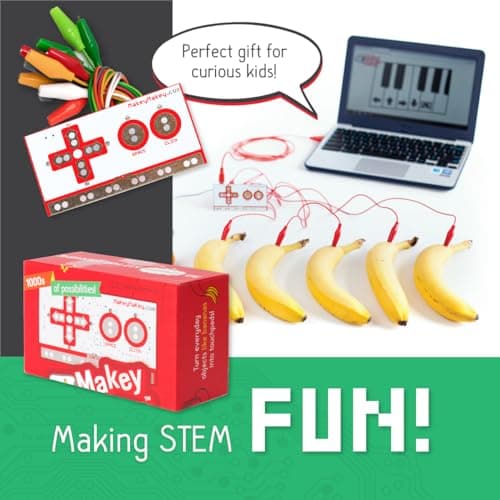
Most STEM toys arrive with a fixed idea of what your child will build. The Makey Makey does the opposite: it hands over a small red circuit board and a fistful of crocodile clips, and asks "what would you like to invent?" Clip one wire to a banana and another to your computer, touch the fruit, and it plays a piano note. Line up five bananas and you have a working keyboard. Swap in play-dough, tin foil, pencil scribbles, a cup of water or a row of friends holding hands, and each one becomes a button. It is one of the most quietly brilliant learning tools ever made, and it has earned its place in classrooms around the world.
The Makey Makey was invented by Jay Silver and Eric Rosenbaum at the MIT Media Lab and is now sold by JoyLabz. It has barely changed in years, and that is a compliment: it got the idea right first time. Here is an honest look, from the specs and owner reports, at whether it deserves a place in your home in 2026.
Disclosure: This article contains affiliate links. As an Amazon Associate, AIToys.co.uk earns from qualifying purchases. If you buy through our links, we may earn a small commission at no extra cost to you. It never changes the price you pay, and it never changes our verdict.
Quick Verdict: Makey Makey Classic
The Makey Makey is a considered pick from the specs and owner reports. Very few toys manage to be genuinely open-ended, genuinely educational and genuinely delightful all at once, but this one does. It teaches circuits, conductivity, cause-and-effect and (when you pair it with free software) real coding, all through play that feels like magic rather than a lesson. The catches are worth knowing: it needs a computer rather than a tablet, and because it is a blank canvas, a little adult encouragement helps a child get started. But as a creativity-and-electronics tool that grows with a child for years, it is close to unbeatable.
Pros
- Pure magic: everyday objects become working keys in seconds.
- Zero setup: no drivers, no app, no account: plug in and play.
- Lasts for years: no batteries and nothing to use up.
- Grows with your child: pairs with free Scratch for real coding.
- Cross-curricular: music, art, science and computing in one board.
Cons
- Needs a computer: it will not work with an iPad or phone.
- Looks simple: the value only lands once you see it in action.
- You bring the ideas: it is a tool, not a step-by-step kit.
- Advanced side takes reading: the back-of-board keys reward a little effort.
What Exactly Is the Makey Makey?
The Makey Makey is an "invention kit for everyone": a small circuit board that plugs into your computer's USB port and pretends to be an ordinary keyboard and mouse. Your computer cannot tell the difference, which is the whole trick. Instead of pressing plastic keys, though, you complete a circuit by touching something conductive that you have clipped a wire to. Touch the banana, and as far as your computer is concerned, someone pressed the space bar.
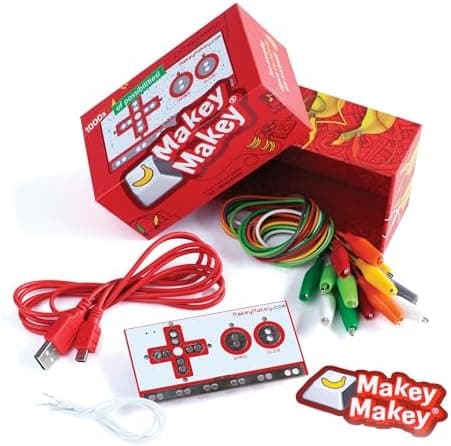
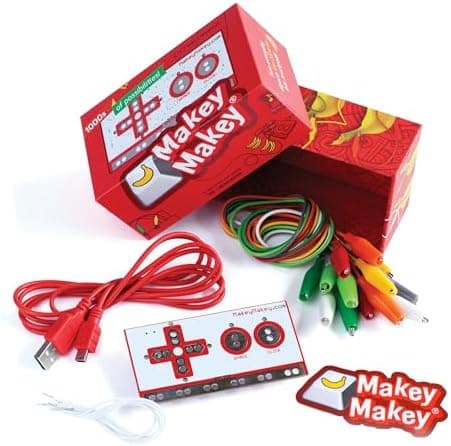
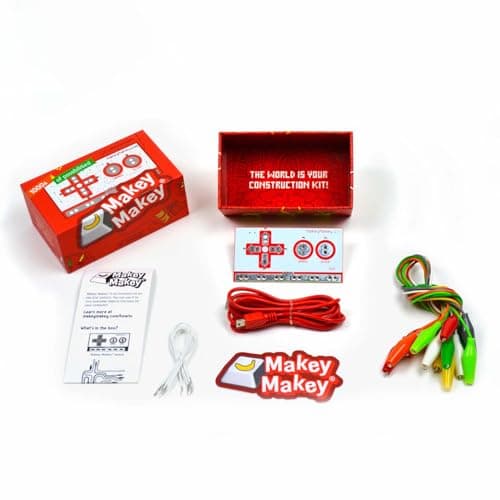
In the box you get the Makey Makey board, a USB cable, seven colourful crocodile (alligator) clips, six connector wires for the back of the board, a set of stickers and a simple visual instruction card. There is nothing to assemble and no software to install. You can be making music on fruit within about a minute of opening the box, which is exactly the kind of instant success that hooks a child.
Crucially, it needs no batteries (it draws its tiny amount of power over the USB cable) and there is nothing to consume or replace. That makes it very different from science kits full of chemicals or single-use parts. One Makey Makey can be used thousands of times, by one curious child or a whole classroom, year after year.
How It Works: Everyday Objects Become Touchpads
The science underneath is genuinely useful for children to grasp. The front of the board has six large touch spots: the four arrow keys, the space bar and a mouse click. You clip a wire from the "Earth" strip at the bottom and hold the metal end (or stand on a sheet of foil), which grounds you. Then you clip another wire to any object you like. The moment you touch that object, your body completes the circuit between it and Earth, and the board registers a key press.
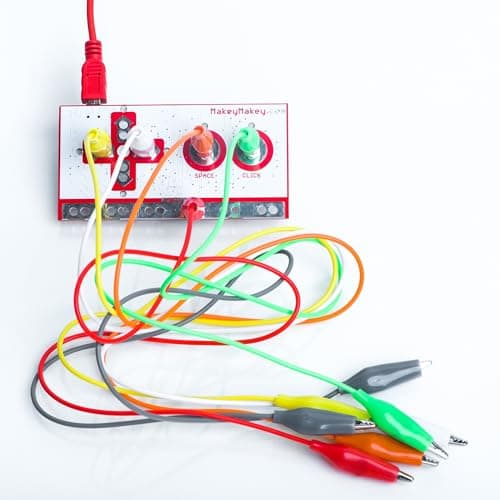
Because the board senses very small currents, it works through surprisingly weak conductors: skin, fruit, water, graphite pencil marks, metal cutlery, ketchup, leafy plants and play-dough all conduct just enough. That leads naturally into brilliant real-world questions (why does the banana work but the plastic ruler does not?) that teach conductivity far better than any worksheet. Turn the board over and there is a second, more advanced side: extra keyboard letters (W, A, S, D, F and G) and full mouse movement, reached with the six connector wires. That back side is where older children graduate to building full game controllers.
What We Like
It is properly, jaw-droppingly magical. The first time a child hears a banana play a note, or watches a pencil drawing become a working piano, there is a genuine gasp. That sense of wonder is priceless, and it is the thing that makes a child want to keep tinkering. Few STEM products earn that reaction on the very first try.
There is nothing to set up. No drivers, no app to download, no account to create, no firmware to update. You plug the USB cable into any computer and it simply works. For a parent who has wrestled with fiddly connected toys, that reliability is a joy, and it means the toy actually gets used rather than abandoned in frustration.
It is endlessly open-ended. The Makey Makey is not one activity, it is thousands. Build a game controller from play-dough, a set of musical stairs, a high-five machine, an interactive poster, a quiz buzzer, a "keep the cat off the sofa" alarm: the same board does all of it. Because the ideas come from the child, no two sessions are the same, and the toy never feels "finished".
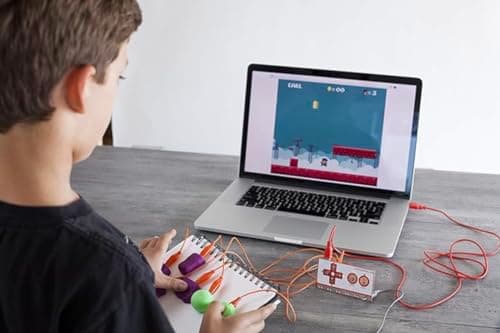
It is wonderfully cross-curricular. This is not only a computing toy. Making instruments teaches music; drawing conductive circuits with graphite teaches art and physics; building a project poster teaches design and presentation. It pulls in children who would never call themselves "into coding", which makes it a superb tool for a mixed group of siblings or a whole class.
What Could Be Better
We promised an honest review, so here are the limitations worth knowing before you buy.
It needs a computer, not a tablet. This is the single most important thing to check. The Makey Makey works with Mac, Windows, Chromebook and Linux, but it is not designed for iPads or phones. If the only device in your home is a tablet, this is not the toy for you, and it is a genuinely common disappointment. A cheap Chromebook or any old laptop is all you need, but you do need one.
It looks underwhelming in the box. At around £47 at the time of writing (July 2026), some parents open it, see a small board and a few clips, and wonder where the value is. The magic is entirely in what it does, not in how it looks, but that does mean the wow factor arrives after you plug it in, not before. It is worth watching a demo video with your child so the price makes sense.
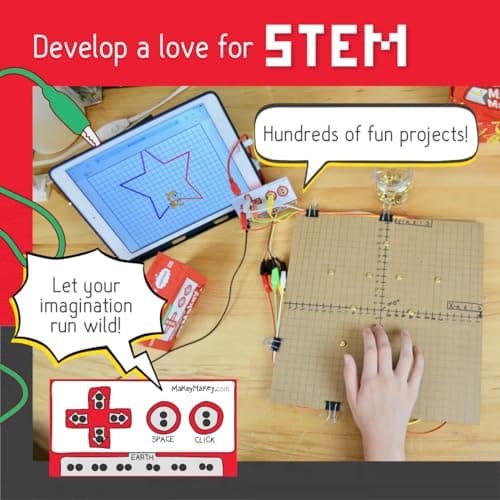
The creativity has to come from somewhere. Because it is a blank canvas, a child who is used to toys that tell them exactly what to do can stall at "now what?" The official website is full of free project guides and videos, and half an hour alongside your child at the start pays off enormously, but this is not a toy you simply hand over and walk away from on day one.
The advanced features take a little learning. Getting started is effortless, but unlocking the back-of-board keys and remapping controls for a bespoke game controller involves reading the guides and a bit of trial and error. That depth is a strength for older tinkerers; just do not expect a seven-year-old to reach it unaided.
Does It Teach Coding?
Out of the box, the Makey Makey is not itself a coding toy. It is an input device. But it becomes one the moment you pair it with Scratch, the free block-based coding language from MIT. Children can build their own game or instrument in Scratch and then control it with whatever they have wired up to the Makey Makey. Now the banana is not just playing a pre-set note; it is triggering a program the child wrote themselves. That is the leap from playing with technology to making it.
This is where we should be clear and honest, as we always try to be on this site: the Makey Makey is not artificial intelligence and makes no claim to be. It is physical computing (circuits, inputs and cause-and-effect) and that is exactly why it is such a strong foundation. The understanding a child builds here, of how a physical action becomes a signal a computer can act on, sits underneath everything that comes later, including the smarter robots and AI toys we cover elsewhere. If your child enjoys the coding side, a natural next step is a programmable board like the BBC micro:bit V2, or for older teenagers, the more advanced Arduino Starter Kit.
Who Is It For?
The Makey Makey is officially aimed at ages 8 and up, and that is a fair guide, though the true range is wider in both directions. A bright six- or seven-year-old will have a wonderful time with an adult alongside them, and at the other end it genuinely engages teenagers, university students and adults. It is used in design schools and museums, not just primary classrooms. There is no upper limit on how sophisticated your inventions can get.
It is a particularly strong choice for creative children who do not think of themselves as "techy", because it comes at computing sideways through music, art and play. It is also a superb tool for families with children of different ages, since a simple banana piano and an advanced Scratch-controlled game can be built with the very same kit. Teachers, home-educators and SEN settings love it for the same reason: the floor is low, the ceiling is high, and the shared "wow" moments bring everyone in.
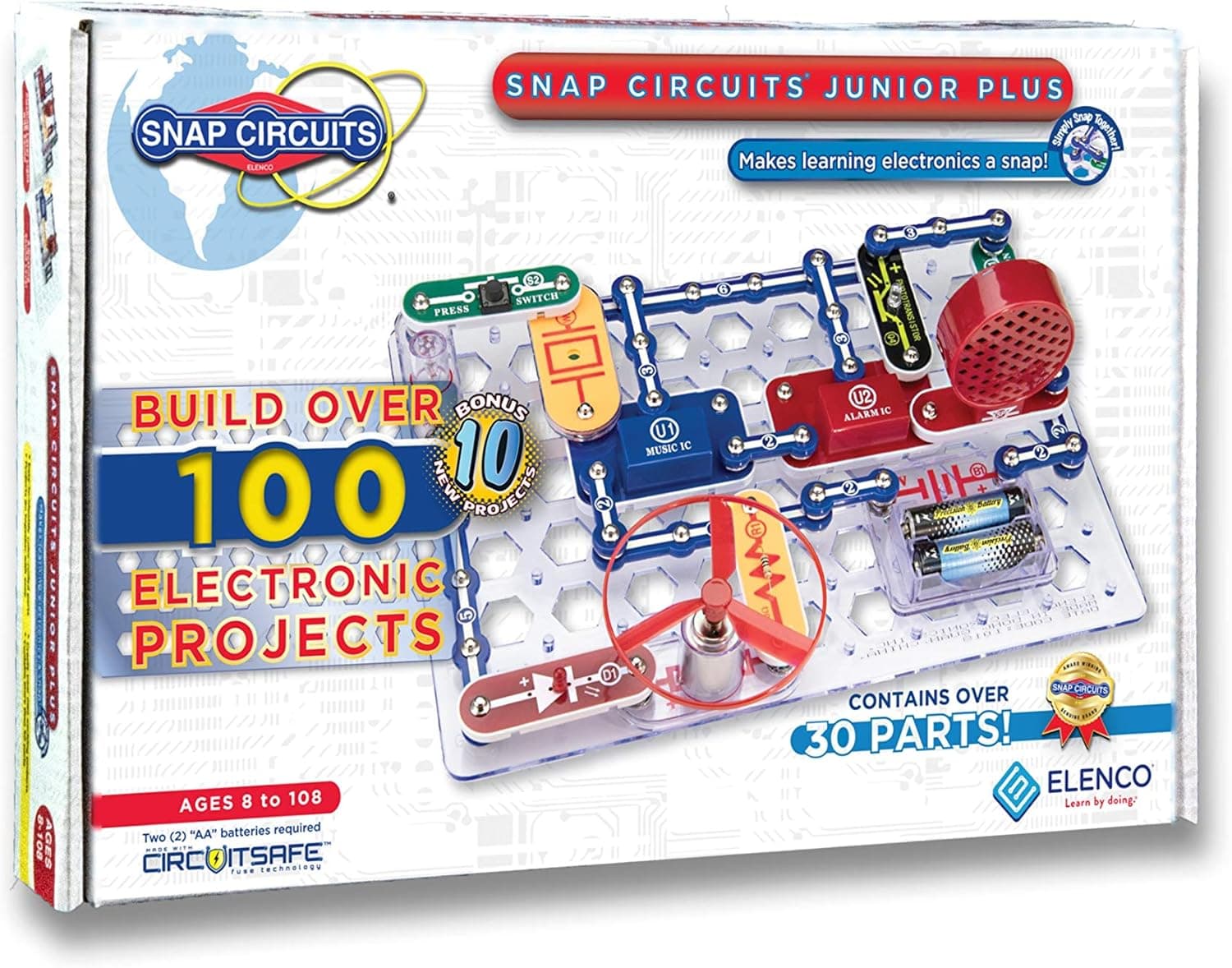
It is not the right pick if you only own a tablet, or if you want a self-directed toy that entertains a child with no input from you. For a more guided, sit-and-follow electronics experience for younger children, a set like Snap Circuits may suit better.
How Does It Compare?
Against other STEM kits, the Makey Makey occupies a lovely niche of its own. Snap Circuits teaches electronics through structured, follow-the-diagram projects, which is more guided but less open-ended. The BBC micro:bit and Arduino are true programmable microcontrollers with far more technical depth, but they demand more reading and setup and lose the instant, tactile "touch a banana" magic that makes the Makey Makey so accessible. Where the Makey Makey wins is breadth of appeal and immediacy: nothing else gets a reluctant child inventing this quickly, and nothing spans as neatly from a five-minute giggle to a genuinely ambitious project. You can see how the whole field stacks up in our guide to the best electronics kits for kids.
Value for Money
At roughly £47, the Makey Makey is not an impulse-buy stocking filler, but it is quietly excellent value for what you get. There are no batteries to buy, nothing to replace and no subscription. The running cost is precisely zero, and the household objects you invent with are free. One kit can entertain a child for years, be shared between siblings, and then be handed to a school or a younger cousin still working perfectly. Measured by hours of genuine, creative engagement per pound, very few toys we review do better. The board is also robust, with no fragile moving parts to snap.
Age, Safety and Setup
Setup is as simple as it gets: plug the USB cable into a computer, clip the Earth wire, clip a wire to an object, and touch it. The Makey Makey runs on the tiny, low-voltage power supplied over USB, so there is no mains electricity, no heat and no meaningful shock risk. It is designed for children to handle the clips and wires themselves. As with any product containing small parts and cables, it is best kept away from children under three, and the recommended age of 8+ reflects the reading and dexterity needed to get the most from it rather than any safety concern. A short adult-guided first session is all most children need before they are off inventing on their own.
Related reading
Frequently Asked Questions
Do I need to know how to code to use it? No. The basic experience (turning objects into keys) needs no coding at all. Coding only comes in later, and optionally, if you want to build your own games or instruments in free software like Scratch.
Does it work with an iPad, tablet or phone? No. The Makey Makey needs a computer with a USB port. Mac, Windows, Chromebook or Linux. It is not designed for iPads or phones, so check what device you have before buying.
Does it need batteries or a subscription? Neither. It draws its power over the USB cable, there is nothing to replace, and there are no ongoing costs of any kind.
What software does it use? None is required to start: it works with anything that responds to a keyboard or mouse, including web pianos, games and slideshows. To make your own projects, most people use Scratch, which is free.
Is it actually AI? No, and it does not pretend to be. The Makey Makey is a physical-computing invention kit that teaches circuits, inputs and creative coding: the foundations that more advanced robots and AI toys build on later.
What age is it best for? Officially 8 and up. Younger children enjoy it with adult help, and it genuinely engages teenagers and adults too, so it suits a very wide range.
The Verdict
The Makey Makey Classic is one of the most joyful and genuinely educational things you can put in front of a curious child. It reduces a big, intimidating idea (how the physical world talks to a computer) to something a seven-year-old can feel in their fingertips, and it wraps that lesson in play so open-ended it never runs out. It teaches circuits, conductivity and, when you want it to, real coding, and it does so while producing more delighted gasps than almost anything else we review.
Its limits are honest and easy to plan around: it needs a computer rather than a tablet, it looks modest until you switch it on, and its blank-canvas nature rewards a bit of grown-up encouragement to get going. Understand those, and you have a toy that lasts for years, suits a huge age range, costs nothing to run, and might just spark a lifelong love of making things.
It is a considered pick from the specs and owner reports, and it has a firm place on our shortlist of the best STEM toys in the UK.
As an Amazon Associate, AIToys.co.uk earns from qualifying purchases. Prices and availability are accurate as of the date of publication but can change. We only ever recommend products we believe will genuinely help UK families.