Disclosure: This article contains affiliate links. As an Amazon Associate, AIToys.co.uk earns from qualifying purchases. If you buy through our links, we may earn a small commission at no extra cost to you. It never changes the price you pay, and it never changes our verdict.
Some STEM toys promise to teach electronics and then hand your child a screen and an app. The Snap Circuits Classic PLUS SC-310 does something braver and, frankly, more useful: it puts real electronic components in your child's hands and lets them build circuits that genuinely work. A radio that pulls a station out of thin air. A lamp that switches on when you touch two fingers to a pad. An alarm that shrieks when the light changes. There is no soldering, no screen and no coding app. Just parts that snap together on a plastic grid like electrical LEGO. That hands-on, "make it work with your own hands" idea is the thread running through this entire review.
Snap Circuits, made by Elenco, has been a fixture of British STEM shelves for well over a decade, and the Classic PLUS SC-310 sits in the sweet spot of the range: bigger and more ambitious than the entry-level Junior kits, but far more approachable than the sprawling Pro sets. If you have already read our Snap Circuits JR. Plus SC-110 review and wondered whether the step up is worth it, this is the kit that question is really about. Here is our honest, hands-on take on whether it earns a place in your home.
👉 Short on time? Check the latest price on AmazonAs an Amazon Associate, AIToys.co.uk earns from qualifying purchases..
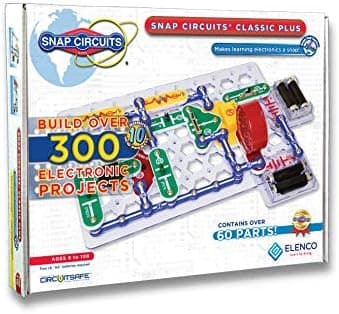
Quick Verdict: Snap Circuits Classic PLUS SC-310
The Classic PLUS SC-310 earns a confident 4.6 out of 5, and it is one of the easiest STEM recommendations we make for the eight-and-over age group. It does the hard thing well: it turns the invisible, intimidating world of electronics into something a child can hold, build and understand in an afternoon. With 60-plus parts and 310 projects, it offers months of genuine play rather than a quick novelty, and because everything snaps together with no tools it is safe enough to leave a capable child to explore alone. The only real friction is practical: you must supply 4 AA batteries, and loose parts demand a bit of tidy-up discipline. For a screen-free toy that quietly teaches how the modern world actually works, it is superb value.
Pros
- Real electronics, real results: children build working circuits, from an AM radio to a lie detector.
- No soldering, no tools: colour-coded parts snap onto the grid, so it is safe and independent play.
- Months of content: 310 projects and a clear full-colour manual mean it earns its shelf space.
- Screen-free: no app, no tablet, no glowing rectangle: increasingly rare and genuinely valuable.
- Grows with the child: compatible with other Snap Circuits sets for easy expansion.
Cons
- Batteries not included: you need 4 AAs before the first project will do anything.
- Tidy-up matters: small loose parts can go missing and block a build.
- A considered buy: it costs more than the Junior kits, so it is a proper present rather than a filler.
What Exactly Is the Snap Circuits Classic PLUS SC-310?
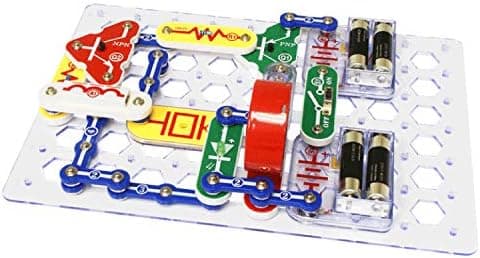
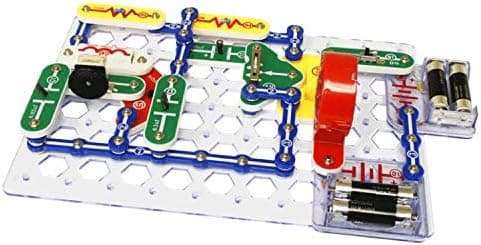
Snap Circuits is an electronics construction system. Instead of the traditional route of stripping wires and heating a soldering iron (neither of which is remotely suitable for a primary-school child) Elenco mounts each component onto a chunky plastic module with press-studs on the corners. Those modules snap onto a grid baseplate and onto each other, and the metal studs carry the current between them. A child follows a numbered diagram in the manual, snaps the parts into place, flicks a switch, and the circuit springs to life.
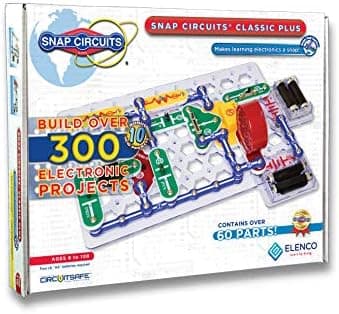
The Classic PLUS SC-310 ships with more than 60 parts, including snap wires of various lengths, a slide switch, resistors, a microphone, capacitors, an integrated circuit, a speaker, a motor and a lamp, all sitting on the familiar clear baseplate. The headline figure is 310 projects, ten of them brand-new bonus builds added to this PLUS edition. Crucially, these are not 310 trivial variations: they build in complexity, so your child moves from a simple lamp circuit through to an AM radio, a light-controlled alarm, a two-finger "lie detector" touch lamp and a photosensitive electronic organ.
The manufacturer's recommended age is 8 and over, and in our experience that is honest. A confident seven-year-old with an adult nearby will manage the early projects, while a capable ten- or eleven-year-old will happily work through the harder builds alone and start to understand why each circuit behaves as it does. It fits neatly into our STEM and coding category as a pure electronics kit, sitting alongside more programmable options like the BBC micro:bit V2 and the Arduino Starter Kit.
The Learning Value: Why We Rate It So Highly
The reason this kit scores so well is that it teaches real, transferable electronics rather than a closed, gimmicky experience. When a child builds the alarm project, they are not just following steps. They are wiring a sensor to a switching circuit to an output, which is exactly how a real burglar alarm works. When they build the touch lamp, they discover that their own skin can conduct a tiny current. These are genuine "aha" moments, and they stick because the child made them happen with their own hands.
There is a quiet cleverness to how the manual scaffolds the difficulty. Early projects use three or four parts and take two minutes. By the middle of the book, a child is reading a proper circuit diagram, identifying components by their symbols and troubleshooting when something does not light up. That troubleshooting is where much of the real learning lives: a project that does not work first time forces a child to check each connection, reason about what might be wrong and fix it. It builds resilience as much as knowledge.
It is also, refreshingly, a screen-free toy in a market flooded with app-paired robots and tablets. There is no account to set up, no firmware to update and no data being collected: a genuine relief for privacy-conscious parents. Your child sits at the kitchen table with a box of parts and a book, and an hour disappears. In an age of glowing rectangles, that alone is worth a great deal. If you want a coding element too, this pairs beautifully with a programmable robot such as the MatataStudio VinciBot for a fuller STEM shelf.
Ease of Use and Build Quality
Getting started is almost frictionless: with one important caveat we will come to. The parts are colour-coded and clearly numbered, the baseplate has a labelled grid (columns A to G, rows 1 to 10) and the manual tells you exactly which part goes on which coordinate. This coordinate system is genuinely well thought out: it removes almost all ambiguity, so even a child who struggles with written instructions can follow the pictures and place parts correctly. Snapping components together is satisfying and gives a reassuring click, and the connections are solid enough that a completed circuit rarely fails because of a loose part.
Build quality is a real strength. The plastic modules are thick and robust, the press-studs are metal rather than flimsy, and the whole system is clearly engineered to be tipped out, jumbled up and rebuilt hundreds of times. This is a kit designed to survive a childhood, and it is one of the reasons Snap Circuits holds its value and gets handed down between siblings.
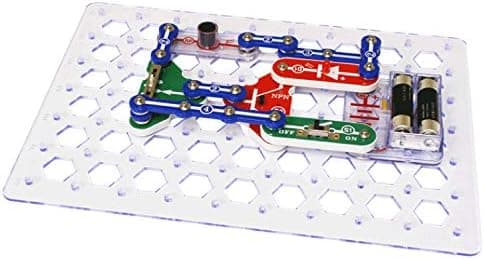
The one thing to plan for: the SC-310 needs 4 AA batteries, and they are not included. Nothing in the kit does anything until they are fitted, so if this is a birthday or Christmas present, buy a pack of AAs to go with it. There are few things more deflating for a child than opening an electronics kit that cannot yet make a single light glow. It is a minor gripe, but a genuinely common one, so it is worth flagging plainly.
Who Is It For? Age and Safety Notes
The Classic PLUS SC-310 is aimed squarely at children aged 8 and over, and that is the age we would recommend it from. The projects assume a level of reading, patience and fine motor control that most eight-year-olds have and most younger children do not. That said, a keen six- or seven-year-old can absolutely enjoy the simpler builds with a parent working alongside them. It can be a lovely shared activity rather than solo play.
On safety, the sensible notes apply. The kit contains small parts and is not suitable for children under three because of the choking hazard, so keep it well away from toddler siblings. The circuits run on low-voltage AA power and are designed to be safe to handle, but the manual quite rightly tells children never to connect the kit's parts to mains electricity or household batteries, and that guidance is worth reinforcing. There is no screen time to manage and no online component to police, which keeps the parental oversight refreshingly simple: mainly, it is about supervising tidy-up so parts do not go missing. Look for the CE and UKCA conformity marks on the packaging, which Elenco's UK-distributed kits carry.
What Could Be Better
No kit is perfect, and it is only fair to be clear about the trade-offs. The most practical frustration is the loose-part management. With 60-plus components, an organised child keeps everything in the tray and can find part 4 in seconds; a less organised one ends up with a jumbled box, and a single missing snap wire can stall a project. The kit would benefit from a more structured storage solution than it provides, so a small compartment box is a worthwhile add-on.
The second, gentler criticism is that the experience is manual-led. For the first many hours, your child is following the book rather than inventing freely, which is exactly right for learning the fundamentals but means the "design your own circuit" creativity comes later, once they understand the components. Some children take to that open-ended stage naturally; others are happy to keep working through the projects. Either is fine, but it is worth knowing the kit teaches before it turns your child loose.
Finally, price. The SC-310 sits above the smaller Junior kits, so it is a considered purchase rather than an impulse buy. We think the jump in content and learning value more than justifies it, but if your budget is tighter, the Snap Circuits JR. Plus SC-110 covers the same core ideas in a smaller package, and our best electronics kits for kids roundup sets out the full ladder of options.
Snap Circuits Classic PLUS SC-310 vs the Rest of the Range
Snap Circuits can be confusing to shop for because the range is large and the naming is not obvious. In short: the Junior kits (like the SC-100 and the SC-110 PLUS) are the entry point, with fewer parts and simpler projects aimed at slightly younger children. The Classic tier (where the SC-310 lives) is the mainstream family choice, offering a big jump in parts and projects without becoming overwhelming. Above that, the Pro kits (the SC-500 and SC-510) add still more components and advanced builds for older, more serious young engineers.
For most families buying a single kit that will last for years, the Classic PLUS SC-310 is the one we would point to. It has enough breadth to keep a child busy for a very long time, the projects reach a satisfying level of complexity, and the price stays sensible. If your child is younger or you want to test the water, drop down to the Junior; if they are already circuit-obsessed and a bit older, the Pro range gives them more room to grow.
How to Get the Most From It
A few small things make a real difference. First, buy those AA batteries in advance and keep a spare set. Second, invest in a cheap compartment storage box so parts do not migrate under the sofa. Third, resist the urge to "help" too much. The troubleshooting when a circuit does not work is where the deepest learning happens, so let your child puzzle it out before you step in. And fourth, do not feel you must go in strict order; if a particular project (the radio and the alarm are perennial favourites) captures their imagination, chase that interest.
For families building a broader STEM collection, this slots in beautifully as the "how electronics actually works" foundation before a child moves on to programmable hardware like the Arduino Starter Kit or a Raspberry Pi 4 starter kit, where they can combine circuits with code.
Related reading
Frequently Asked Questions
Does the Snap Circuits Classic PLUS SC-310 need batteries? Yes. It requires 4 AA batteries, which are not included in the box. Buy a pack to go with it, especially if it is a gift, because none of the projects will work until the batteries are fitted.
What age is the SC-310 suitable for? The manufacturer recommends ages 8 and over, and we agree. A confident younger child can enjoy the simpler builds with an adult alongside, but the full range of projects suits eights and up. It is not suitable for children under three due to small parts.
Is any soldering or special tool required? No. That is the whole point of Snap Circuits. Every component is mounted on a module with press-studs, and parts simply snap together on a grid. There are no tools, no soldering and no sharp edges.
How is it different from the Snap Circuits Junior kits? The Classic PLUS SC-310 has more parts (60-plus) and far more projects (310) than the Junior kits, and the builds reach a higher level of complexity. It is the natural step up once a child has outgrown, or wants more than, an entry-level set.
Is it compatible with other Snap Circuits sets? Yes. Snap Circuits parts are cross-compatible across the range, so you can combine the SC-310 with other kits or add upgrade sets later. This is part of what makes it good long-term value.
Is it a screen-free toy? Completely. There is no app, no tablet and no online account. Your child builds physical circuits from a printed manual, which makes it a genuinely screen-free STEM activity.
The Verdict
The Snap Circuits Classic PLUS SC-310 is one of the most quietly brilliant STEM toys on the market, and it earns its 4.6 out of 5. It takes electronics (a subject that intimidates plenty of adults) and makes it genuinely accessible, satisfying and safe for a child to explore on their own. The 310 projects deliver real longevity, the snap-together system is clever and robust, and the screen-free, app-free nature is a breath of fresh air. Yes, you need to supply the batteries and keep the parts tidy, but those are small prices for a toy that can teach a child how the electronic world actually works and keep them absorbed for months. If you have a curious eight-to-eleven-year-old, this is an easy and confident recommendation.
👉 Ready to buy? Check the latest price and availability on Amazon.
Price and availability were correct at the time of writing (22 July 2026) but can change; always check the current price on Amazon before buying.