Disclosure: This article contains affiliate links. As an Amazon Associate, AIToys.co.uk earns from qualifying purchases. If you buy through our links, we may earn a small commission at no extra cost to you. It never changes the price you pay, and it never changes our verdict.
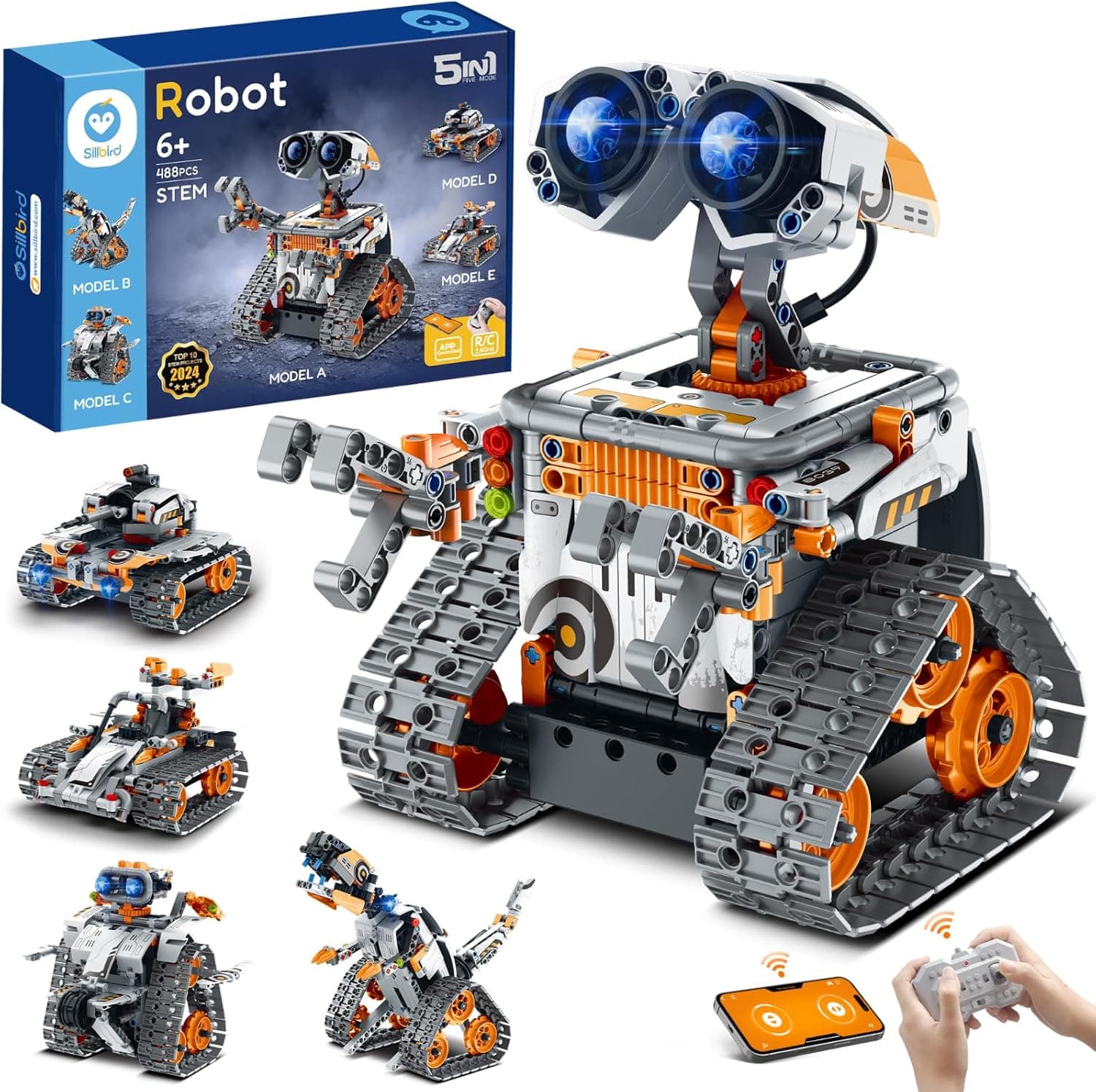
Not every "coding robot" needs to be about coding first. The Sillbird 5-in-1 STEM Robot leads with building (488 pieces of LEGO-Technic-style construction) and adds a layer of remote and app control on top. For families whose child loves clicking bricks together as much as making things move, it's one of the best-value kits on Amazon UK, and a clever alternative to pricier programmable robots like the Makeblock mBot.
Here's our honest take on what you get for around £50, and where the compromises lie.
👉 In a hurry? Check the latest price on AmazonAs an Amazon Associate, AIToys.co.uk earns from qualifying purchases..
Quick Verdict: Sillbird 5-in-1 STEM Robot
The Sillbird earns a healthy 4.3 out of 5. As an affordable, satisfying construction kit with a motorised, controllable payoff, it's hard to beat at the price: owners repeatedly compare it favourably to LEGO Technic. The five models keep things fresh, and the build itself is a genuine STEM workout in patience and fine-motor skill. It loses a little ground because you can only build one model at a time, the instructions can be fiddly, and the "coding" is fairly light. Set expectations as "brilliant building toy with a tech twist" rather than "serious programming robot" and it delivers.
Pros
- Excellent value: 488 pieces for around £50, LEGO-Technic feel.
- Five builds: wall robot, explorer, mech dinosaur, tank and stunt car.
- Remote and app control: drive it, plus simple in-app programming.
- Real construction skills: patience, sequencing and fine-motor practice.
- Helpful support: owners praise fast replacement of any missing parts.
Cons
- One model at a time: switching means taking the last one apart.
- Fiddly instructions: some steps need an adult's eye.
- Light on coding: nowhere near the depth of Scratch or Arduino kits.
- A long build: rewards patience over instant gratification.
Key Features
The Sillbird is pitched at children aged 8 to 13, and that feels right: the piece count and instruction detail suit confident builders. Here's what's in the box.
488 pieces, five models. The kit is a Technic-style construction set with hundreds of interlocking parts. From them, children can build five different machines (a walking-style wall robot, an explorer robot, a mech dinosaur, a tank and a stunt car) though only one at a time. Each model has its own instruction sequence, so there are effectively five projects in the box.
Remote and app control. Once built, the model isn't static. A bundled remote lets children drive it around, and a companion app adds another layer, including simple programming "tracks" that let them sequence movements rather than just steer in real time.
Flexible, poseable joints. The robot builds feature adjustable heads, arms and hands, so children can pose them and trigger little interactions: a nice touch that extends play beyond just driving.
Rechargeable power. Unlike many AA-hungry robots, the Sillbird's motorised core is rechargeable, which keeps running costs down over time.
What We Like
The build is the star, and it's genuinely good. With 488 parts, this is a meaty project that can absorb a child (or a child-and-parent team) for an afternoon, and the components fit together cleanly. Owners consistently describe it as "almost like LEGO" and "a great, affordable alternative to LEGO Technic": high praise at this price, and it matches our impression. If your child loves the LEGO Boost style of build-then-animate play, this scratches a similar itch for far less money.
The five-model variety is the other big win. A single-build kit can feel finished once it's assembled; here, there's always another machine to attempt, which stretches the value a long way. And the motorised, controllable payoff at the end (driving the finished dinosaur or tank around the living room) is exactly the reward that keeps children invested through a long build.
We also note the customer service. Across owner reviews, a recurring theme is that when the odd small part is missing from a big bag of components, a quick email to Sillbird results in replacements arriving within days. That's reassuring for a kit with this many pieces.
It's worth dwelling on the building experience, because it's where most of the value lies. Working through several hundred parts teaches sequencing, spatial reasoning and the simple discipline of following instructions carefully. Slow down or skip a step and you'll soon be backtracking, which is a lesson in itself. Many parents report sitting down to "help for a minute" and staying for the whole build, which tells you something about how absorbing it is. The finished models are sturdy enough to actually play with rather than just display, and the poseable joints mean children keep tinkering with them after the initial assembly is done. For a child who already loves clicking bricks together, that combination of a long, rewarding build and a controllable result at the end is a near-perfect match, and it does it all for roughly a third of what an equivalent branded Technic set would cost.
What Could Be Better
In the interests of an honest review, here's where it falls short.
The "one model at a time" reality is the main one. Because all five builds share the same pieces, switching from the dinosaur to the tank means dismantling the first. For some children that's part of the fun; for others, who'd hoped to keep their finished creation on the shelf and build the next, it's a disappointment worth flagging.
The instructions divide opinion. Most owners find them detailed and followable, but a few (including some adults) report fiddly steps where it's easy to go wrong, and younger or less patient builders may need a hand to stay on track. With a build this size, the occasional misstep means backtracking.
And it's important to be clear about the coding. This is a building toy with light programming, not a serious coding platform. The app's sequencing tracks are a fun extra, but they don't approach the depth of block-and-text systems like the mBot's mBlock. If structured coding education is your priority, a dedicated coding robot from our mBot alternatives round-up will serve you better.
That said, the app is a pleasant bonus rather than the main event. Once a model is built, children can pair it over Bluetooth and use the app to drive it, trigger its movements, and string together simple sequences. Enough to introduce the idea that a machine follows instructions in order, which is the seed of all coding. Younger children tend to treat it mostly as a fancy remote control, while older ones enjoy experimenting with the movement sequences and seeing the robot replay them. It won't teach Scratch or Python, but as a gentle on-ramp that rewards a long building session with a bit of programmable play, it does the job it sets out to do.
Who Is It For?
The Sillbird is ideal for children aged 8 to 13 who love building: the LEGO Technic fan, the child who enjoys following a long set of instructions to a satisfying mechanical payoff, and the family who wants a lot of hands-on, fairly screen-light play for a modest outlay. It also makes a strong-value birthday or Christmas gift precisely because it looks and feels far pricier than it is.
It's less suited to children who want to keep every build permanently, to those who'll lose patience with a long assembly, or to families specifically seeking a structured coding curriculum: for whom the Makeblock mBot or another programmable robot is the better buy. Our best STEM toys round-up is a good place to compare the building-led options.
Value for Money
This is the Sillbird's trump card. A 488-piece, motorised, app-and-remote-controlled building robot for around £50 is genuinely impressive. Particularly when the obvious comparison, LEGO Technic, costs considerably more for a similar parts count. Add the five models and the rechargeable core, and the cost-per-hour-of-play is excellent.
You are, of course, trading away the deep coding features of a dedicated robot, and the "build one at a time" limitation means it's not quite five toys in one. But as an affordable, absorbing construction kit with a satisfying tech payoff, it's one of the best-value picks in this category, and a smart choice if you found the guide to choosing a first coding robot steered you towards building over pure programming.
Amazon prices change, so check the current figure before buying.
Setting Up and Getting Started
There's no real "setup" in the software sense. The Sillbird's value is in the building, so getting started simply means opening the box and beginning the first model. Set aside a decent chunk of time: with 488 pieces, even a confident builder won't finish in twenty minutes, and it's genuinely better tackled across a couple of relaxed sessions than rushed in one sitting. We'd recommend laying the bagged parts out in order before you start and keeping the instruction booklet flat and well lit, because a few of the steps are easy to misread and a single wrong join early on can mean backtracking later. Younger or less experienced builders will appreciate an adult nearby for the trickier sections, though plenty of children happily work through it solo. Once the model is finished, charging is over USB and pairing the app is straightforward. Connect over Bluetooth, and your child can drive the robot and play with its movement sequences. Treat the build itself as the main event, because that's where the hours of value and the real STEM learning live.
👉 See the latest Sillbird price on Amazon.
Verdict
The Sillbird 5-in-1 STEM Robot is a terrific budget building kit with just enough tech to feel special. The 488-piece construction is satisfying and genuinely educational, the five models stretch the value, and the motorised, controllable result gives children a real reward for their patience. Go in understanding that it's a building toy first and a coding toy a distant second (and that you can only build one model at a time) and it's one of the easiest value recommendations we can make for keen young makers.
Our rating: 4.3 out of 5.
👉 Ready to start building? Check the latest price on Amazon.
Age guidance reflects the manufacturer's recommended age of 8+. Always supervise younger children with small parts.