Disclosure: This article contains affiliate links. As an Amazon Associate, AIToys.co.uk earns from qualifying purchases. If you buy through our links, we may earn a small commission at no extra cost to you. It never changes the price you pay, and it never changes our verdict.
For a lot of families, a child's first proper tablet is a genuine rite of passage, and few products own that moment in the UK quite like Amazon's Fire Kids range. The Fire HD 10 Kids Pro is the version built for older children. Officially aimed at ages 6 to 12, it swaps the toddler-proof foam bumper of the standard Kids tablet for a slimmer, more grown-up case, adds a filtered web browser and video calling, and keeps the two things that made the range a bestseller: outstanding parental controls and a year of the Amazon Kids+ content library.
At £149.99 it is not the cheapest tablet your child could have, but it is far from the most expensive either, and Amazon bundles in enough (the case, the Kids+ subscription and a no-questions-asked 2-year guarantee) that the maths is more interesting than the sticker price suggests. The catch, and there is always a catch with a Fire tablet, is that it runs Amazon's own version of Android without the Google Play Store. Whether that matters is the thread that runs through this whole review. Here is our honest, hands-on take on who the Fire HD 10 Kids Pro is really for.
Quick Verdict
The Fire HD 10 Kids Pro is the best-value big-kid tablet in the UK for parents who want serious control over what their child sees and does. The parental tools are the best in the business, the included year of Amazon Kids+ is genuinely good, and the 2-year replacement guarantee takes the fear out of the first inevitable drop. You are trading away the open Google Play Store and iPad-grade polish. Accept that, and there is very little at this price that looks after a 6-to-12-year-old as well.
£149.99 (price correct as of July 2026). Check the latest price on Amazon UK →As an Amazon Associate, AIToys.co.uk earns from qualifying purchases.

What Makes It the "Pro"?
Under the bonnet, the Kids Pro is the same tablet as the standard Fire HD 10 Kids: a bright 10.1-inch 1080p Full HD screen, 3GB of RAM, 32GB of storage (expandable to 1TB with a microSD card), up to 13 hours of battery life and USB-C charging. Amazon says it is around 25% faster than the previous generation, and in everyday use (reading, streaming, drawing, casual games) it feels perfectly smooth.
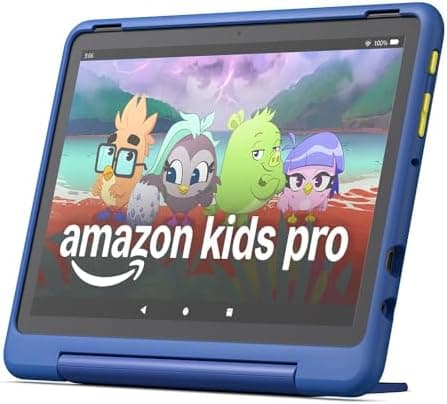
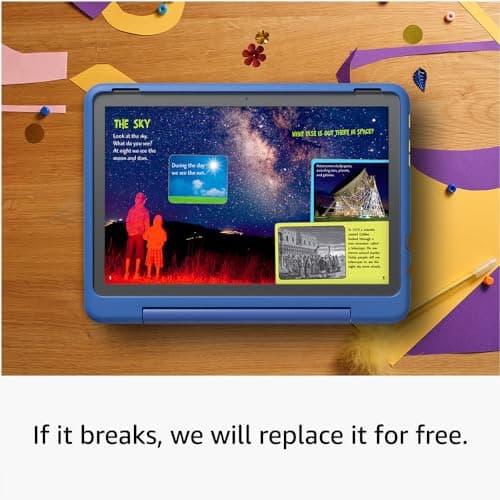
The "Pro" badge is really about presentation and permissions rather than power. Instead of the chunky, brightly coloured kid-proof bumper, you get a slimmer, more understated case that an eight- or ten-year-old won't feel embarrassed carrying. You also unlock features aimed at older children: a filtered web browser, and video and voice calling so they can ring approved contacts. Both editions include the same one-year Amazon Kids+ subscription and the same 2-year worry-free guarantee.
Kids vs Kids Pro: Which Should You Buy?
This is the single most common question parents ask, so let's answer it plainly. The two tablets are near-identical inside; the difference is the case and the age profile.
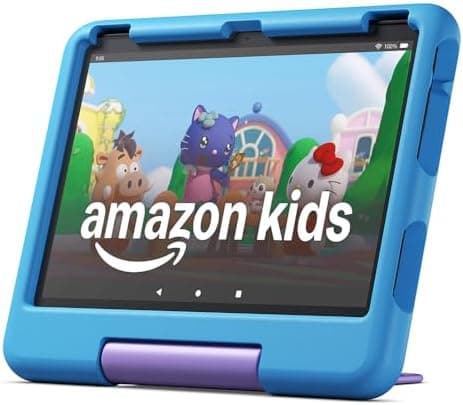
The standard Fire HD 10 Kids (ages 3-7) comes in a thick, squishy kid-proof case designed to survive being dropped, thrown and sat on, and its content skews younger. The Fire HD 10 Kids Pro (ages 6-12) has the slim case, the older-child content filters, the web browser and calling. There is no difference in screen, speed or battery.
Our rule of thumb: if your child is under six, or is heavy-handed, choose the standard Kids tablet for that armour-like case. If they are six or older and would rather not be seen with a "baby" tablet, the Pro is the one. If you want to weigh the 3-7 edition and the non-Amazon rivals side by side, our best kids' learning tablets round-up compares the whole Fire range against Samsung, Lenovo and iPad options.

Amazon Kids+: The Part That Adds the Value
The reason to buy a Fire Kids tablet rather than a bare Fire HD 10 is Amazon Kids+, and it is included free for the first year. Kids+ is a curated, advert-free library of thousands of books, audiobooks, games, videos and apps, with recognisable names such as Disney, Marvel, LEGO, National Geographic Kids and CBeebies alongside a lot of genuinely educational content. Everything in it is age-filtered, so you are not left policing a firehose of random YouTube.
This is where Amazon's "save up to £60" claim comes from. Buy the tablet, case and a year of Kids+ separately and you would pay considerably more. After the first year, Kids+ renews automatically, starting at £4.99 per month, and you can cancel any time from the Parent Dashboard. Be honest with yourself about this: if your family will lean on Kids+, the bundle is excellent value. If you know you'll cancel immediately and only use free apps, a plain Android tablet may suit you better.
Parental Controls: Best in the Business
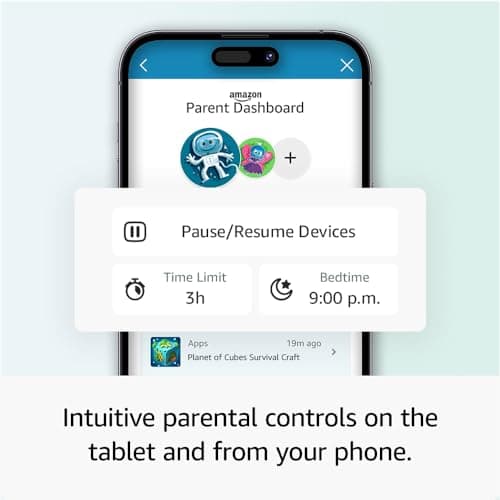
If you buy a Fire Kids tablet for one reason, it is this. The Amazon Parent Dashboard app (which lives on your own phone) is the most complete set of parental controls we've used on any children's tablet, and it has the awards to match.
From your phone you can set daily screen-time limits (and different limits for weekdays and weekends), pause the tablet instantly at bedtime, and set "educational goals" that require your child to read or learn for a set time before entertainment apps unlock. You approve or block individual apps and websites, review what they've actually been using, and grant requests when they ask to download something new. Each child gets their own profile, so siblings don't share limits or content. It is remote, granular and genuinely reassuring: the kind of control that turns a tablet from a worry into a tool.
Screen, Performance and Battery
The 10.1-inch 1080p Full HD display is the standout piece of hardware. It is sharp and bright enough that books are comfortable to read, films look good, and homework research is easy on the eyes: a clear step up from the smaller, lower-resolution screens on many budget kids' tablets.
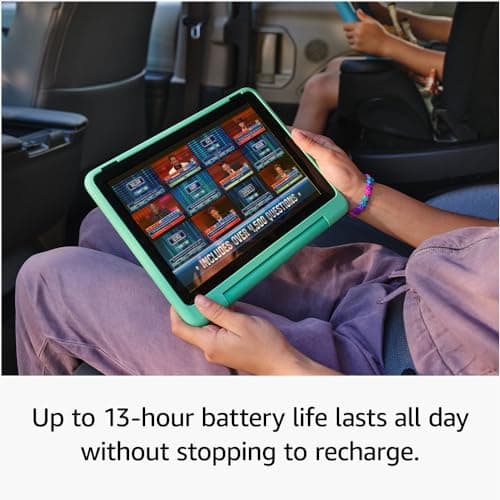
Performance is best described as "smooth for what children actually do." With 3GB of RAM the tablet handles reading apps, streaming, drawing and the kind of casual games in Kids+ without stutter. It is not a high-end gaming device and it won't pretend to be, but it never felt sluggish in day-to-day use. Battery life is a real strength: Amazon quotes up to 13 hours, and while heavy video streaming will bring that down, it comfortably lasts a long car journey or a full day of on-and-off use. Storage is 32GB out of the box, which fills faster than you'd expect once a few games and downloaded videos pile up: budget for a cheap microSD card if your child likes to keep a lot offline.
What We Like
The combination of best-in-class parental controls, a year of genuinely good Kids+ content and a 2-year "we'll replace it if it breaks" guarantee is hard to beat at this price. The slim case and older-child features make it feel appropriate for a nine- or eleven-year-old rather than a toddler. The screen and battery punch above the price, and the whole thing is set up to be safe from the moment you take it out of the box. For a parent who wants a device they can hand over without anxiety, that is a lot of reassurance for £149.99.
What Could Be Better
The big one is Fire OS. Amazon's tablets run a fork of Android that uses the Amazon Appstore instead of Google Play. Most mainstream apps your child wants (Netflix, Disney+, Minecraft, Spotify, Zoom, BBC iPlayer) are available, but some are not, and Google's own apps (including the standard YouTube Kids app and Google Classroom) are absent or awkward. There are ways to sideload Google Play, but we don't recommend fiddling with that on a child's device: it undermines the very simplicity and safety you bought the tablet for.
The cameras are basic (5MP front and rear) which is fine for video calls and the odd silly selfie but nothing more. Amazon Kids+ auto-renews at £4.99 a month after year one, so set a reminder if you don't want to keep it. And it is worth being clear-eyed that the "Pro" is not a more powerful tablet; it is the same hardware with a slimmer case and older-child settings. If you want raw performance and years of software life, an iPad is a different (and much pricier) proposition.
Who It's For: Age, Safety and Screen Time
The Fire HD 10 Kids Pro is squarely aimed at children aged 6 to 12, and that is exactly who it suits: confident enough to want a "real" tablet, young enough that you still want a firm hand on what they can access. It is an especially good fit for keen readers (the Kids+ book library is superb), for families already inside the Amazon ecosystem, and for households where more than one child will share one device across separate profiles.
On safety, the filtered web browser means there is no unfettered access to the open internet, and everything runs inside the child profile you control. As with any connected device aimed at children, it's worth reviewing the privacy settings and the Amazon Kids terms. Children's profiles are designed to meet child-privacy rules, but you are still the one deciding what's shared and enabled. And no set of controls replaces the screen-time culture you set at home: the tools here are excellent for enforcing limits, but it's still worth balancing tablet time with hands-on, screen-free play. Pairing a tablet with something like a Yoto Player for audio, or the tactile toys in our best screen-free coding toys guide, keeps the balance healthy.
Is It Good Value?
At £149.99 (correct as of July 2026), the Fire HD 10 Kids Pro sits in the sensible middle of the kids' tablet market: well above the throwaway £40 budget tablets, well below an iPad. The value case rests on the bundle: the tablet, the protective case, a year of Amazon Kids+ and the 2-year worry-free guarantee together would cost noticeably more bought piecemeal, and that replacement guarantee is unusually generous for the category. Fire tablets are also among the most heavily discounted products Amazon sells, so it's well worth checking the current price around major sale events rather than assuming the list price. We won't claim it's ever the "lowest" price anywhere, but for what you get in the box, it's strong value.
£149.99 (price correct as of July 2026). Check the latest price on Amazon UK →
Frequently Asked Questions
Does the Fire HD 10 Kids Pro have the Google Play Store? No. It uses the Amazon Appstore. Most big-name apps are there, but some (including Google's own apps) are missing. You can technically sideload Google Play, but we don't recommend it on a child's device.
What's the difference between the Fire HD 10 Kids and Kids Pro? The case and the age profile. The standard Kids tablet (ages 3-7) has a chunky kid-proof case; the Kids Pro (ages 6-12) has a slim case plus a filtered web browser and video calling. The hardware inside is the same.
Is Amazon Kids+ free forever? No. One year is included free. After that it renews automatically from £4.99/month, and you can cancel any time from the Parent Dashboard.
Can more than one child use the same tablet? Yes. You can set up multiple child profiles, each with its own screen-time limits and age-appropriate content.
Is it good for schoolwork? It's fine for reading, filtered web research and light note-taking, but it isn't a laptop replacement for heavy typing or specialist school software.
What age is it best for? Six to twelve. If your child is younger than six, the standard Fire HD 10 Kids tablet with its tougher case is the better buy.
The Verdict
The Amazon Fire HD 10 Kids Pro doesn't try to be the most powerful tablet in the room, and it doesn't need to be. What it does: hand a 6-to-12-year-old a bright, capable, genuinely safe tablet, with the best parental controls on the market, a year of excellent content and a guarantee that survives clumsy hands: it does better than anything else near the price. The only real question you need to answer is whether you can live without the Google Play Store. If you can, this is the easiest kids' tablet in the UK to recommend. If your child needs specific Google apps, look to an Android tablet or an iPad instead.
For most families with primary-school-aged children, though, the Fire HD 10 Kids Pro is the sensible, safe, well-priced choice, and that's why it remains a bestseller.
Our rating: 4.4 / 5
£149.99 (price correct as of July 2026). Check the latest price on Amazon UK →
Related Reviews and Guides
- Best Kids' Learning Tablets UK 2026: how the Fire range compares to Samsung, Lenovo and iPad
- Best AI Toys for 9-12 Year-Olds UK 2026: ideas to pair with a first tablet
- Osmo Genius Starter Kit Review: turn tablet time into hands-on learning
- Yoto Player (3rd Generation) Review: a screen-free companion for younger siblings
- Best Screen-Free Coding Toys UK 2026: balance the screen time