The Best Coding Robots for Under 5s in 2026: Nurturing Young Minds
Expert reviews of the 8 best screen-free coding robots for preschoolers in 2026. Compare Tale-Bot Pro, Botley 2.0, Cubetto, Code & Go Mouse and more by age
The Best Coding Robots for Under 5s in 2026: Nurturing Young Minds
Digital literacy and computational thinking are no longer skills for the future. They're essential for the present. Introducing these concepts to children at an early age can provide a significant advantage, fostering problem-solving skills, logical thinking, and creativity. While screen time is often a concern for parents of young children, a new generation of educational toys offers a hands-on, engaging way to introduce foundational coding concepts without the need for screens: coding robots.
For children under five, traditional coding might seem light years away. However, coding robots designed for this age group focus on pre-coding skills, teaching concepts like sequencing, algorithms, debugging, and logical reasoning through play. These robots are tactile, often brightly coloured, and designed to be intuitive for little hands and developing minds. They empower children to become creators, not just consumers, of technology.
At AIToys.co.uk, we've meticulously researched the top coding robots available for preschoolers in 2026, considering age-appropriateness, educational value, durability, and overall engagement. This year we've expanded our list to eight screen-free favourites (every one confirmed in stock at the time of writing) to help you choose the perfect robot to spark your child's curiosity and lay a strong foundation for future STEM success.
_As an Amazon Associate, AIToys.co.uk earns from qualifying purchases. If you click one of our links and make a purchase, we may receive a small commission at no additional cost to you. This helps support our work in providing unbiased reviews and recommendations._
Why Introduce Coding Concepts to Under 5s?
You might be wondering if a four-year-old is really ready for "coding." The truth is, these robots don't teach complex programming languages. Instead, they introduce the underlying principles of computational thinking, which are crucial for a wide range of academic and life skills:
- Problem-Solving: Children learn to break down tasks into smaller steps and figure out how to achieve a desired outcome.
- Logical Thinking: They begin to understand cause and effect, and how a sequence of commands leads to a specific behaviour.
- Sequencing: This is a fundamental concept in coding: understanding that actions happen in a particular order. Coding robots help children visualise and plan sequences.
- Debugging: When a robot doesn't do what's expected, children learn to review their commands and identify where they went wrong, a crucial skill in both coding and everyday life.
- Creativity & Imagination: Many coding robots allow for open-ended play, encouraging children to imagine scenarios and use the robot to tell stories or navigate imaginative worlds.
- Screen-Free Learning: Every robot in this guide is designed for screen-free play, offering a refreshing alternative to tablets and phones while still delivering genuine educational value.
- Preparation for Future Learning: These early experiences build confidence and familiarity with STEM concepts, making formal education in these areas more accessible and enjoyable later on.
Our Top Picks for 2026: In-Depth Reviews
We've looked closely at preschool coding robots to bring you our top recommendations for 2026. Each robot offers a unique approach to learning, but all share the common goal of making early coding fun and engaging. Prices are approximate and correct as of June 2026. Always check the live price on Amazon before buying.
1. MatataStudio Tale-Bot Pro: Best for Ages 3-5
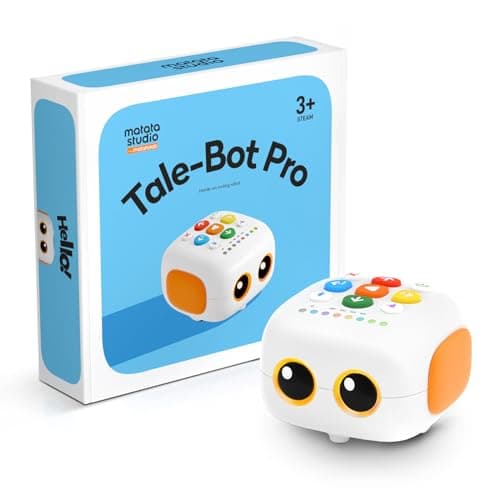
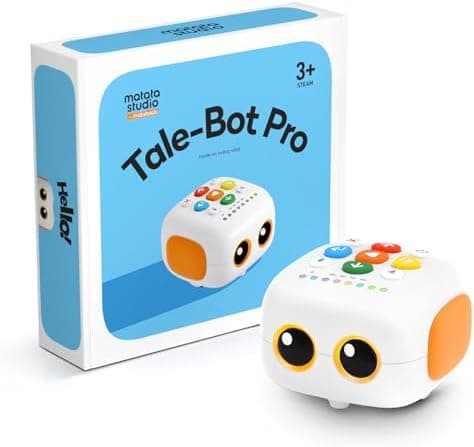
Overview: If you want a robot designed specifically for the under-5 bracket, the Tale-Bot Pro is our standout pick for 2026. Built by MatataStudio (the team behind the award-winning Matatalab range), it's a chunky, friendly robot with big directional buttons right on top of its head. No remote, no app, and no screen required. A glowing face shows expressions, and the robot talks, plays sounds and even records your child's voice, making every command feel like a conversation.
Key Features:
- On-body buttons: Forward, back, left, right, plus action buttons sit on the robot itself, perfect for little hands.
- Expressive face and sounds: Tale-Bot reacts with emotions and audio feedback, keeping toddlers hooked.
- Obstacle sensors: It detects objects and edges, introducing the idea of a robot "sensing" its world.
- Map mats and story cards: Comes with adventure maps and command cards that turn coding into storytelling.
- Voice recording and drawing: Add a pen and Tale-Bot draws its path, making sequences visible.
Educational Value: Tale-Bot Pro nails the fundamentals (sequencing, directionality and cause-and-effect) without any of the friction of remotes or apps. Because everything happens on the robot, even a three-year-old can press a few buttons and immediately see the result, building the confidence loop that keeps young learners engaged. The map adventures encourage planning and gentle problem-solving as children work out how to reach a destination.
Pros:
- Genuinely designed for ages 3-5, not adapted from an older toy.
- Completely screen-free with intuitive on-body controls.
- Expressive personality keeps toddlers engaged.
- Map mats and cards add structured challenges.
Cons:
- Pricier than the simplest mice and caterpillars.
- Some accessories and expansion mats are sold separately.
Verdict: For the exact 3-5 age range this guide targets, the Tale-Bot Pro is the most thoughtfully designed robot on the list. It's our top recommendation for a first coding robot.
Around £89.99. Check price on Amazon UK →As an Amazon Associate, AIToys.co.uk earns from qualifying purchases.
2. Learning Resources Botley 2.0 Coding Robot Activity Set: Best All-Rounder
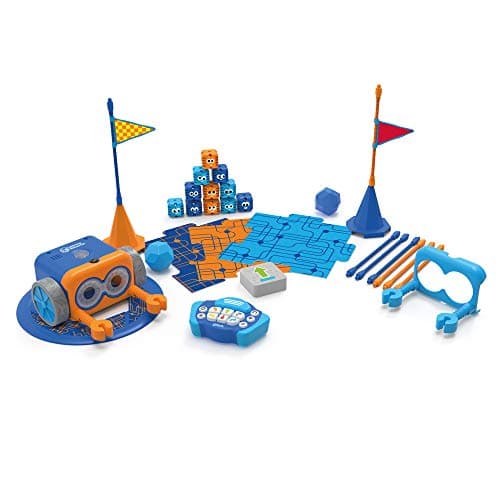
Overview: Botley 2.0 is an enhanced version of the original award-winning Botley, packed with more features, advanced coding capabilities, and even more ways to play. Officially recommended for ages 5 and up, it's perfectly accessible for a curious 4-year-old with some guidance, and remains a favourite for its robust design and generous activity set. It's entirely screen-free and focuses on true, object-based coding.
Key Features:
- Lights & sounds: Botley 2.0 lights up and makes sounds, engaging children's senses during play.
- Advanced movements: It can detect objects, follow black lines, and has a "looping" feature that introduces more complex coding concepts.
- Hidden features: Children can unlock hidden tricks, adding an element of discovery.
- 77-piece activity set: Includes coding cards, obstacle pieces and a game board for structured, out-of-the-box play.
- Remote programmer: All programming is done via an easy-to-use remote: no screen needed.
Educational Value: Botley 2.0 excels at teaching sequential programming, step coding and logical thinking. The object-detection feature introduces conditional ("if/then") statements in a simplified form, while the looping button hints at repetition. The activity set provides numerous challenges that encourage planning, prediction and troubleshooting: the building blocks of computational thinking.
Pros:
- Highly durable and robust for young children.
- Excellent educational value covering core coding concepts.
- Extensive activity set provides long-lasting engagement.
- Object detection and looping add complexity as skills grow.
Cons:
- Requires 5 AAA batteries (not included).
- Can be slightly overwhelming for the youngest without adult help.
Verdict: A comprehensive, durable robot that grows with your child. If you want one toy that covers everything from first sequences to looping, Botley 2.0 is the all-rounder to beat.
Around £67.94. Check price on Amazon UK →
3. Primo Toys Cubetto Playset: Best Montessori Choice
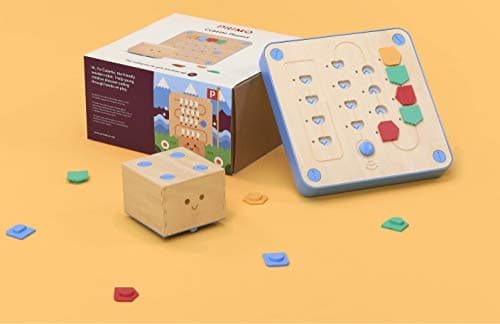
Overview: Cubetto is a beautifully designed, Montessori-inspired wooden robot that introduces programming to children as young as three. It's celebrated for its tactile, hands-on approach, using a tangible "control board" and colourful command blocks instead of screens or buttons on the robot itself. Cubetto encourages storytelling and imaginative play as children guide the friendly wooden robot through adventure maps.
Key Features:
- Wooden design: Made from high-quality, durable wood with a classic toy feel.
- Screenless and gender-neutral: No screens, no remote: just pure tactile play.
- Command-block system: Children place physical coloured blocks into the control board to build sequences (forward, left, right, function).
- Adventure maps and storybook: Comes with a world map and storybook; expansion packs add new maps and stories.
- Function block: Introduces the concept of subroutines (functions) early on, explained simply.
Educational Value: Cubetto is unparalleled at introducing sequential programming and algorithmic thinking to very young children. By physically manipulating the blocks, kids develop a concrete understanding of abstract concepts. The function block brilliantly teaches reusable code, while the adventure maps build planning and spatial awareness. It also develops fine motor skills.
Pros:
- Exceptional for very young children (3+ years).
- Unique tactile, screen-free coding experience.
- High-quality, durable wooden construction.
- Teaches functions in a concrete, age-appropriate way.
Cons:
- The most expensive option on this list.
- Expansion packs are sold separately.
Verdict: A premium, heirloom-quality choice that shines for its innovative, tactile approach. If budget allows and you love the Montessori philosophy, Cubetto is an outstanding investment.
Around £180.00. Check price on Amazon UK →
4. Learning Resources Code & Go Robot Mouse: Best Budget Buy
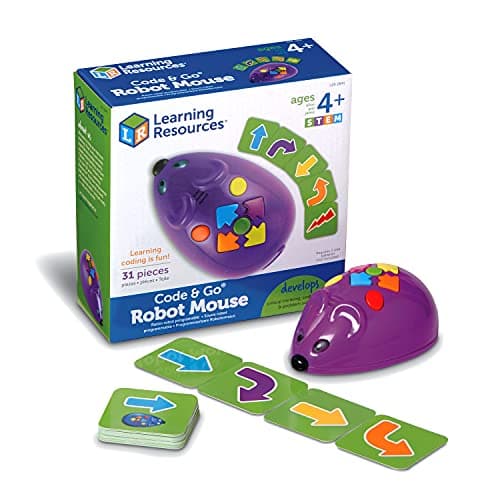
Overview: Meet Colby, the Code & Go Robot Mouse: one of the most affordable and best-loved ways to introduce coding to children aged 4 and up. This bright, cheese-chasing mouse is programmed using simple directional buttons on its back, making it an ideal first step into sequencing and logical thinking without any screens.
Key Features:
- On-board buttons: Forward, back, left, right and an action button let children build sequences directly on the mouse.
- Coding cards: Included cards help children plan and record their sequences before pressing "Go".
- Light-up and sound feedback: Two speeds, plus lights and squeaks confirm each command.
- Maze-ready: Works brilliantly with the separately available maze grid and walls to set goal-based challenges.
- Screen-free: Everything happens on the mouse: no app required.
Educational Value: The Robot Mouse is a superb low-cost entry point for sequencing, directionality and step-by-step problem solving. Children plan a route to the "cheese", translate it into button presses, then debug when Colby takes a wrong turn. It's a clear, satisfying loop that teaches persistence and planning, and it scales up nicely when you add maze pieces.
Pros:
- Excellent value for money.
- Very simple and intuitive for first-time coders.
- Compact and durable.
- Pairs with maze accessories for extended play.
Cons:
- The standalone mouse has fewer accessories than the full activity set.
- Requires AAA batteries (not included).
Verdict: The best budget pick on this list. If you want to test the waters without a big outlay, Colby the Robot Mouse delivers real coding fundamentals for pocket-money money.
Around £33.70. Check price on Amazon UK →
5. Learning Resources Coding Critters MagiCoders: Blazer the Dragon: Best for Imaginative Play
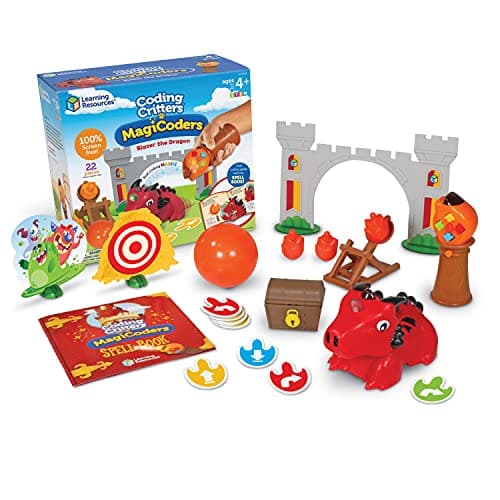
Overview: Coding Critters MagiCoders bring a dash of magic to early coding. Blazer the Dragon is an adorable, story-themed robot pet that children program using a "magic wand": casting coding "spells" to send Blazer on enchanted adventures. It's entirely screen-free and blends imaginative role-play with genuine sequencing practice, making it perfect for children aged 4 and up who love a story.
Key Features:
- Wand-based coding: Children wave the wand and press buttons to build sequences of "spells" (commands).
- Two play modes: A code mode for programming, plus a free-play mode where Blazer reacts like a friendly pet.
- Story-led: Comes with a storybook and spell cards that scaffold play and spark narrative skills.
- Lights, sounds and personality: Blazer responds with magical effects that delight younger children.
- Screen-free: All coding happens with the wand and the dragon: no app needed.
Educational Value: MagiCoders teaches directional coding, sequencing and cause-and-effect inside a make-believe world. By "casting spells", children unknowingly build and debug command sequences, while the storybook encourages them to invent their own challenges. For imaginative kids who prefer characters to grids, this is a wonderfully gentle on-ramp to computational thinking.
Pros:
- Highly engaging, magical theme.
- Combines storytelling with real sequencing practice.
- Two play modes balance structure and free play.
- Completely screen-free.
Cons:
- Functionality is more playful than technical compared with Botley.
- Requires AAA batteries (not included).
Verdict: If your child is drawn to stories, animals and a bit of magic, Blazer the Dragon turns coding into an adventure. A charming, affordable pick for imaginative learners.
Around £51.16. Check price on Amazon UK →
6. Learning Resources Cooper the STEM Robot: Best for Toddlers (3+)
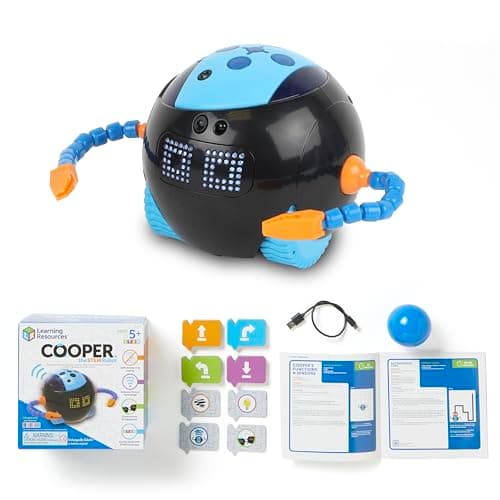
Overview: Cooper is a friendly, brightly coloured robot built for the very youngest STEM explorers. Aimed at ages 3 and up, this gift set focuses on early problem-solving, matching and sequencing through tactile, screen-free play. With an expressive design and chunky, toddler-proof pieces, Cooper is a gentle first introduction to the world of robots before children move on to programmable models.
Key Features:
- Toddler-friendly design: Big, robust parts suited to small hands and enthusiastic play.
- Hands-on activities: Sorting, matching and sequencing tasks build pre-coding logic.
- Lights and sounds: Interactive feedback keeps little ones engaged.
- Gift-set format: Arrives ready to play with accessories included.
- Screen-free: No app or device required.
Educational Value: Cooper lays the groundwork for coding by developing the skills that come first: recognising patterns, following a sequence and understanding cause-and-effect. For a three-year-old, that's exactly the right starting point. The play is open-ended and parent-friendly, so you can guide gentle challenges and celebrate small wins together.
Pros:
- Ideal for the youngest end of the under-5 range.
- Durable and genuinely toddler-proof.
- Encourages pre-coding logic and fine motor skills.
- Affordable gift-ready set.
Cons:
- Less "programmable" than the robots higher up this list.
- Children may outgrow it as they approach school age.
Verdict: A brilliant first robot for three-year-olds who aren't quite ready for button-sequencing. Cooper builds the foundations that make later coding click.
Around £51.00. Check price on Amazon UK →
7. Learning Resources Switcheroo Coding Crew: Best Card-Based Coder
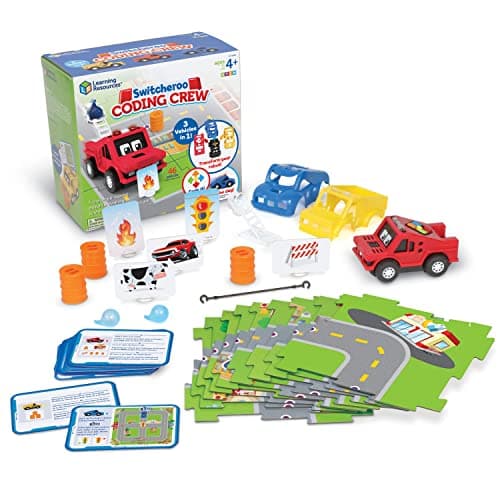
Overview: The Switcheroo Coding Crew offers a clever twist on screen-free coding: instead of pressing buttons, children slot coding cards into the robot, which then "reads" them and carries out the sequence. With swappable character tops, ages 4 and up can mix and match their crew while learning to plan and execute a program: a satisfyingly physical way to see code come to life.
Key Features:
- Card-reading coding: Insert command cards and the robot executes the sequence in order.
- Swappable characters: Interchangeable tops keep play fresh and personal.
- Tangible sequencing: Children physically lay out their program before running it.
- Lights and sounds: Friendly feedback confirms each step.
- Screen-free: No app or tablet needed.
Educational Value: Switcheroo makes the abstract idea of "a program" wonderfully concrete: a child builds a stack of cards, feeds them in, and watches the robot follow them step by step. That tight link between the cards and the action reinforces sequencing and debugging: when the robot doesn't reach its goal, kids reorder the cards and try again. The swappable characters add a layer of imaginative ownership.
Pros:
- Card-based coding is intuitive and very visual.
- Swappable tops add replay value and personalisation.
- Strong reinforcement of sequencing and debugging.
- Completely screen-free.
Cons:
- Cards can be misplaced over time.
- Requires batteries (not included).
Verdict: A genuinely different take on early coding that suits children who like to plan with physical pieces. Great value and a refreshing alternative to button-based robots.
Around £64.89. Check price on Amazon UK →
8. Sphero indi: Best for Growing With Your Child
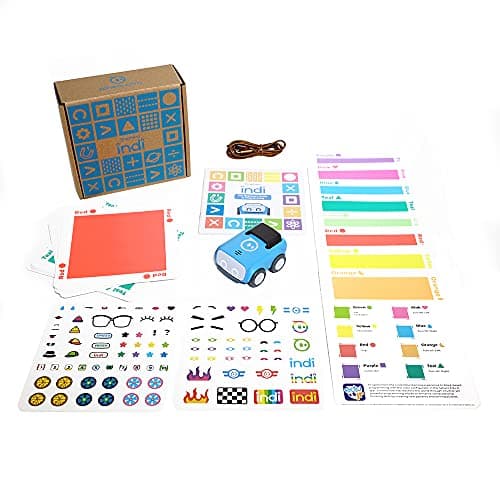
Overview: Sphero indi is a screenless little robot car that teaches coding through colour. Children lay down coloured tiles, and indi drives over them, reacting to each colour with a different action: green means go fast, red means stop, and so on. Aimed at ages 4+, it starts completely screen-free, then (for older siblings or when your child is ready) unlocks an optional app with block-based coding, so it genuinely grows with your child.
Key Features:
- Colour-tile coding: Place tiles to program indi's behaviour: no screen required to start.
- Challenge cards: Included cards set puzzles that build logical thinking.
- Two stages of learning: Screen-free play first, optional app-based block coding later.
- Durable, zippy design: Built to take knocks and keep rolling.
- Creative, open-ended play: Children design their own colour mazes and routes.
Educational Value: indi is brilliant for cause-and-effect and algorithmic thinking. Because each colour is a command, children quickly grasp that they are "programming" a path simply by arranging tiles. Solving the challenge cards builds planning and debugging, and the optional app gives the toy real longevity as your child approaches school age and beyond.
Pros:
- Screen-free to start, with room to progress.
- Colour-based coding is instantly understandable.
- Encourages open-ended, creative problem solving.
- Well-built and from a trusted STEM brand.
Cons:
- One of the pricier options.
- The app's block coding is aimed at slightly older children.
Verdict: The best choice if you want a robot that won't be outgrown in a year. indi delivers screen-free fun for under-5s and a clear path to more advanced coding later.
Around £124.99. Check price on Amazon UK →
Comparison Table: Coding Robots for Under 5s (2026)
| Robot | Best For | Recommended Age | Coding Method | Approx. Price |
|---|---|---|---|---|
| MatataStudio Tale-Bot Pro | Ages 3-5 overall | 3-5 years | On-body buttons | £90 |
| Botley 2.0 Activity Set | All-round value | 4-5+ (officially 5+) | Remote programmer | £68 |
| Primo Toys Cubetto | Montessori fans | 3-6 years | Tactile command blocks | £180 |
| Code & Go Robot Mouse | Budget buy | 4+ years | On-body buttons | £34 |
| Coding Critters MagiCoders | Imaginative play | 4+ years | Magic-wand sequences | £51 |
| Cooper the STEM Robot | Toddlers | 3+ years | Hands-on activities | £51 |
| Switcheroo Coding Crew | Card-based coding | 4+ years | Coding cards | £65 |
| Sphero indi | Growing with your child | 4+ years | Colour tiles (+ optional app) | £125 |
_Prices are approximate and correct as of June 2026. Always check the live price and availability on Amazon before buying._
🏬 Also available on the high street: Browse coding robots & STEM toys at The Entertainer →
Key Considerations When Buying
Choosing the right coding robot depends on your child's age, interests, and your family's budget. Here are some factors to keep in mind:
- Age appropriateness: While many state "3+", consider your child's individual developmental stage. Cooper and Tale-Bot Pro suit the youngest; Botley and Sphero indi offer more depth as skills grow.
- Screen-free vs app-enabled: Every robot here is screen-free to play. Sphero indi adds an optional app for progression: decide what balance works for your family.
- Durability: Young children can be tough on toys. Look for robust materials that withstand drops and bumps. Cubetto's wood and Botley's tough plastic both excel here.
- Educational depth: How far can the robot take your child? Some teach basic sequencing; others introduce loops, functions or app-based coding.
- Engagement & playability: A toy that captures a child's imagination will be used more often. Story-led robots like MagiCoders suit imaginative children.
- Battery requirements: Most of these robots need batteries. Consider whether you prefer disposables or rechargeables, and factor in the cost.
- Expansion & accessories: Do extra mats, cards or maze pieces cost more? Factor these into the overall price and longevity.
How to Maximise Learning with Coding Robots
Getting a coding robot is just the first step. Here's how to ensure your child gets the most out of their new educational toy:
- Start simple: Don't overwhelm them with complex challenges initially. Let them experiment, press buttons, and see what happens.
- Play together: Join your child's coding adventures. Ask open-ended questions like, "What do you think will happen if we add another 'forward'?"
- Encourage experimentation: Emphasise that it's okay to make mistakes. Debugging (finding and fixing errors) is a core part of coding and problem-solving.
- Connect to real life: Point out sequences in daily routines: "First we put on our socks, then our shoes."
- Use storytelling: Incorporate the robot into imaginative scenarios. "Can Tale-Bot deliver a message to the teddy bear?"
- Create challenges: Use household items to build obstacle courses. Encourage your child to draw maps or design new paths.
- Limit instructions: Instead of step-by-step commands, pose a problem and let your child figure out the solution.
- Patience is key: Every child learns at their own pace. Celebrate small victories and focus on engagement rather than perfect execution.
Frequently Asked Questions (FAQ)
Q: Are coding robots truly educational for under 5s? A: Yes. While they don't teach formal programming languages, they excel at introducing foundational concepts vital for computational thinking: sequencing, logical reasoning, problem-solving and debugging. These skills transcend coding and benefit overall cognitive development.
Q: My child is only 3 years old. Is that too young? A: Not at all for options like Cooper the STEM Robot, MatataStudio Tale-Bot Pro or Cubetto. These are designed with simplicity and tactile interaction in mind for very young learners, making abstract ideas concrete through hands-on play.
Q: Do these robots require a screen or tablet? A: Every robot in this guide is screen-free to play. Programming happens directly on the robot, with cards, with blocks or with colour tiles. Only Sphero indi offers an optional app, and it isn't needed for screen-free play.
Q: How durable are these coding robots? A: Generally very robust. Manufacturers like Learning Resources, Primo Toys, MatataStudio and Sphero understand these toys will endure energetic play. Cubetto (wood) and Botley (tough plastic) are particularly hard-wearing.
Q: What's the difference between a coding robot and a regular toy robot? A: A regular toy robot simply moves or makes sounds. A coding robot is designed for children to program its movements using a sequence of commands: the child becomes the "programmer," directly influencing the robot's behaviour through logical instructions.
Q: Are there any safety concerns with these robots? A: These toys meet relevant UK safety standards and carry CE/UKCA marks. Always supervise young children, especially with smaller accessories, and ensure battery compartments are securely fastened. Check the manufacturer's age recommendations and warnings.
Q: How do I keep my child interested over time? A: Variety is key. Introduce new challenges, build different obstacle courses, or create new stories. Play alongside your child, and explore expansion mats or cards where available. Keep it fun and let natural curiosity lead.
Conclusion
Investing in a coding robot for your preschooler is more than just buying a toy; it's an investment in their future. These engaging, screen-free devices offer a playful gateway into the fundamental principles of computational thinking, problem-solving and creativity. Skills that are increasingly crucial in our modern world.
Whether you choose the perfectly age-matched MatataStudio Tale-Bot Pro, the versatile Botley 2.0, the beautifully tactile Cubetto, the budget-friendly Code & Go Robot Mouse, the magical Coding Critters, the toddler-ready Cooper, the card-based Switcheroo Coding Crew, or the grow-with-you Sphero indi, you'll be giving your child a powerful tool to explore, learn and grow.
At AIToys.co.uk, we're confident that any of our eight top picks will be a valuable addition to your child's early learning journey, fostering a lifelong love for STEM. Always check the latest prices and availability via the provided Amazon links. Happy coding, little ones!
Related Articles
How we picked these
Every product here was checked against its live Amazon UK listing before publication: in stock, the listing matching the model we describe, and the price recorded at the time of writing. We read the manufacturer's own specifications for the figures quoted, and work through recent verified-purchase reviews looking for the same fault reported repeatedly rather than one-off complaints.
Picks are ordered by who each product actually suits: age, budget, and whether an app or subscription is involved. Not by commission. AIToys.co.uk earns from qualifying purchases through the links on this page; that does not affect the order. The full process, including what we don't do, is on our how we choose page.
Related reading
Read next
Best Magnetic Tiles UK 2026: 12 Sets Compared for Every Age and Budget
The best magnetic tiles in the UK for 2026. Connetix, Magna-Tiles, Playmags and budget sets compared on magnet strength, piece mix, marble runs and value.
Best Electronics Kits for Kids UK 2026-10 Circuit-Building Sets Tested
The 10 best electronics kits for kids in the UK for 2026: snap-together circuit sets compared by age, projects and price, from £11.99 to £79.95.
Best Solar-Powered STEM Kits for Kids UK 2026-10 Eco Robot Builds
The 10 best solar-powered STEM kits for kids in the UK for 2026: solar rovers, robots and planetariums compared by age, builds and price.