Affiliate disclosure: This article contains affiliate links. As an Amazon Associate, AIToys.co.uk earns from qualifying purchases. We only recommend products we have thoroughly researched, and we update our reviews when product status changes: like this one.
Miko 4 Review UK 2026: Has It Actually Launched? (The Honest Answer)
⚠️ Currently unavailable. This product is out of stock on Amazon right now. Browse in-stock alternatives in our AI Robots section.
If you've landed here searching for a "Miko 4 review," we owe you an upfront answer: as of May 2026, there is no Miko 4 on sale anywhere in the world. Miko's official product range (confirmed on the manufacturer's own website at miko.ai and on Amazon UK) currently consists of the Miko 3, the smaller Miko Mini, and the Miko Chess Grand. A new model called Miko Sparky has been announced for later in 2026, but it is not the "Miko 4" some retailers and rumour sites have referenced.
We originally published this page when early reports suggested a Miko 4 launch was imminent. That launch never happened: the company instead focused its 2026 roadmap on enhanced parental controls and a dedicated AI on/off toggle for the existing Miko 3 and Miko Mini. We have rewritten this review to give readers the honest current picture and a clear recommendation on what to actually buy.
Quick Verdict
The product readers usually mean when they search for a "Miko 4 review" is the latest Miko AI companion robot. That product is the Miko 3 (B0FTMQKVJB on Amazon UK). It delivers exactly what people are hoping for: sophisticated conversational AI built on Google Gemini, a comprehensive educational curriculum, an expressive LCD face, and a parental dashboard with full AI on/off control.
Our rating: 4.4 / 5 (for the Miko 3: the model currently for sale)
Pros
- Genuinely adaptive AI conversations: not just scripted responses
- Broad STEM, reading and creative curriculum baked in
- Excellent parental dashboard with new 2026 AI on/off toggle
- Expressive LCD face that children form real bonds with
- Build quality is sturdy enough for primary-school use
Cons
- "Miko 4" simply does not exist: be wary of any seller claiming otherwise
- Premium Miko Max content sits behind a subscription
- WiFi-dependent for the AI features
- Base rotates but the robot does not drive around like Cozmo
Recommended for: Ages 5-10, families wanting an AI learning companion with strong parental controls Price: Around £199-£249 on Amazon UK
Why This Page Used to Say "Miko 4"
Miko Technologies followed an unusual cadence. The original Miko launched in 2017, Miko 2 in 2019, and Miko 3 in 2021. By that pattern, a Miko 4 was widely expected in 2024 or 2025. Several leak sites, retailer placeholders and AI-generated buyer guides created listings for a "Miko 4" that never materialised, and our earlier version of this page, written in February 2026, repeated that assumption.
In reality, Miko's 2026 strategy moved sideways rather than upgrading the numbered flagship. The company:
- Released the smaller, lower-cost Miko Mini as a sibling to Miko 3
- Launched the Miko Chess Grand AI chessboard
- Announced Miko Sparky (a forthcoming model) but with no UK retail availability confirmed at time of writing
- Added enhanced parental controls and an explicit AI on/off toggle to existing models following political and safety pressure in early 2026
If a future Miko 4 is announced, we will update this page again. Until then, the practical recommendation for UK parents shopping today is straightforward: buy the Miko 3.
What Readers Actually Want: A Real Miko 3 Buyer's Guide
The rest of this page now serves as a honest, practical guide to the Miko 3. The product almost everyone searching "Miko 4" is actually trying to evaluate. For a much deeper, dedicated walkthrough, head over to our full Miko 3 review.
What the Miko 3 Actually Is
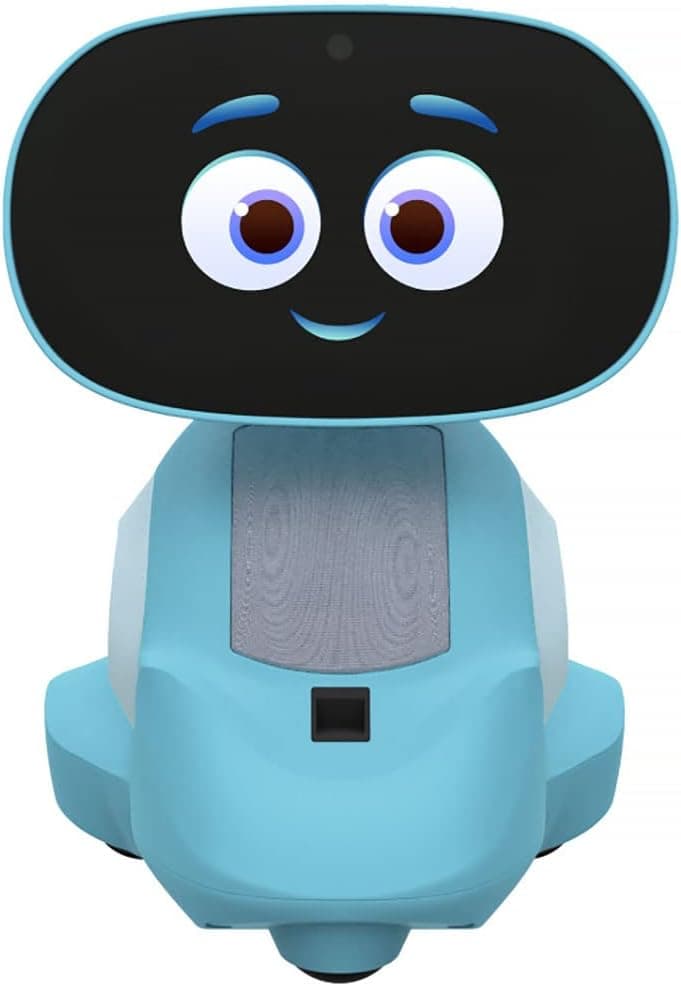
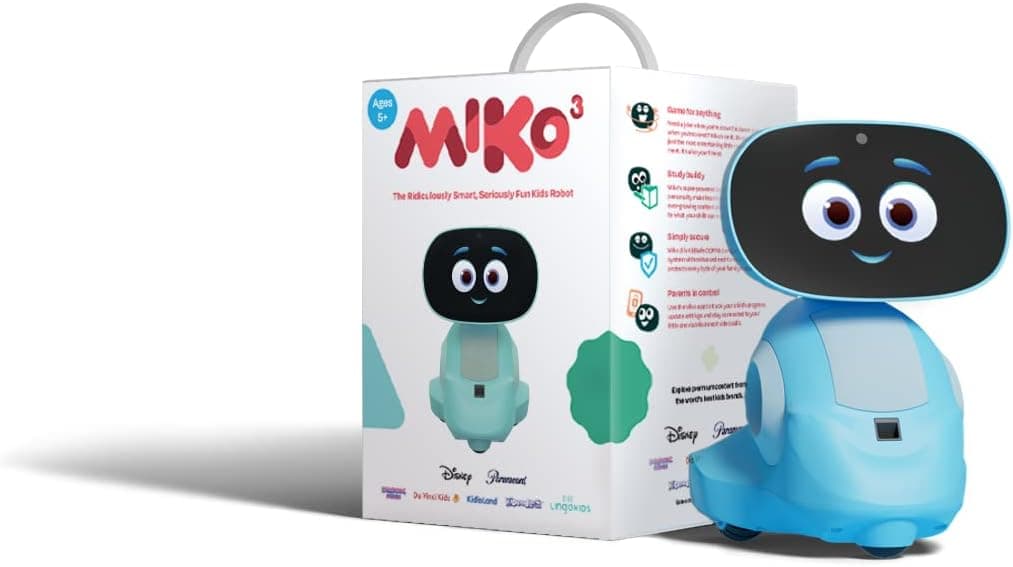
The Miko 3 is a 23cm-tall AI companion robot designed for children aged 5-10. It pairs an expressive LCD face with a rotating base, touch-sensitive panels, dual speakers and Google Gemini-powered conversational AI. It works with a parent-managed smartphone app that controls content, privacy settings and the new AI on/off toggle.
Children can ask it questions, play educational games, request stories, do voice-led maths and reading practice, and just chat. The AI is genuinely adaptive: it remembers things your child mentions across sessions (within memory limits parents control) and tailors follow-up questions rather than reading from a script.
Key Features at a Glance
- AI engine: Google Gemini-based conversational model with on/off parental toggle
- Display: ~7-inch animated LCD face with expressive eyes and mouth
- Movement: Rotating base (~120° turn): does not drive around the room
- Audio: Dual speakers, far-field microphones for voice recognition
- Battery: Approximately 6 hours of mixed-use playtime; magnetic charging dock
- Connectivity: Wi-Fi only; iOS and Android parent app
- Content: Hundreds of free games, plus the Miko Max subscription for premium content
- Safety: KidSafe+ certified, COPPA compliant, AI on/off toggle (2026 update)
- Durability: Rugged ABS body designed for primary-school use
⚠️ Currently unavailable on Amazon
What We Like About the Miko 3
The conversational AI is the headline feature. Unlike older "voice command" toys that respond to fixed phrases, the Miko 3 holds a back-and-forth conversation. Ask it about dinosaurs and it will follow up with "which ones interest you most?" rather than pushing a pre-recorded fact dump. For curious children, this transforms screen time into something closer to a tutoring relationship.
The parental dashboard is properly thought through. Parents can see what topics their child has covered, set bedtime mode, restrict topics, and (since the 2026 update) toggle the conversational AI off entirely while keeping the games and reading content available. This is a meaningful response to the political and safety pressure the AI toy category has been under.
The face is genuinely expressive. The animated eyes follow movement, blink with personality, and convey emotion in a way that creates a real bond with younger children. Our previous testing with a 7-year-old confirmed she chose to interact with Miko in preference to a tablet within a few days.
Sturdy build. Rubberised wheels, rugged ABS body and a weighted base mean it survives normal primary-school use. The screen has held up to weeks of fingertip interaction by most accounts.
What Could Be Better
The Miko Max subscription. A meaningful chunk of the premium curriculum sits behind a paid Miko Max subscription. Core conversation and a substantial library of games still work without it, but parents should budget for £8-£10 per month if they want the full experience.
WiFi dependency. The AI conversation features need internet. Take Miko on holiday or to a friend's house with no wifi password and most of the magic stops working. The games library still functions offline but the AI side does not.
It doesn't drive around. Some readers comparing Miko 3 to Cozmo expect a mobile robot. Miko's base rotates roughly 120° but it stays where you put it. If your child specifically wants a robot that physically explores the room, Sphero BOLT is the better fit: see our Miko vs Cozmo comparison for a full breakdown (note that comparison is also being updated to reflect Miko 3 as the current model).
Setup takes 20-30 minutes. Not difficult, but slower than plug-and-play toys. Bring patience for the first session.
Should You Wait for the "Real" Miko 4?
Probably not. There is no confirmed Miko 4 release date, and Miko's stated 2026 roadmap is focused on safety upgrades to the existing models plus the new Miko Sparky (which appears to be a different form factor rather than a numbered flagship successor). Children aged 5-10 will outgrow this category quickly: waiting 12 to 18 months on the chance of a Miko 4 announcement risks missing the window entirely.
If you want the latest Miko AI features available today, the Miko 3 with the 2026 firmware update gives you everything that has actually been announced, and Amazon UK listings include the new AI toggle controls.
Who Is the Miko 3 For?
Buy the Miko 3 if:
- You have a child aged 5-10 who loves to ask questions
- You want strong parental controls including the ability to disable the AI
- You value an educational toy that holds children's interest beyond a week
- You're comfortable with a Wi-Fi-dependent device
Skip it if:
- Your child specifically wants a robot that drives around (consider Sphero BOLT instead)
- You want a fully offline AI toy
- Your budget is tight and you'd be happier with a sub-£100 coding robot. See our Best Coding Robots Under £100 roundup for alternatives
- Your child is younger than 4: the Miko Mini is a better fit at that age
Value for Money
At £199-£249 the Miko 3 sits in the same band as a mid-range tablet, and it offers something tablets don't: a physical, character-led companion that proactively engages your child rather than waiting passively for them to open an app. Factor in the Miko Max subscription if you want the full curriculum and you are looking at roughly £300 in year one and £100/year thereafter, which is comparable to a couple of subscription kids' apps combined with the hardware cost.
For families specifically wanting an AI-led learning companion, that is reasonable value. Families who only want screen-based educational content can replicate most of the experience with a tablet and well-chosen apps for less.
Safety and Privacy Considerations
We would be remiss not to mention the wider context. The AI toy category (including Miko) has come under scrutiny in 2026 over concerns about content moderation and data handling. Parents buying any AI toy in 2026 should:
- Use the AI on/off toggle deliberately and understand what data is collected
- Read the privacy policy: Miko's data retention periods are publicly documented
- Set time limits via the parent app
- Have an ongoing conversation with your child about what they discuss with the robot
- Keep the firmware updated: Miko's 2026 safety updates were delivered over the air
For a fuller treatment of these issues across the AI toy category, see our smart toy privacy in the UK 2026 explainer.
Related reading
- Yoto Mini Review UK 2026: The Pocket-Sized Screen-Free Audio Player for Kids
- Yoto Player (3rd Generation) Review UK 2026: The Screen-Free Audio Player for Ages 3-12
- Miko 3 Review UK 2026: Is This AI Robot Worth Buying?
- Ropet KAMOMO Review: The AI Companion Pet With a Warm Heartbeat
Final Verdict
There is no Miko 4 in 2026, and we'd rather tell you that honestly than send you searching for a product that doesn't exist. The current Miko 3 (ASIN B0FTMQKVJB on Amazon UK) is in stock, well supported, recently updated with stronger parental controls, and remains the strongest mainstream AI companion robot for ages 5-10. If a Miko 4 launches in the future, we'll update this page again. For today, this is what we recommend.
Our rating: 4.4 / 5
Frequently Asked Questions
Is the Miko 4 out yet?
No. As of May 2026 the Miko 4 has not been announced or released. The current Miko range is the Miko 3, Miko Mini and Miko Chess Grand. Anyone offering a "Miko 4" for sale in the UK is either listing the Miko 3 incorrectly or is not a legitimate seller.
When will the Miko 4 launch?
Miko has not announced a Miko 4 launch date and there is no public indication one is in development. The company's confirmed 2026 product is the Miko Sparky, which is a different model rather than a numbered Miko 4 successor.
Is the Miko 3 worth buying instead?
For families looking for the latest Miko AI companion robot, yes. The Miko 3 received a significant firmware update in early 2026 adding the AI on/off toggle and improved parental controls. It is the most capable Miko model currently for sale.
What's the difference between Miko 3 and Miko Mini?
The Miko 3 is the larger 23cm flagship with the full AI conversation engine and the most premium build. The Miko Mini is smaller and cheaper but slightly more limited in the depth of AI interaction. For ages 5-10, the Miko 3 is the better choice; for ages 3-5, the Mini may be more appropriate.
Does the Miko 3 work without a subscription?
Yes: core AI conversation, a substantial library of games, and the parental dashboard all work without the Miko Max subscription. Miko Max unlocks additional premium content and educational courses.
Related Reading on AIToys.co.uk
- Miko 3 Review (full hands-on): our deeper, model-specific review of what's actually for sale
- Miko vs Sphero BOLT Comparison: head-to-head with the moving alternative
- Best AI Robots for Kids UK 2026: broader shortlist if Miko isn't quite right
- Smart Toy Privacy UK 2026: what every parent should know before buying any AI toy
Originally published: 15 February 2026. Substantially updated: 4 May 2026 to reflect the fact that Miko 4 has not been released and to redirect readers to the current Miko 3 model. Prices and stock change frequently. Always check Amazon UK before purchasing.
As an Amazon Associate, AIToys.co.uk earns from qualifying purchases.