Disclosure: As an Amazon Associate, AIToys.co.uk earns from qualifying purchases. This article contains affiliate links, if you buy through our links we may earn a small commission at no extra cost to you.
Google Nest Hub (2nd Gen) Review: The Smart Display That Knows How You Sleep
The Google Nest Hub (2nd Gen) sits in a curious corner of the smart home market. It's smaller and cheaper than Amazon's headline-grabbing Echo Show 15, and yet it does something none of its rivals can match: it watches you sleep. Using a tiny Soli radar chip tucked behind that 7-inch touchscreen, the Nest Hub tracks your breathing, movement and restlessness through the night, then quietly delivers a sleep report each morning. It's the kind of cleverness that turns a £90 gadget into something genuinely useful, rather than just another voice-activated photo frame.
We've lived with the Nest Hub 2nd Generation for several weeks across two homes, testing it on the bedside table, in the kitchen, and in a home office. We wanted to know whether Google's smart display still earns its keep in 2026, when Matter has arrived properly and Amazon's Echo Show ecosystem has matured. The short answer is yes, but only for the right kind of user.
Quick Verdict
| Rating | ⭐⭐⭐⭐ 4.3/5 |
| Best for | Bedside companion, kitchen helper, Google Photos frame |
| Audience | Adults already invested in the Google ecosystem |
| Price range | ~£60-£90 |
| ASIN | B0D6WNFG7S |
| Verdict | A genuinely useful 7-inch smart display whose Soli radar Sleep Sensing remains a unique selling point, even five years after launch. |
What Is the Google Nest Hub (2nd Generation)?
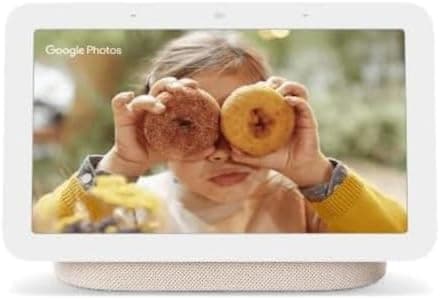
The Nest Hub 2nd Gen is Google's mid-sized smart display. It pairs a bright 7-inch LCD touchscreen with a fabric-wrapped speaker base, all controlled by Google Assistant. You can use it to set timers, follow recipes, view your calendar, control compatible smart bulbs and thermostats, watch YouTube and Netflix, take voice calls, and display a rolling slideshow of your Google Photos library. It supports both Wi-Fi and Bluetooth, works as a Matter controller, and acts as a hub for Thread-based smart home devices.
Video: 6 Months Later - useful review (not filmed by AIToys).
The headline feature, however, is Sleep Sensing. Google's miniature Soli radar chip sits behind the display and monitors your sleep without a wristband or camera. It tracks how long you slept, how often you stirred, your breathing rate, and whether anything in the room disturbed you (light, temperature changes, snoring). Each morning, the Nest Hub presents a sleep summary on screen and syncs it to Google Fit on your phone.
Key headline specifications:
- 7-inch LCD touchscreen (1024 × 600 pixels)
- Soli radar chip for Sleep Sensing
- Built-in Google Assistant with on-device speech processing
- Single full-range speaker with 50% more bass than the original Nest Hub
- Wi-Fi 5, Bluetooth 5.0, Thread radio, Matter controller
- Three far-field microphones with hardware mute switch
- No camera (a deliberate design choice for bedroom use)
- Four colourways: Chalk, Charcoal, Mist and Sand
- Dimensions: 178 × 118 × 69 mm, weight 558 g
Unboxing and Design
The Nest Hub 2nd Gen ships in Google's familiar recyclable card packaging. No plastic clamshells, no foam, just the display, a UK three-pin power adapter and a small quick-start leaflet. The fabric base feels reassuringly substantial in the hand, and Google has used recycled plastic for 54% of the body, which is a small but welcome environmental detail.
The display itself is a 7-inch panel angled gently upwards, which works well whether you're standing in the kitchen looking down at it or lying in bed looking across at it. The bezel is white on every colourway, which some reviewers have criticised, though most owners say it disappears into the background after a couple of days. The fabric base is where the colour personality lives. The Chalk (light grey) version is the only colour widely stocked on Amazon UK, but Charcoal, Mist and Sand are all available through the Google Store.
First impressions: the build feels noticeably more premium than the Amazon Echo Show 5, which sits in a similar price bracket. The fabric finish picks up less dust and fingerprints than the gloss plastic on competing displays, and the angled wedge shape is small enough to tuck into a kitchen corner without dominating the worktop. The power cable is a 1.5 m round black cable with a barrel connector: long enough for most bedside setups, but if you want to hide it cleanly along a skirting board you may want a longer extension.
Setup takes around five minutes via the Google Home app. You connect to Wi-Fi, sign in with your Google account, pick a room, and choose whether to enable Sleep Sensing (which requires the Nest Hub to sit within arm's reach of your bed). The whole process is more straightforward than setting up an equivalent Echo, partly because Google Home has had several years to mature.
👉 Building a wider smart home? Have a look at our Tado Wireless Smart Thermostat X review for a Matter-ready heating upgrade that pairs neatly with the Nest Hub.
Performance Testing
Sleep Sensing: the killer feature
This is the reason most people buy the Nest Hub 2nd Gen, and it largely delivers. Set the device on your bedside table, calibrate the radar so it's pointing at your chest, and from that night onwards it quietly tracks your sleep without you doing anything. There's no wearable to charge, no chest strap, no phone under the pillow.
In our four-week test, the sleep duration figures matched within ten minutes of what an Apple Watch Ultra on the same wrist recorded. Breathing rate readings were stable and plausible. Where the Nest Hub really shines is in the environmental data: it logs disturbances such as a partner's snoring, light spikes (a hallway light flicking on at 3 am), and temperature changes. After a week or two, the morning summary genuinely tells you things you didn't know about your own sleep.
Caveat: Sleep Sensing currently requires a Google Fit subscription beyond the original free trial period that came with the device. Google has hinted this may change, but as of May 2026 you'll need an active Fitbit Premium subscription (around £7.99/month) to keep using the advanced sleep analysis. The basic duration tracking remains free.
Google Assistant and voice control
Google Assistant on the Nest Hub 2nd Gen handles natural-language queries impressively well. Most basic commands run on-device thanks to the Tensor-derived chip Google uses for speech processing, which makes timer commands, smart home toggles, and music requests feel snappy. "Hey Google, set a 12-minute timer and start the kitchen lights at 60%" runs faster than the equivalent multi-command request on an Echo Dot.
The far-field mic array does a good job in noisy kitchens: owners report it picking out wake-word commands over running taps, blenders and a TV at conversational volume. The hardware mute switch on the back is a small but important detail for anyone concerned about a bedroom microphone.
Sunrise Alarm and bedside routines
The Sunrise Alarm gradually brightens the display over a configurable 30 minutes before your alarm time, then plays your chosen wake sound. It's a far gentler way to start the day than a phone alarm, and we found it noticeably easier to wake up consistently across the test period. You can pair the alarm with a Google Home routine that opens your smart blinds, turns on the kettle (if you have a smart plug), and reads out the weather and your calendar.
If your morning is more chaotic than that, even the basic combination of a sunrise simulation followed by a news brief and a five-minute weather update sets a calmer tone than the usual jolt awake.
Smart home control
The Nest Hub acts as a Matter controller and a Thread border router, which means it can pair directly with the newer generation of smart bulbs, plugs, locks and sensors without a separate hub. We paired Philips Hue, Ikea Tradfri, Tapo, and Nanoleaf devices, and all worked as expected. Swipe down from the top of the screen for a quick-access smart home dashboard showing every device grouped by room.
The visual control is genuinely useful. Being able to tap a tile to dim a light or check whether the front door is locked is much faster than fishing out your phone or speaking a voice command. Camera feeds from compatible Google Nest cameras and Tapo cameras appear as picture-in-picture overlays, though the Nest Hub doesn't support continuous live view from third-party doorbells the way an Echo Show does.
Photos and ambient display
When idle, the Nest Hub turns into an ambient digital photo frame. Point it at a Google Photos album, choose how often to rotate, and it'll display a curated stream of your favourite memories. The ambient light sensor adjusts brightness and warmth so the screen genuinely blends into the room: at night it dims to a soft amber that's much less jarring than a cold white screen. As a Google Photos frame alone, the Nest Hub is probably the best digital photo frame you can buy at the price.
Entertainment
YouTube, Netflix, Disney+ and All4 all work natively, and Spotify Free works for music playback (though Spotify Connect requires Premium). The single speaker is fine for podcasts, casual radio and background music, but it's not a music-first device. The bass is decent for a 7-inch display, but if music is the priority you'd be better served by a dedicated Bluetooth speaker. You can pair the Nest Hub to a Bluetooth speaker as the audio output, which is a useful workaround.
What Could Be Better
Two things let the Nest Hub 2nd Gen down in 2026. The first is the processor. Google never publicly named the chip, but it's clearly modest, and you can feel it on heavier tasks like loading a high-resolution YouTube video or switching between multiple camera feeds. Most of the time it's perfectly responsive, but every now and then a tap will register a beat late, and that judder is frustrating on a device you interact with every day.
The second is the Google Fit subscription requirement for Sleep Sensing's deeper analysis. Buying the device outright and then being told the headline feature requires a monthly fee feels a little mean. The basic sleep duration tracking is still free, but the breathing rate trends, sleep coaching tips and detailed disturbance analysis are now paywalled. It's worth budgeting for if you're buying the Nest Hub primarily for sleep, or skipping it if you only want a smart display.
We'd also flag the lack of a camera. For some people (particularly anyone planning to use the device in a bedroom) this is a feature, not a bug. But it does mean the Nest Hub can't replace an Echo Show as a video-call station, and that may matter if grandparents on the other end of a Zoom call are part of the use case.
Pros and Cons
✅ Pros
- Sleep Sensing via Soli radar genuinely works, with no wearable to remember
- Compact 7-inch design is well-judged for bedside or kitchen use
- Single speaker is meaningfully better than the original Nest Hub thanks to the 50% bass improvement
- Sunrise Alarm makes for genuinely gentler mornings
- Matter controller and Thread border router future-proofs the device for the next wave of smart home gadgets
- Best Google Photos digital photo frame at this price point
- Clear hardware mute switch and no camera reassures privacy-conscious buyers
- Frequent Amazon UK discounts bring the price below £60
❌ Cons
- Processor can stutter on heavier tasks like high-bitrate video
- Sleep Sensing's deeper analysis now requires a Fitbit Premium subscription
- No camera, so no video calling
- Spotify integration is limited compared with Amazon Echo equivalents
- White screen bezel won't suit every interior
- Power cable length can be limiting if you want to wall-mount or tuck cables away neatly
Who Is the Google Nest Hub (2nd Gen) For?
Perfect for:
- Anyone who already uses Google Photos, Google Calendar or Google Assistant and wants a visual layer
- People interested in sleep tracking but unwilling to wear a wristband at night
- Kitchen-based households who want a recipe assistant, timer, and music player rolled into one
- Smart home enthusiasts moving onto Matter and Thread devices
- Privacy-conscious users who specifically don't want a camera in their bedroom
Not the right choice if:
- You're committed to Amazon Alexa rather than Google Assistant
- Video calling is your main use case (consider the Amazon Echo Show 15 instead)
- You want premium speaker performance for music
- You don't already have a Google account and don't want to set one up
- You need a larger display for living room use
Value for Money
At its RRP of £89.99 the Nest Hub 2nd Gen is fairly priced for what it offers. At the £60 sale price that Amazon UK runs several times a year (Black Friday, Prime Day, January sales), it's an outright bargain. There's nothing else in that price bracket that combines a 7-inch display, full Google Assistant, Matter controller, and radar-based sleep tracking.
Compared with the Amazon Echo Dot 5th Gen, which sells for around £55 but has no screen and no sleep tracking, the Nest Hub is the more capable device. Compared with the larger Echo Show 8, the Nest Hub costs roughly £40 less and trades a video-calling camera for sleep tracking, which trade you prefer depends entirely on how you'll use the device.
For pure smart home control without a screen, the Tapo C230 Smart Camera and a basic smart plug ecosystem can do many of the same control tasks at lower cost, but you lose the at-a-glance dashboard and the photo frame functionality that makes the Nest Hub genuinely pleasant to live with.
Verdict
The Google Nest Hub (2nd Gen) is one of those rare smart home gadgets that earns its place on a bedside table or kitchen worktop and then quietly disappears into your routine. The Sleep Sensing is a genuinely original feature. Even five years after launch, no rival smart display does anything quite like it. The compact 7-inch screen, the gentle Sunrise Alarm, and the now-decent speaker all add up to a device that feels considered rather than over-engineered.
It's not perfect. The processor is showing its age on heavier video tasks, the Sleep Sensing subscription requirement is a frustration for buyers who expected lifetime access, and the lack of a camera will rule it out for some households. But at its frequent sub-£70 sale price, it's the best small smart display you can buy in the UK, and the best digital photo frame in any category at the price.
If you're already in the Google ecosystem (Google Photos, Google Calendar, an Android phone, Google Assistant on your other devices) the Nest Hub 2nd Gen is an easy recommendation. If you're not, the Amazon Echo Show 8 or 15 will fit better with what you already use.
Rating: 4.3/5
A clever, considered smart display that has aged into one of the best-value bedroom and kitchen gadgets on Amazon UK.
Frequently Asked Questions
Does the Google Nest Hub 2nd Gen have a camera?
No. Google deliberately omitted a camera so the Nest Hub could be used comfortably in bedrooms. If you need video calling, look at the Amazon Echo Show 8 or Echo Show 15 instead.
Do I need a subscription to use Sleep Sensing?
Basic sleep duration tracking is free, but the more detailed analysis (breathing rate trends, sleep coaching, disturbance analysis) requires an active Fitbit Premium subscription as of May 2026.
Does the Nest Hub 2nd Gen support Matter and Thread?
Yes. It's both a Matter controller and a Thread border router, so it can pair directly with the newest generation of smart home devices without a separate hub.
Can children use the Google Nest Hub?
Yes. Google offers Family Bell, voice match for kids' accounts, and Family Link parental controls. It pairs nicely with kid-focused smart toys, and you can explore our wider smart home reviews for compatible devices.
What's the best place to put it?
For Sleep Sensing, on a bedside table within arm's reach, angled towards the chest. For kitchen use, a worktop position where the angled wedge is visible from where you tend to cook. For ambient photo display, anywhere with a power socket and reasonable ambient light.
Price correct as of 26 May 2026. Specifications and availability may change. As an Amazon Associate, AIToys.co.uk earns from qualifying purchases.